Digital transformation roadmap for convenience stores


A digital transformation roadmap shows you how to make your store work better. You can use new tools like mobile apps and online ordering. These tools help you connect with customers in new ways. You also get better at keeping track of products. You can use data to make smarter choices for your business.
You learn more about what customers like.
You make shopping feel special for each person.
You help customers come back and buy more. These changes help your store stay strong and grow.
Key Takeaways
Look at your store’s technology and how customers feel. Find what needs to get better.
Make goals that are clear and can be measured. This helps you see progress and know if you succeed.
Pick digital tools that make things easier for customers. Use tools like mobile payments and inventory tracking to help your store run better.
Ask customers and workers for feedback often. Use their ideas to make smart choices and keep making your store better.
Begin with simple projects that are easy to start and finish fast. After that, work on harder projects one at a time.
Assessing Your Store’s Digital Readiness

Before you start your digital transformation roadmap, you should know how your store is doing. You can check how your store works now. Look at your technology and how customers feel when they shop. This helps you see what is good and what needs to get better.
Reviewing Operations and Technology
Start by looking at how your store runs every day. Ask if your point-of-sale system is new enough. Check how you keep track of your products. See if you use digital tools for ordering or restocking. Many stores still do things by hand. This can make things slow and cause mistakes. If you get better technology, you can save time and make fewer errors.
You can also see how your store compares to others. Industry benchmarks show how well you use digital tools. For example, stores with mobile-first designs and easy app logins make customers trust them more. Stores with advanced search and clear prices help shoppers choose faster. The table below shows important things to check:
Dimension of Convenience | Description | Impact on Digital Readiness |
|---|---|---|
Access Convenience | Mobile-first design, app usability, seamless login | Enhances perceived value and trust |
Search Convenience | Advanced filtering, recommendation systems, transparent pricing | Reduces search costs and improves decision efficiency |
Evaluation Convenience | Decision-support tools like user reviews | Influences customer satisfaction |
Order Convenience | Smooth checkout, flexible payments | Critical for user adoption |
Logistics Convenience | Prompt delivery, accurate tracking | Strongly influences post-purchase satisfaction |
Evaluating Customer Experience
You need to know how customers feel about your store. There are different ways to get feedback and find places to improve. Mystery shopping gives you honest ideas about your service. It helps you find problems. Customer surveys tell you what shoppers like and what they want to change. Digital checklists help your team remember tasks and fix problems fast. Here are some common ways to check customer experience:
Method | Description |
|---|---|
Mystery Shopping | Provides unbiased feedback on customer service and operational consistency, helping identify gaps and enforce standards. |
Customer Surveys | Gathers insights on customer preferences and behaviors, guiding service and operational decisions to enhance loyalty. |
Digital Checklists | Streamlines internal processes, ensuring operational consistency and faster issue resolution through real-time tracking. |
Tip: When you use these tools, you learn what your customers want. This helps you make smart choices for your digital transformation roadmap.
Setting Digital Transformation Goals
Defining Measurable Objectives
You need clear goals to guide your digital transformation roadmap. When you set measurable objectives, you can track progress and see what works. Start by asking what you want to improve. Do you want faster checkout times? Do you want more customers to use your app? Write down your goals in simple terms. Use numbers when possible. For example, you might want to increase mobile orders by 20% in six months.
Many stores face problems when they do not set clear goals. Here are some common mistakes to avoid:
Unclear goals can make your plan fail.
Not having enough IT skills can slow you down.
If leaders do not support the plan, it will not work.
Ignoring what customers want can hurt your store.
People may resist change.
Not having enough money can stop your progress.
Forgetting to use data can lead to missed chances.
Setting deadlines that are too short can cause stress.
Tip: Make your goals simple, clear, and easy to measure. This helps everyone in your store understand what to do.
Aligning Goals with Business Needs
You should match your goals with what your business needs most. This helps you get the best results from your digital transformation roadmap. Follow these steps to align your goals:
Stay customer-centric. Always think about what your customers value.
Do not treat digital transformation as just an IT project. Involve business leaders and check the value often.
Measure your return on investment in new ways. Think about how fast you can adapt and what you might miss if you wait.
Simplify your technology. Spend money on tools that help your business grow.
Set a clear data plan. Know how data can help you make better choices.
Successful stores make sure all departments work together. They use these strategies:
Strategy | Description |
|---|---|
Give customers the same great service everywhere, both online and in-store. | |
Customer Data Management | Use data to send the right offers and messages to each customer. |
Integration of Digital Tools | Make work easier for staff and better for customers by using smart tools. |
Many stores now use mobile apps and loyalty programs to keep customers coming back. Online ordering and contactless services have become normal. Some stores use AI and automation to manage inventory. These steps help you meet customer needs and reach your goals.
Building Your Digital Transformation Roadmap
Identifying Key Initiatives
You need to pick the best digital ideas for your store. Look at what other stores are doing. Many stores get new point-of-sale systems. This makes checkouts faster and lets customers pay in more ways. Mobile payments like Apple Pay help people pay quickly and safely. Loyalty programs bring customers back and help you learn what they buy. Apps let customers order ahead or see deals.
Here is a table showing common digital initiatives and what they do:
Digital Initiative | Description |
|---|---|
Replace old POS systems to provide faster checkouts and accept more payment types. | |
Mobile Payments | Adopt mobile payment options to enhance customer convenience and security. |
Enhancements to Customer Loyalty Programs | Upgrade loyalty programs to drive revenue and improve marketing decisions. |
You can use machines to track inventory. This helps you keep popular items in stock and waste less. Self-service tools let customers do things on their own. This saves time for workers. Make sure these tools work with your POS and back-office systems. This keeps your data correct. Use customer data to make special deals and better ads.
Tip: When you pick digital ideas, think about your customers and staff. Choose tools that make shopping easier and help your store run well.
Prioritizing Projects
You need to choose which projects to do first. Some projects give big results with little work. Others need more time and effort. You can use a simple table to help decide:
Impact/Effort Category | Description |
|---|---|
High impact, low effort | Start these first, like connecting POS to inventory. |
High impact, high effort | Plan these for later, such as AI-driven personalization. |
Low impact, any effort | Skip or remove these projects. |
Pick projects that help customers and make your store work better. For example, connect your POS system to inventory tracking. This helps you know what is in stock. Using machines to track inventory cuts mistakes and saves money. Loyalty program data helps you make deals just for each customer.
Use machines to track inventory and avoid running out.
Study buying habits to stay ahead.
Connect self-service tools to your POS system.
Use customer info to make loyalty programs better.
Note: Start with easy projects that help a lot. Save harder projects for later in your digital transformation roadmap.
Assigning Roles and Timeline
You need a clear plan for who does what and when. First, check your store’s technology, staff skills, and how customers shop. Decide what you want your store to look like after changes. Find what needs to improve. Balance quick wins with bigger projects.
Here are best ways to assign roles and set timelines:
Check your store’s tech, staff, and customer problems.
Describe your future store after changes.
Find what needs to get better.
Pick which projects to do first.
Plan money for tech and training.
Set clear jobs and deadlines.
Keep everyone updated and working together.
Use a simple timeline to track your progress. Give each project to a team member or group. Set deadlines that are easy to meet. Make sure you have enough resources for each step.
Alert: Clear jobs and timelines help your digital transformation roadmap stay on track. Good communication builds trust and keeps your team happy.
When you use digital tools, your store can become a mobility hub. Modern payment systems are very important for this change. Customers spend more time at your store. You can offer fresh food, rewards, and other services. In the future, AI will help you know what customers need, like making sure an EV charger is ready. SMART Mobility hubs turn stores into places that offer many things, not just fuel. This brings more people in and makes customers happier.
Tip: Think bigger than simple upgrades. Use your digital transformation roadmap to make your store fit new trends and become a key part of the mobility ecosystem.
Implementing Digital Solutions
Technology Rollout
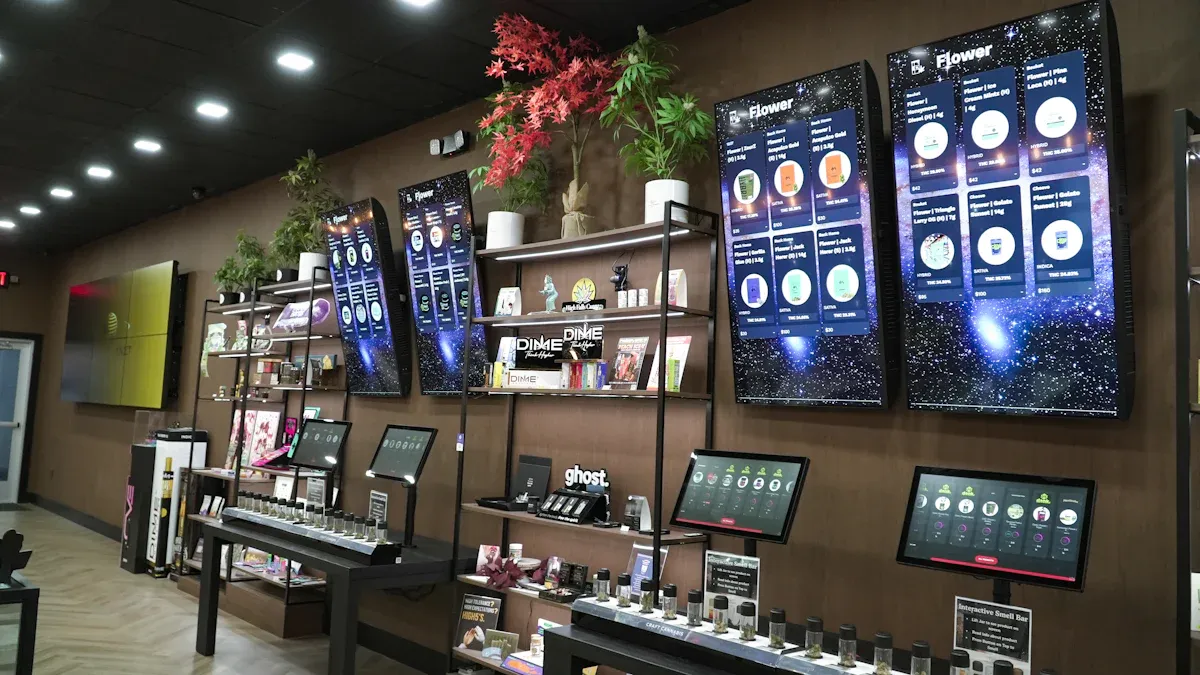
You can make your store better with new technology. Start with tools that help workers and customers. Digital menu boards and self-checkouts make shopping quick and fun. Smart shelves show what is in stock right now. They also tell you when to add more products. Digital signs catch people’s eyes and let you change ads fast. Many stores use AI assistants for easy jobs like answering questions or changing prices. Predictive analytics help you pick good prices and beat other stores.
Here are some smart ways to use technology:
Use digital menu boards and self-checkouts to make service faster.
Try smart shelves for updates on what is in stock.
Add digital signs for easy marketing changes.
Use AI tools to do simple jobs.
Collect sales and feedback data to make your store better.
Tip: Start with one or two tools first. Make sure they work well before you add more.
Staff Training and Change Management
Your team must learn how to use new tools. Good training helps everyone feel ready for changes. Give hands-on lessons for each person’s job. Let your staff try the new systems. Help them if they feel worried about technology.
A simple plan for change management looks like this:
Phase | Description |
|---|---|
1 | Prepare: Set goals and check if your team is ready. |
2 | Manage: Teach and talk about the changes. |
3 | Sustain: Measure progress and keep improving. |
You can help your team by sharing clear messages. Tell them why you are making changes and how it helps them. Use meetings, emails, or posters to keep everyone updated.
Note: When your team understands the changes, they do better and help your store succeed.
Automating Processes and Improving Communication
Automation saves time and stops mistakes. You can use technology for inventory, restocking, and orders. IoT sensors check fridge temperatures and send alerts if there is a problem. Smart shelves with RFID sensors track products and warn you before you run out. These tools let your staff help customers more.
Process | Description |
|---|---|
Real-time updates and automatic orders keep shelves full. | |
Improved Employee Performance | Tools help track and boost staff productivity. |
Streamlined Operations | Fewer manual tasks mean fewer errors. |
"Clear, intentional communication keeps teams rowing in the same direction and eliminates surprises that often lead to last-minute fire drills. It fosters alignment, trust, and, ultimately, better outcomes."
When you connect your store with headquarters, you get better support and faster updates. Good communication builds trust and helps everyone reach the same goals.
Tip: Automate simple jobs and keep everyone informed. This makes your store work well and keeps customers happy.
Measuring and Optimizing Progress
Tracking Key Performance Indicators
You need to check if your digital transformation is working. Key performance indicators, or KPIs, help you see how well you are doing. You can count how many people use your new tools. You can see how happy customers are. You can check how much money you earn from digital changes. The table below lists important KPIs for convenience stores:
KPI | Description |
|---|---|
Daily/Monthly Active Users | Number of people who use your digital services each day or month. |
Adoption Rate | How many customers use your new technology compared to all customers. |
Average Time Spent | How long customers use your digital features. |
Retention | How many customers keep using your services. |
Customer Effort | How easy it is for customers to finish a task. |
Customer Satisfaction | How happy customers feel about your store and services. |
Net Promoter Score | How likely customers are to recommend your store. |
Revenue from Digital Technology | Money earned from new digital tools. |
Percentage of Cloud Deployments | How well your store uses cloud technology for staff and data. |
Active Usage Metrics | How often customers use your digital tools. |
You should check these KPIs often. Look at how your store works every week. Check your money numbers every month or every quarter. This helps you find problems early and fix them fast.
Gathering Feedback and Continuous Improvement
You can make your store better by listening to customers and workers. Use surveys, suggestion boxes, and online reviews to get feedback. Mobile apps and loyalty programs help you hear from customers after they shop. The table below shows ways to get feedback and their benefits:
Method | Description | Benefits |
|---|---|---|
Surveys | Ask questions to get clear answers. | Easy to understand results. |
Suggestion Boxes | Let people share ideas anonymously. | Honest feedback. |
Online Reviews | Read what customers say online. | Builds trust with new shoppers. |
Customer Events | Talk to customers at special events. | Builds loyalty and community. |
In-app Feedback | Get feedback through your app. | Fast and simple for users. |
Loyalty Programs | Reward feedback and purchases. | More repeat customers. |
You should use feedback to make your store better. For example, you can make checkout faster. You can offer more ways to pay. You can keep shelves full. Data helps you make smart choices. Stay open to new ideas and keep learning. When you listen and change, your store stays ahead and customers stay happy.
Tip: Small changes from feedback can make customers happier and help your store sell more.
You can make your store better by using a simple plan. First, check how ready your store is for digital tools. Next, set goals and choose the right technology. This will help your store in many ways. You will work faster and make fewer mistakes. You will spend less money and keep customers coming back. The table below shows what you get:
Benefit | Description |
|---|---|
Easier work and better staff management. | |
Better service and shopping for customers. | |
Cost Reductions | Spend less on tech and software. |
Strengthened Customer Loyalty | Build stronger bonds with shoppers. |
Start now by doing these things:
Check how digital your store is today
Make shopping better with new tools
Use data to give special deals
FAQ
What is a digital transformation roadmap?
A digital transformation roadmap is a step-by-step plan. You use it to add new technology to your store. It helps you know what to do first and how to reach your goals.
How can digital tools help my convenience store?
Digital tools make your work easier. You can track products, speed up checkout, and talk to customers. These tools help you save time and grow your business.
What are the first steps I should take?
You can start by:
Checking your current technology
Asking customers what they want
Setting clear goals for your store
How do I measure success after going digital?
Method | What You Learn |
|---|---|
Customer surveys | How happy shoppers feel |
Sales reports | If your sales numbers grow |
App usage data | How many use your new tools |
Do I need to train my staff?
Yes, you do. Training helps your team feel ready. You show them how to use new tools. This makes your store run better and keeps everyone happy.
See Also
Exploring Global Automated Retail: Micromarkets Versus Smart Stores
The Future of Retail: Embracing AI-Powered Stores
Understanding AI-Driven Corner Stores: Essential Insights for Retailers
Transforming Online Retail Management with AI-Driven Tools
Introducing Cashierless Shopping: Cloudpick's Innovative Solutions
