Best Practices for Securing AI Stores with Enterprise Authentication in Corporate Campuses

You have a new security challenge as AI agents and non-human identities are now important in your work. Weak access controls, too many permissions for AI identities, and actions that are not watched can let out private data or mess up how things work. Trust, following rules, and strong identity security mean you must focus on enterprise authentication. If you do not have good checks and management, problems can get worse fast and people may not know who is responsible. Keeping AI stores safe guards your things, your good name, and your business.
Key Takeaways
Use strong enterprise authentication to manage who can get into AI stores. This keeps important data safe and makes sure only the right people use AI tools.
Use Single Sign-On (SSO) and Multi-Factor Authentication (MFA) to make logging in easier and safer. These tools help stop password overload and give extra safety steps.
Check your AI systems often for weak spots. Do security checks every three months and use automatic scans to find and fix problems.
Teach your team about good security habits. Training helps people spot dangers like phishing and shows why strong passwords and safe tool use matter.
Make clear rules for access and use Role-Based Access Control (RBAC) to set limits. This lowers the chance of people getting in who should not and makes sure users only get what they need.
AI Store Security Challenges

User Access Complexity
There are many ways to get into enterprise AI stores. Most companies use about five identity solutions and four network access solutions. This means there are lots of doors for people and systems. You have to decide who can enter and what they can do. If you do not control these doors, data can leak out and rules can be broken. Many companies do not know which AI tools workers use or how they use them. Weak rules make it easy for secret data to get out. More than half of security leaders think workers let AI tools see private data by mistake. AI tools that are not managed make following rules even harder.
Tip: Use single sign-on and adaptive authentication. These help make access easier and stop users from getting tired of passwords.
Non-Human Identities and Service Accounts
Non-human identities like service accounts help run AI systems. These accounts work like digital helpers and do jobs without people. Every service account is a non-human identity. They are now more important and can do as much as people. If you give them too many powers or use them in many places, you could get attacked. You need to keep a list of all these accounts and give each one its own name. Check these accounts often and use tools to manage their passwords. This stops accounts from having too many powers or being forgotten. Give only the powers needed and change passwords often. People should check logs and set alerts for strange actions.
Risk Category | Impact | Recommended Mitigation |
|---|---|---|
Overprivileged NHIs | Bigger problems if hacked | Least privilege, regular checks |
Insecure Cloud Configurations | People get in who should not | Change secrets often, use tools to find mistakes |
Long-lived Secrets | Hackers stay in longer | Change and end secrets automatically |
Environment Isolation Failures | Problems spread to other places | Give each place its own NHIs |
Trust and Data Protection
You build trust by keeping data safe and showing how AI works. If workers do not trust your AI tools, they might use ones you do not allow. This is called shadow IT and is risky. Gartner says 69% of companies think workers use public GenAI tools without asking. Not trusting your tools makes your security weaker. You must protect main data, plus logs, prompts, and extra info. Bad things have happened before, like database leaks and session problems. These show that weak controls and bad session rules can cause big trouble. You need strong enterprise authentication, clear rules, and checks to keep data safe and keep trust.
Note: Being open, clear, and fair helps people trust and use safe AI tools.
Enterprise Authentication Methods

You need strong enterprise authentication to keep your AI stores safe. This helps you control who can get to important data and systems. It also makes sure only trusted people and AI agents can do things. Without these controls, you could have data leaks or people getting in who should not. You might also break rules you need to follow. The methods below are the main ways to make AI stores safe.
Authentication Method | Description |
|---|---|
Single Sign-On (SSO) | Centralizes user authentication through a single identity provider, ensuring only authorized access to AI applications. |
Adds an extra layer of security by requiring additional verification beyond just a password. | |
Provides strong cryptographic identity for service-to-service authentication, ideal for high-security environments. | |
Role-Based Access Control (RBAC) | Manages user permissions based on roles, ensuring users have access only to necessary resources. |
SSO for Centralized Access
Single Sign-On (SSO) lets you use one username and password for many AI tools. This makes your work easier and you do not have to remember lots of passwords. SSO also helps you use the same rules for all your AI stores. If someone leaves the company or changes jobs, you can quickly stop their access.
But SSO has some problems. Sometimes, settings are wrong, like short timeouts or unsafe links. These mistakes can make your system less safe. If SSO is not set up well, it can be a weak spot. You may also have trouble connecting old systems or special AI apps. To fix these problems, try SSO with a small group first. Use multi-factor authentication and check your system often. Teach your users and watch your systems to stop mistakes.
SSO makes sure only the right people use AI tools.
Centralized access helps you control who can do what and see what happens.
MFA for Enterprise Authentication
Multi-Factor Authentication (MFA) adds another step to logging in. You need something you know, like a password, and something you have, like a code on your phone. This makes it much harder for bad people to get in, even if they know your password.
MFA is very important for keeping AI stores safe. It protects both people and AI agents. You can set up MFA to ask for approval before doing important things. For example, you might use a "watch mode" that checks before an AI agent does a big job. Operator models can give control back to people for things like captchas, so only real users can finish tasks.
MFA helps stop phishing and password stealing.
It checks every user and request, which is called zero-trust.
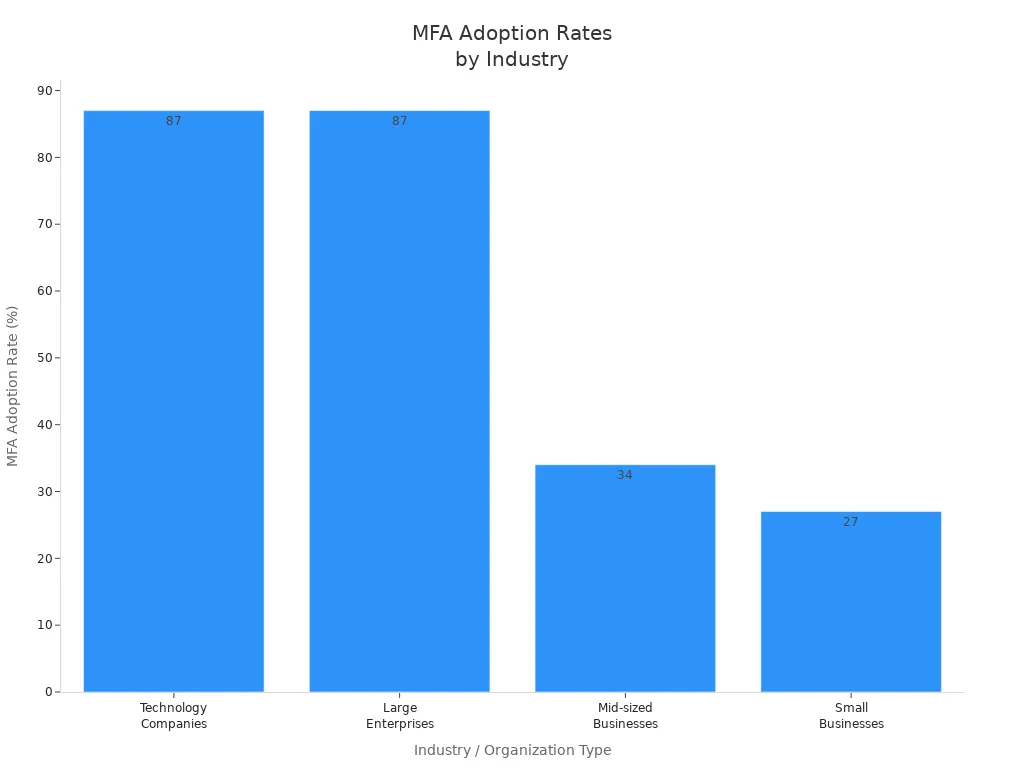
MFA is used most in technology, finance, and healthcare. These groups care a lot about security and must follow strict rules. Big companies use MFA more because they have more risk. Small businesses use it less because it can cost more and be harder to set up.
Identity Federation
Identity federation lets you use one account for many systems and places. You do not need to make new accounts for every AI store. This makes things safer because there are fewer ways for hackers to get in. You can use the same rules everywhere, which keeps things safe.
Identity federation also helps people work faster. Users log in once and get all the tools they need. This means fewer login problems and more time for work. You save money because you do not need as many login systems. Admins spend less time fixing accounts and more time on important jobs.
Benefit | Description |
|---|---|
Centralized authentication reduces access points for cyber threats, keeping sensitive information secure and applying uniform access controls across systems. | |
Productivity Amplified | Users gain easy access to multiple systems with one set of credentials, reducing login challenges and allowing teams to focus on their main responsibilities, thus enhancing overall performance. |
Cost Reduction | Eliminating multiple authentication systems cuts down on setup, maintenance, and operational costs, streamlining identity management and reducing IT resource demands. |
Lower Administrative Costs | Simplifies user identity management for administrators, allowing them to focus on more critical tasks and reducing the workload associated with managing multiple accounts and passwords. |
Identity federation also helps you follow rules. Short-lived tokens are used instead of long-lasting passwords, so it is harder for hackers to get in. Automatic password changes keep your system safe from old or stolen passwords.
Role-Based Access Control
Role-Based Access Control (RBAC) helps you give people and AI agents only the access they need. You give roles based on what jobs people do. Each role has its own set of things it can do. This means no one gets more access than they need.
To use RBAC, start by checking your data for mistakes. Try RBAC with a small group first. Make sure people are involved, especially when AI helps pick who gets access. Check how well your RBAC works and change it if needed. Teach your users how access is decided so they trust the system.
Check your AI systems and what security you need.
Try RBAC with a few AI agents first.
Teach your team how to manage AI agent access.
Watch and improve your RBAC system as you go.
Get everyone involved so they know how it works.
RBAC makes it easier to use enterprise authentication rules. You can quickly change roles when people get new jobs or when new AI agents join. This keeps your AI stores safe and follows the rules.
Tip: Use RBAC with SSO and MFA for the best safety. Using all three helps you control both people and AI agents with confidence.
Implementation and Controls
Credential Management
You need to keep credentials safe to protect AI stores. Many companies lose data when developers put passwords in code. Uber lost 57 million records because AWS keys were found online. Facebook showed 600 million passwords by saving them as plain text. McDonald's AI chatbot leaked job applicants' data because it used a weak password.
You can stop these problems by doing these things:
Store less sensitive data and use tokens.
Set up guardrails to block risky actions early.
Encrypt data even when AI agents use it.
Watch for strange activity all the time.
Tip: Old secrets managers are not good for fast AI work. Use tools that change credentials often and keep them safe.
Session Security
Session security stops people from getting into AI stores without permission. Set strict timeouts and watch session activity closely. If sessions last too long, attackers can stay inside longer. Use short-lived tokens and log users out automatically. Always check who is using the system, both humans and AI agents.
Session Security Practice | Benefit |
|---|---|
Short-lived tokens | Limits risk if credentials leak |
Automatic logout | Stops access after no activity |
Real-time monitoring | Finds suspicious actions fast |
Audit Logging
Audit logging lets you see who does what in AI stores. Record who did it, what they accessed, what they did, when, and why. This helps you find mistakes and follow rules. Good logs help you spot changes and keep settings safe.
Log every action by people and AI agents.
Keep logs safe and easy to check.
Use code to stop settings from changing by mistake.
Note: Audit logs help build trust and show you follow rules.
Access Policy Enforcement
You must set access rules for people and AI agents. Use IAM systems to manage permissions. IAM shows who uses resources and helps automate updates. Always give only the needed permissions and change credentials often.
Find and organize all identities, including bots and tools.
Watch and log access to catch misuse.
Automate updates to avoid mistakes.
Keep watching AI interactions in real time to spot problems. Set normal usage patterns and look for anything strange. Protect privacy but also keep your company safe.
Callout: Good access rules lower risk and help you see what happens. You keep your AI stores safe and follow the rules.
Governance and Compliance
Regulatory Standards
You must follow strict rules when you manage AI stores. Many industries have laws that protect data and privacy. For example, healthcare uses HIPAA, finance uses SOX, and companies in Europe must follow GDPR. These rules tell you how to store, use, and share data. You need to know which laws apply to your business. You should also check if your AI stores meet these standards. If you do not follow the rules, you can face big fines or lose trust.
A good way to stay compliant is to use a table to track your requirements:
Regulation | Applies To | Key Requirement |
|---|---|---|
HIPAA | Healthcare | Protect patient data |
SOX | Finance | Secure financial info |
GDPR | EU businesses/users | User data privacy |
Note: You should review your compliance status often. This helps you find gaps before they become problems.
Continuous Assessment
You need to check your AI store security all the time. Do not wait for a problem to happen. You should run full security checks every quarter for systems in production. Use monthly automated scans to find new assets and spot weak points. If you have high-risk AI systems, check them more often. When you update models, add new data, or change your setup, run a new assessment right away. If you work in a regulated industry, match your checks with your audit schedule.
Run quarterly security assessments for production AI stores.
Use monthly automated scans for asset discovery and vulnerabilities.
Check high-risk systems more often.
Reassess after major updates or changes.
Align assessments with compliance audits if required.
Tip: Regular checks help you find and fix problems before attackers do.
Incident Response
You must have a plan for when things go wrong. An incident response plan tells you what to do if someone breaks in or data leaks. You should know who to call, how to stop the attack, and how to fix the damage. Practice your plan with your team. This helps everyone act fast and stay calm during a real event.
A strong governance system builds trust. It shows you care about security and follow the rules. Good governance also helps you spot risks early and keep your AI stores safe.
Tips and Pitfalls
Avoiding Complexity
You should keep your authentication flows simple. Complex systems confuse users and increase mistakes. When you add too many steps, people find ways around security. This weakens your controls. Review your login process with real users. Their feedback helps you find what works and what does not. You can improve both security and user experience this way.
Vulnerability Type | Description |
|---|---|
Unauthorized Access | Weak access controls let people get into important AI tools and data. |
Prompt Injection Attacks | Attackers can trick AI systems to do bad things, which can hurt them. |
Insecure APIs | APIs without strong authentication can be used by attackers, causing leaks. |
Tip: Use continuous authentication with SSO and MFA. This keeps your system safe and easy to use.
Usability vs. Security
You must balance security with ease of use. If you make security too hard, users will try to bypass it. If you make it too easy, you risk attacks. Each user group, like students, teachers, and IT staff, has different needs. You should adjust your controls for each group. This prevents unauthorized access and keeps everyone safe.
Ask users for feedback on login steps.
Test new security features with a small group first.
Update your process based on what you learn.
User Training
You need to train your users. Many security problems happen because people do not know the rules. Show users how to spot fake login pages and phishing emails. Teach them why strong passwords and MFA matter. Remind them to report anything strange right away.
Note: Regular training builds a strong security culture and lowers risk.
Shadow IT Risks
Shadow IT happens when users bring in tools you do not control. This is common if your systems are hard to use. Shadow IT can lead to data leaks and rule-breaking. You must watch for unknown AI tools and stop their use. Set clear rules and explain why approved tools are safer.
Monitor for new or unknown AI apps.
Talk to users about the dangers of unapproved tools.
Make it easy for users to request new tools safely.
By following these tips, you can secure your AI stores without making life harder for your users. You build trust, reduce risk, and keep your company safe.
You can keep your AI stores safe by using strong authentication. Check your systems often and make rules for who can get in. Update your controls when you see new risks. Teach your team about safety and watch for new threats. Follow the rules and protect data to build trust.
Callout: Always put security and compliance first in every AI store job.
FAQ
What is an AI store in a corporate campus?
An AI store is a safe place for your company’s AI tools. You use it to manage and watch AI models and agents. It helps you control who can use them and keeps important data safe.
Why does enterprise authentication matter for AI stores?
Enterprise authentication makes sure only trusted people and AI agents get in. It keeps your data safe and helps you follow rules. It also stops people from doing things they should not.
How do you secure non-human identities in AI stores?
Give each non-human identity its own credentials. Check their permissions often and use tools to change secrets. Watch what they do and set alerts for anything strange.
What should you do if you detect unauthorized access?
Move quickly. Take away access, look into what happened, and use your response plan. Change credentials and check logs to stop problems from happening again.
See Also
The Future Belongs To Stores Powered By AI
What Retailers Should Understand About AI Corner Stores
Modern Retail Advantages Of AI-Driven Combo Vending Machines
