How to Implement Secure Authentication in AI Stores for Enterprises


You need to take enterprise authentication very seriously. This helps keep your AI stores safe. Strong identity frameworks, single sign-on, and multi-factor authentication are your best tools. These tools help protect you. Adaptive security lets you react quickly to new threats. Enterprise authentication should protect both users and AI agents. Weak enterprise authentication can cause many problems.
89% of AI-powered APIs use weak authentication. This makes big risks for enterprise authentication.
Enterprise authentication works best with many layers of tools. You also need clear rules for every way people get access.
Key Takeaways
Use strong identity frameworks and multi-factor authentication to make AI stores safer.
Check and change authentication rules often to keep up with new threats and rules.
Give each user and AI agent a special digital identity to watch what they do and control access well.
Use new authentication protocols like OAuth 2.0 instead of old systems to make things safer.
Always watch for strange activities and act fast if there is a problem.
Enterprise Authentication Challenges in AI Stores
AI Agent Authentication Risks
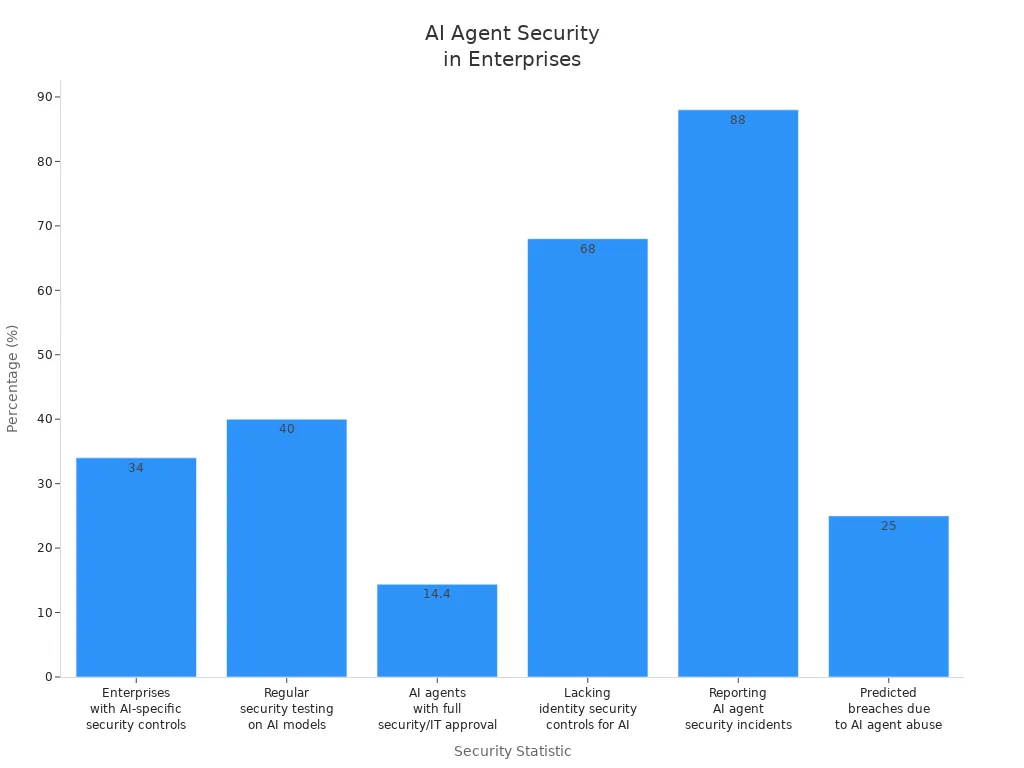
There are special risks when you handle ai agent authentication in enterprise AI stores. Many companies see security problems with AI agents often. Attackers use weaknesses like EchoLeak and ServiceNow BodySnatcher to pretend to be agents and get past controls. Only 34% of enterprises have security controls made for AI. Less than 40% test their AI models for security often. Most companies do not have identity security controls for AI agents. This causes many breaches. Experts think the breach rate from AI agent abuse could reach 25% by 2028.
Integration with Legacy Systems
Legacy systems make it hard to use modern authentication in AI stores. Old methods like NTLM and Basic authentication send credentials every time. You need to switch to protocols like OAuth 2.0 and OpenID Connect. These use token-based authentication and strong encryption. This change makes security and user experience better. But you must fix compatibility issues and teach staff about new systems. Even with these problems, updating legacy systems is important for strong ai agent authentication.
Managing User and Agent Roles
You must give each agent and user a unique digital identity. Use delegated authority models and mix role-based access control with attribute-based policies. Give credentials for each task and change them often. Watch for strange access patterns and unauthorized privilege escalation. AI agents need identities that last only for a short time and expire after tasks. If you cannot find an agent, you cannot control its access or trust its output. Managing ai agent authentication means treating agents as non-human identities and using special controls.
Evolving Threats and Compliance
Threats change fast in enterprise AI stores. You need flexible identity and access management strategies to keep up. Most companies do not have AI governance policies. This raises security and compliance risks. Keep records for every agent interaction to meet SOC2 and GDPR rules. Limit agent access to only the data they need. Make high-risk AI systems clear and open. These steps help you follow rules and lower risks with ai agent authentication.
Challenge | Description |
|---|---|
Problems happen when expired tokens or changed passwords block connectors. | |
Security and governance | Enterprises must handle tough security and governance needs during integration. |
Managing multiple agents | Handling many agents can cause authentication problems. |
Implementing Enterprise Authentication
Identity Verification and SSO
Start with strong identity verification. This step makes sure only trusted users and AI agents can enter your AI store. Pick the right single sign-on protocol. SAML is good for enterprise apps. OAuth 2.0 fits modern needs. Choose an identity provider that works for your company. Okta, Microsoft Entra ID, and Auth0 are popular for enterprise SSO. Check your identity directory to make sure it is correct. This stops mistakes and mismatches.
Keep all parts of your SSO system safe. Use strong encryption and do regular audits to protect against breaches. Set user privileges before you start using the system. Only share identity information with apps that need it. Do not allow username and password logins. Make sessions end after a set time to keep access secure. These steps help build a strong base for ai agent authentication and ai-driven identity.
Tip: Always check your SSO framework and identity provider choices. Make sure they use modern authentication protocols and work with your current systems.
Step-by-step SSO deployment:
Find the apps that need SSO.
Keep all SSO parts secure.
Set user privileges and access levels.
Protect privacy by sharing identity only when needed.
Do not allow old logins.
Set rules for session expiration.
Multi-Factor Authentication for AI Agents
Use mfa to keep AI agent authentication safe. Multi-factor authentication lowers the chance of someone getting in without permission. Give each AI agent its own identity. Replace shared credentials with unique ones that can be checked. Use OAuth 2.0 client credentials flow to give authentication credentials. Make access tokens that last only for a short time and need to be checked again.
Give agents only the permissions they need for their jobs. Use context-aware access controls. Change permissions in real time based on what agents do. Keep authentication safe with short-lived credentials and automatic token management. Keep detailed records for every agent action.
Note: Cryptographic attestation can be used instead of regular mfa for non-human identities. Use short-lived certificates, hardware security modules, or workload identity federation.
mfa is needed to control access to AI systems.
It lowers the risk of someone getting in without permission.
Use context-aware authorization to change permissions as needed.
Watch agent usage and take away access right away if needed.
Access Control Strategies
Use good access control models to manage permissions for people and AI agents. Role-based access control gives permissions based on job roles. Attribute-based access control adds flexibility by looking at user attributes. Policy-based access control mixes identity, context, and real-time conditions into dynamic policies.
Write down how you want agents to be used and what limits they have. Set rules for responsible behavior. Define context boundaries and permissions to stop sensitive information from getting into an agent’s reasoning. Real-time monitoring helps you see how agents use systems. Regular audits make sure agent access matches what your company needs.
Access Control Model | Description | Best Use Case |
|---|---|---|
RBAC | Gives permissions by role | Small to medium teams |
ABAC | Uses user attributes for access | Flexible environments |
PBAC | Mixes identity, context, and real-time factors | Complex enterprise AI stores |
Callout: Policy-based access control is best for complex places with lots of AI agents and users. It helps with adaptive security and real-time checks.
Token and Session Security
Keep tokens safe and manage session lifecycles carefully. Use strong cryptography when making and storing tokens. Never keep tokens in plaintext. Protect the process of giving out tokens from being changed. Sign tokens with private keys. Limit who can use tokens and how long they last. Set short token lifetimes to lower risks.
Stop token replay and use by people who should not have them. Connect tokens to certain resources and limit who can use them. Keep detailed logs of token activity. Watch for strange things. Pick open, auditable, and standards-based solutions for better security and working together.
Use strong cryptography to make tokens.
Limit who can use tokens and set short lifetimes.
Connect tokens to resources and limit who can use them.
Check token use and watch for strange activity.
Tip: Self-healing tokens and adaptive security protocols help you react fast to threats and keep access safe.
Real-Time Monitoring
Use continuous monitoring to find and stop authentication breaches. Real-time monitoring looks at user behavior and network activity. It finds strange things that might mean someone is trying to get in without permission. This way, you can act fast to stop threats and keep important data safe.
Real-time detection systems notice odd login places or many failed tries. Security teams get alerts or accounts lock automatically to stop unauthorized access. Continuous monitoring helps with adaptive security and real-time checks for users and AI agents.
Real-time monitoring looks at behavior and activity.
It finds strange things and tells security teams.
Accounts lock or alerts go off to stop breaches.
Note: Continuous monitoring is very important for keeping modern authentication and safe access in enterprise AI stores.
AI Agent Authentication Best Practices
Least Privilege Principle
You should use the least privilege principle for ai agent authentication. Give each agent only the data and tools it needs. Make sure every agent has its own identity. This helps you track what each agent does. Set permissions for each job and do not give extra access. Use just-in-time access so agents lose credentials after finishing tasks. Build a main gateway for agents to connect with your systems. This gateway checks rules and keeps agent workspaces separate.
Strategy | Description |
|---|---|
Access Restriction | Agents get only the data and tools they need. |
Permission Limitation | Agents have only the permissions needed for their jobs. |
Each agent gets a special identity for tracking. | |
Just-in-Time Access | Agents get access for a short time and lose it after tasks. |
Centralized Gateway | A gateway checks rules and keeps agent spaces apart. |
Tip: Platforms like Auth0 or Kinde help manage agent identities and keep access limited.
Adaptive and Context-Aware Access
Adaptive and context-aware authorization makes ai agent authentication better. You can use detailed authorization models like attribute-based and policy-based access control. These models help you make choices using real-time information. Give agents short-term permissions and change access by device or location. Continuous checks look at privileges as things change. Adaptive security policies react to risks and new threats. Trust scoring lets you give access based on how agents act. Zero trust means you always check and use least privilege.
Component | Description |
|---|---|
Use ABAC and PBAC for smart access choices. | |
Just-In-Time Management | Give short-term permissions to lower risk. |
Context-Aware Authentication | Check agents by device and location. |
Continuous Authorization | Change privileges as things change. |
Adaptive Security Policies | Change permissions when risks or threats appear. |
Trust Scoring | Give trust scores based on agent actions. |
Zero Trust Principles | Always check and use least privilege. |
Audit Logging and Compliance
You need strong audit logging for ai agent authentication. Make logs so no one can change them. Use storage that only lets you write once. Sort logs by type and set up automatic rules for keeping them. Protect logs with encryption and strict controls. Back up logs often and add them to disaster plans. Make sure logs do not have extra personal data. Follow rules like GDPR to stay legal.
Log safety and no changes keep records safe.
Rules for keeping logs help you follow the law.
Encryption and controls keep log data private.
Backups and disaster plans help you stay compliant.
Privacy rules stop you from saving extra personal info.
Note: Using platforms that automate logging and checks makes security easier.
Regular Security Reviews
You need to check ai agent authentication systems often. High-risk systems should be checked every month. Medium-risk systems need checks every three months. Low-risk systems should be checked once a year. These checks help you find weak spots in your security and permissions. Checking all the time keeps your authentication strong and legal.
Review Frequency | |
|---|---|
High-risk | Monthly |
Medium-risk | Quarterly |
Low-risk | Annually |
Callout: Regular checks help you follow rules and handle new threats in ai agent authentication.
Common Pitfalls and Solutions
Overlooking Insider Threats
Do not forget about insider threats in your infrastructure. Many security problems come from people inside your company. These people can get into important systems and data. To lower this risk, you should:
Find users who might be risky.
Share rules clearly and often.
Know why users do certain things.
Teach people about risky actions.
Make plans to respond before trouble happens.
Add these steps to your infrastructure. This helps you find issues early and keeps your systems safe from inside risks.
Token Expiry and Revocation Issues
Token management is very important for secure authentication. If you do not handle token expiry and revocation well, attackers can use old or stolen tokens to get in. You should:
Use strong signature algorithms and check tokens the right way.
Store tokens safely, like using HttpOnly cookies with Secure and SameSite flags.
Set good expiration times for access tokens (15 minutes to 1 hour) and refresh tokens (1 day to 2 weeks).
Keep a list of revoked tokens to stop bad access.
Use Multi-Factor Authentication to make things safer.
"Short-lived tokens help keep modern authentication and authorization systems safe. These tokens expire quickly—usually in minutes or hours. This makes it harder for attackers to use them if they steal or intercept them."
Companies that use token rotation see 63% fewer bad access attempts from expired credentials. Make token management a main part of your infrastructure.
Integration Gaps with Security Tools
Problems can happen if your authentication system does not connect well with other security tools. These gaps can make your infrastructure weak. Check that all parts of your system work together. Test your integrations often. Make sure your infrastructure uses modern security standards and APIs. This helps you avoid blind spots and keeps your systems strong.
Scalability and Performance
When your AI store gets bigger, your infrastructure must handle more users, agents, and data. Old systems often cannot keep up with fast and complex AI workloads. You need a platform that connects and grows easily. The best way to scale AI is by using a shared platform that makes processes the same for all teams. This makes delivery faster and security better. Enterprise AI architecture gives you a strong base for scaling while keeping security, governance, and compliance. Build your authentication on enterprise-grade infrastructure to avoid gaps and keep your operations stable.
Privacy and Compliance in Enterprise Authentication

Data Protection Regulations
You must follow strict rules to protect data in enterprise authentication for AI stores. These rules tell you how to keep privacy and security. Every rule has its own needs. The table below shows the main rules and what you must do:
Regulation | Key Requirements |
|---|---|
GDPR | Privacy-by-design, explainable AI decisions, breach notification, consent management |
HIPAA | Granular access controls, PHI encryption, audit trails, minimum necessary access, continuous monitoring |
SOC2 | Security, Availability, Processing Integrity, Confidentiality, Privacy trust criteria, operational effectiveness evaluation |
You need to know these needs. They help you keep sensitive data safe and avoid legal trouble.
Secure Data Handling
You must keep data safe to follow the rules. Start by sorting your data and checking risks. This helps you protect important information. Use multi-factor authentication (MFA) for extra safety. MFA stops most account attacks and keeps bad users out. Mark sensitive data so you know what needs the most care. Encrypt all data when stored and sent. Encryption stops attackers from reading your data if they get it.
Sort data and check risks
Use multi-factor authentication (MFA)
Mark sensitive data for care
Encrypt data when stored and sent
MFA can stop almost all account attacks. You keep enterprise authentication strong and follow the rules by doing these things.
Auditability and Transparency
You need clear records and open steps in your authentication system. Use strong ways like MFA and biometrics to get into models and data. Use least-privilege role-based access control (RBAC) and just-in-time elevation for important jobs. Behavioral analytics help you find strange activity fast. Split jobs between development, data curation, deployment, and monitoring to lower insider risks.
Keep logs full, easy to check, and safe from changes. Store logs in systems that only let you add new records. Set rules for how long to keep logs to match the regulations. Export logs often and use databases like Postgres for metadata. Special indices like OpenSearch make searching simple. Encrypt logs and use checks like hashes and signatures.
Tip: Open logging and strong access controls help you follow the rules and build trust with users.
You can keep your AI store safe by using main security ideas like authentication, authorization, encryption, auditability, integrity, and zero trust. Using layered security helps protect users and AI agents. This way, you can run things at a bigger scale, make faster choices, and spot threats better.
Benefit | Description |
|---|---|
Handle many tasks with strong access controls. | |
Adaptive efficiency | Change defenses and use less privilege. |
Enhanced security | Act fast against threats and lower credential risks. |
Look at your current authentication plan.
Then, follow these steps:
Do a security check.
Use identity-first security.
Set up real-time monitoring.
Make zero trust access rules.
Automate compliance tasks.
Regular checks help you find weak spots, work better, and keep your enterprise safe.
FAQ
What is the best way to manage AI agent identities?
You should pick an identity provider like Okta or Auth0. Give each AI agent its own identity. Change credentials often to keep things safe. Watch what agents do for security and rules.
How does multi-factor authentication help secure AI stores?
Multi-factor authentication (MFA) adds extra safety. You need more than a password to get in. MFA stops most people who should not have access, even if they know your password.
Can I integrate modern authentication with legacy systems?
Yes, you can do this. Use OAuth 2.0 or OpenID Connect. These work with many old systems. Sometimes you need special tools to connect them.
How often should I review authentication policies?
Check high-risk systems every month. Look at medium-risk systems every three months. Review low-risk systems once a year. Checking often helps you find and fix problems.
See Also
The Future of Retail Lies in AI-Driven Stores
Transforming Online Retail Management with AI Tools
Modern Retail Benefits from AI-Enhanced Combo Vending Machines
