How Computer Vision Detects and Prevents Shrinkage

You see that many stores lose money because of shrinkage. Most shrinkage happens from stealing, mistakes, and cheating. AI-powered cameras help prevent shrinkage by watching your store all the time. These smart systems can find strange actions quickly and send warnings right away. Here are some important facts you should know:
Retail theft causes 65% of shrinkage. Stealing by workers is 29%, and stealing by others is 37%.
AI cameras lower shrinkage by 34% compared to old ways.
These cameras are 92% correct in finding shoplifters.
AI lowers false alarms by 76%.
You can use this technology at self-checkout to prevent shrinkage and make your store safer.
Key Takeaways
Shrinkage makes stores lose billions every year. Knowing why it happens helps stop losing money.
AI-powered cameras lower shrinkage by 34%. They also give real-time warnings for strange actions.
Watching self-checkout is very important. Computer vision helps find stealing and errors at checkout.
Good inventory tracking with computer vision lets you know what is on your shelves. This helps stop surprises.
Using computer vision can make stores safer. It also lowers false alarms and makes shopping better for customers.
Shrinkage in Retail
What Is Shrinkage
Sometimes, your store has less inventory than you expect. This is called shrinkage. Shrinkage means you lose inventory for reasons besides sales. You notice shrinkage when you count your stock and see it is less than your records. Shrinkage can happen if workers steal, people shoplift, suppliers make mistakes, paperwork is wrong, or products get damaged.
Tip: You can stop shrinkage if you know why it happens and check your inventory often.
Impact on Retailers
Shrinkage can cause many problems for your business. You lose money and products. You might need to pay more for security and training. Here are some facts about how much shrinkage costs stores:
In 2022, shrinkage made stores lose $112.1 billion in the United States.
In 2024, experts think global retail shrink will reach $132 billion.
Stores may raise prices because they want to cover these losses. Shrinkage can also make your profits go down and make it harder to grow your business.
Common Causes
There are many things that can cause shrinkage. The table below shows the main causes and what they mean:
Cause of Shrinkage | Description |
|---|---|
Shoplifting and External Theft | Customers steal items or join in organized retail crime. |
Employee Theft or Misuse | Workers may not scan items or take products without paying. |
Operational Errors and Miscounts | Staff may make mistakes when counting stock or at checkout. |
Supplier Fraud and Receiving Mistakes | Suppliers may send fewer items than you ordered or make mistakes in shipments. |
Damage, Spoilage, and Expired Goods | Products can get damaged, spoiled, or expire before you sell them. |
You can lower shrinkage if you know these causes and try to stop them.
Traditional Loss Prevention Methods
Manual Surveillance
In many stores, you see guards or workers watching people. This is called manual surveillance. They walk around and look for anything strange. Sometimes, they watch cameras in a special room. Manual surveillance helps find theft, but it is not perfect. People can get tired and miss things. You cannot always count on someone to see every problem.
Here is a table that shows how manual surveillance and automated systems compare in stopping shrinkage:
Method | Shrinkage Reduction (%) |
|---|---|
Automated Systems | |
Manual Surveillance | N/A |
Manual surveillance does not have a clear number for shrinkage reduction. Automated systems work better.
Electronic Systems
You can use electronic systems to help stop loss in your store. These systems use technology to watch for stealing and mistakes. Some common electronic systems are:
Security cameras that scare off thieves because people can see them.
Cameras that watch registers and stockrooms all the time.
AI analytics that find strange actions.
Sensors that send alerts right away to help keep the store safe.
You can also use other tools to protect your store:
A strong point-of-sale (POS) system that finds fraud.
Smart shelves and displays that make stealing harder.
Many stores use Electronic Article Surveillance (EAS) to stop shoplifting. EAS uses security tags, deactivators at checkout, and gates at the doors. If someone tries to leave with a tagged item, an alarm will go off.
Limitations
Traditional ways help lower shrinkage, but they have problems. Manual surveillance depends on people, so mistakes can happen. Electronic systems like cameras and EAS can miss smart thieves or cause false alarms. These systems do not always work together, so you may not see everything that happens in your store. You need better tools to catch more problems and keep your store safe.
How Computer Vision Prevents Shrinkage
AI-Powered Cameras
AI-powered cameras watch your store all day and night. They never get tired or lose focus. These cameras look at video feeds and search for strange actions. They can see people moving oddly or staying in one spot too long. This helps you find problems early.
AI-powered cameras:
Check video feeds all the time for odd patterns.
Spot suspicious actions, like weird movements.
Notice people hanging around in important areas.
Keep watching without stopping.
When the system sees something strange, it sends you a warning fast. This helps you stop shrinkage before theft or cheating happens.
Note: Human guards can miss things when they get tired. AI cameras give you better coverage and quicker alerts.
Real-Time Analytics
Real-time analytics check video feeds and store data right away. This helps you catch theft and mistakes as they happen. The system looks at live video and compares it to sales data. If it finds a problem, like a scanned item not matching what is in the cart, it alerts your staff.
Real-time analytics:
Find theft and odd actions instantly.
Match live video with sales data to spot mistakes.
Send quick alerts to staff when something is wrong.
For example, if someone tries to return an item without a receipt or scans a cheap item instead of the real one, the system asks for manager approval. This fast action helps you stop shrinkage and keep your store safe.
Tip: Quick alerts help you act fast, so you can stop theft or errors before you lose money.
Self-Checkout Monitoring
Self-checkout makes shopping faster, but it can cause new problems. Many thefts happen at self-checkout because it is easy to skip scanning items or switch barcodes. Computer vision helps you stop shrinkage by watching every transaction closely.
The system checks the item in the shopper’s hand against the barcode scanned.
If it finds a problem, it asks the shopper to fix it.
If the shopper does not fix it, the system alerts staff.
The system can change how strict it is based on how busy the store is.
Here is a table showing why self-checkout needs strong monitoring:
Evidence Type | Description | Source |
|---|---|---|
Theft Rate | Theft at self-checkout is 5 times higher than at regular checkout. | |
Percentage of Theft | 39% of grocery store theft happens at self-checkout. | |
Retailer Actions | Many retailers are limiting self-checkout due to shrinkage. |
Computer vision helps you stop shrinkage at self-checkout by catching mistakes and theft right away. This keeps your losses low and your customers honest.
Inventory Tracking
Computer vision helps you track your inventory better. The system checks your shelves all the time and finds empty spots or items in the wrong place. It sends you alerts when stock is low or missing, so you can refill shelves quickly.
Computer vision:
Spots empty or low-stock shelves right away.
Sends alerts to refill shelves fast.
Tracks where products are and if they are missing.
Cuts down on manual checks.
This technology helps you stop shrinkage by making sure you always know what is on your shelves. You can find problems like theft, damage, or mistakes before they hurt your business.
Tip: Good inventory tracking means fewer surprises and more control over your store.
By using AI-powered cameras, real-time analytics, self-checkout monitoring, and inventory tracking, you can stop shrinkage better than ever before. These tools work together to make your store safer and smarter.
Benefits and Implementation
Enhanced Security
Computer vision makes your store safer. These systems watch for theft and mistakes right away. They see when someone hides a product or goes into a restricted area. You get alerts fast, so you can act quickly to stop shrinkage. Here is a table showing how computer vision helps security:
Benefit | Description |
|---|---|
Real-time detection | Finds suspicious actions and lets you respond fast. |
Product concealment identification | Sees when someone tries to hide or steal something. |
Monitoring restricted zones | Watches important areas without bothering shoppers. |
Computer vision finds more shrink with better accuracy. It gives you instant reports. This helps you make smart choices to stop shrinkage.
Reduced False Alerts
You do not want to deal with false alarms. Computer vision uses item recognition and barcode checks. This means you get fewer false alerts than old systems. The system uses visual checks, so it looks at what is really happening. You can trust the alerts and spend less time checking errors.
Accurate item recognition cuts down false alerts.
Real-time barcode data finds real shrink at checkout.
Visual checks focus on real problems, not guesses.
Improved Customer Experience
Computer vision helps shoppers have a better time. Customers check out faster and wait less. Smart carts and digital displays help them find items. Some stores use checkout-free shopping, so people do not wait in line. Computer vision also tracks busy spots and wait times, so you can staff your store better.
Smart carts give real-time help.
Digital displays make shopping easier.
Integration and Scalability
You can add computer vision to your store step by step. Start with a technical check of your setup. Run a pilot test to see how it works. Train your staff and answer their questions. If you have many stores, computer vision helps you see what happens everywhere. You can make quick choices and keep your stores working the same way.
Challenge | Solution |
|---|---|
Technical limitations | Keep training the system |
Integration with old systems | Add computer vision in steps |
Staff resistance | Train and involve your team |
Rules and laws | Watch and adjust for compliance |
Computer vision grows with your business. It helps you stop shrinkage in all your stores.
Real-World Effectiveness
Case Studies
You can find out how computer vision helps in real stores. Many stores use these systems to stop shrinkage and do better in business. Here are some examples:
One store checked old CCTV videos. They saw refund fraud by workers after noticing strange patterns in sales.
Stores use AI-powered video analytics to match sales with how many people come in. This helps them guess odd actions with high accuracy.
Visionify’s AI system sends real-time alerts for inventory. This means products are available more often and customers are happier. Many stores want to use this system in more places.
Self-checkout systems with computer vision can tell what products are and see odd actions. This makes shrinkage rates much lower.
Trigo-powered stores say shrinkage drops by up to 70%. This proves computer vision is very strong.
These stories show you can trust computer vision to keep your store safe and help your business.
Data on Shrinkage Reduction
You might wonder how much computer vision helps. The numbers make it clear. Stores see big drops in shrinkage when they use these systems.
Metric | |
|---|---|
Overall Shrinkage Reduction | 20-40 |
Targeted Theft Reduction | 30-60 |
Process Error Identification | 40-70 |
Vendor Compliance Improvement | 25-50 |
You can also check results from different store chains:
Retail Chain | Shrinkage Reduction Rate | Annual Savings per Store |
|---|---|---|
Chain A | 22% | $43,000 |
Chain B | 38% | €67,000 |
Chain C | 56% | $128,000 |
Chain D | Up to 70% | N/A |
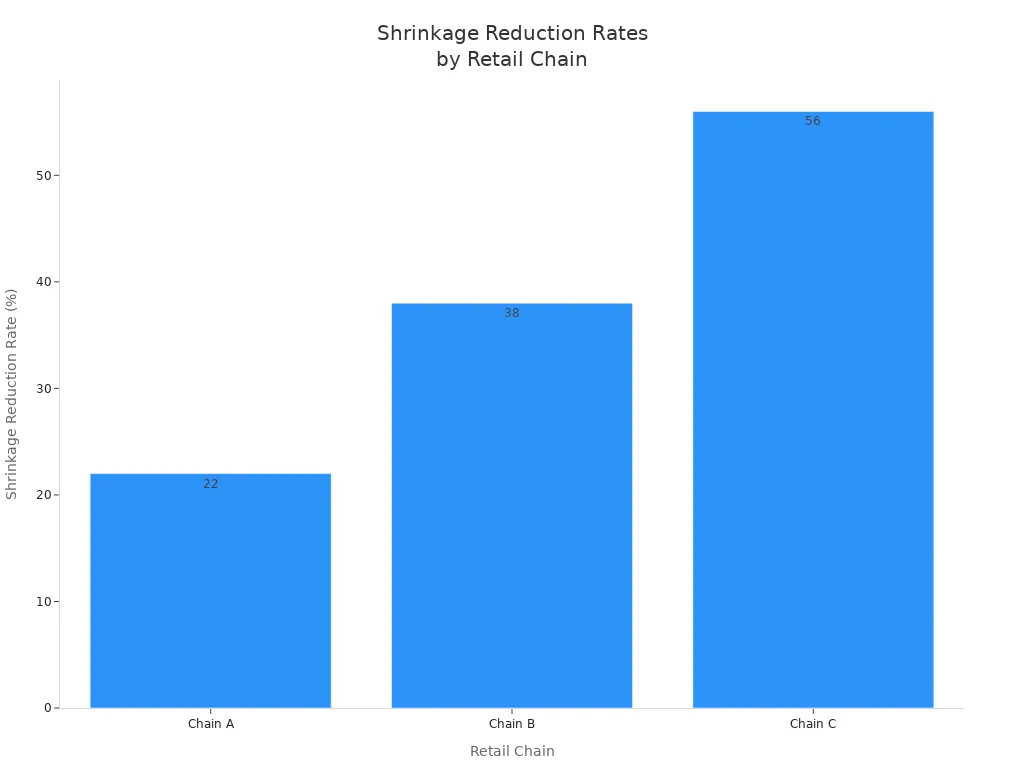
You can see that computer vision really works. Shrinkage goes down, and stores save money every year.
You can see computer vision helps stores stop loss in new ways. This technology lets you watch your store live and get quick info. You can spot theft and mistakes right away. Computer vision works better than old ways because it uses smart item checks and fast data. This makes it easier to manage your stock and help customers.
Description | |
|---|---|
Real-time monitoring | Use systems that watch your store all day to catch theft fast. |
Let technology find problems and alert your staff quickly. | |
Enhanced operational efficiency | Make sure your security does not slow shoppers down. |
If you want to stop shrinkage, try these steps and see your store get better.
FAQ
How does computer vision spot theft in real time?
You get instant alerts because AI cameras watch for odd actions. The system checks for things like hiding items or skipping scans. You can act fast to stop theft before it happens.
Can computer vision work with my current cameras?
Yes, you can use many existing cameras. The system connects to your video feeds and adds smart features. You do not need to replace all your equipment.
Will computer vision protect customer privacy?
You keep customer privacy safe. Most systems blur faces or use data only for security. You control who sees the footage and how you store it.
Is computer vision hard to set up in my store?
You can start small. Many providers offer easy setup and training. You get support to help your team learn the system quickly.
See Also
How Cloudpick Vending Machines Promote Healthier Snack Choices
The Benefits of Cloudpick's Checkout Systems for Customers
A Guide to Discovering Cloudpick Vending Machine Designs
The Progression of Self-Checkout Technology Over Time
The Transformation of Retail Through Smart Electronics Vending Machines
