How to Upgrade an Existing Store for Cashierless Shopping


You want to upgrade an existing store to enhance the experience for cashierless shopping. This change helps meet what shoppers want today, providing a quicker and easier experience. You will notice that shopping becomes smoother, removing long lines and awkward moments. Many stores report that wait times are shorter after they upgrade an existing store. They also find that operations work better, which can help save money. These positive changes make customers happier and help your store stay strong in retail.
Key Takeaways
Check if your store is ready for cashierless shopping. Look at your technology, layout, and building setup.
Pick the best cashierless technology for your store’s needs and budget. You can use RFID or computer vision systems.
Teach your staff how to use the new systems. This helps them help customers and fix problems.
Tell customers about the new shopping process in a clear way. This helps them trust you and want to try it.
Ask for feedback often to make the cashierless experience better. This keeps your store meeting what customers want.
Assess Store Readiness
Before you upgrade an existing store for cashierless shopping, you should check if your store is ready. This step helps you find problems early. It also lets you plan for a smooth change.
Review Automation Level
Begin by checking your store’s technology. Ask if your store uses any automation now. Many stores have gaps before switching to cashierless systems. You can see some of these gaps in the table below:
Automation Gap | Description |
|---|---|
You need a lot of money for new technology and setup. | |
Operational Changes | Staff must learn new systems, and you may need to change your store layout. |
Customer Adoption Barriers | Some customers worry about privacy or do not like new technology. |
Technical Failures | Glitches can cause mistakes at checkout and upset customers. |
Smaller stores may have trouble with high setup costs. Some customers, like older people, may not want to use new systems.
Analyze Layout and Infrastructure
Now, look at your store’s layout and infrastructure. Check if shelves, lighting, and wiring can handle new sensors and cameras. Make a list of places that need upgrades. If your store has narrow aisles or bad lighting, fix these first. Good planning helps you avoid problems later.
Define Business Goals
Set clear goals for your upgrade. Most stores want shopping to be faster and easier for customers. Others want to save money and work better. The table below shows common goals:
Objective | Description |
|---|---|
Shorter checkout times and happier shoppers. | |
Lower costs and better use of staff time. |
"Digital-first grocery operations let stores use smart inventory systems. These systems help stores manage supply chains better without worrying about store layouts."
When you know your goals, you can pick the right technology. You can plan your upgrade an existing store project with confidence.
Steps to Upgrade an Existing Store
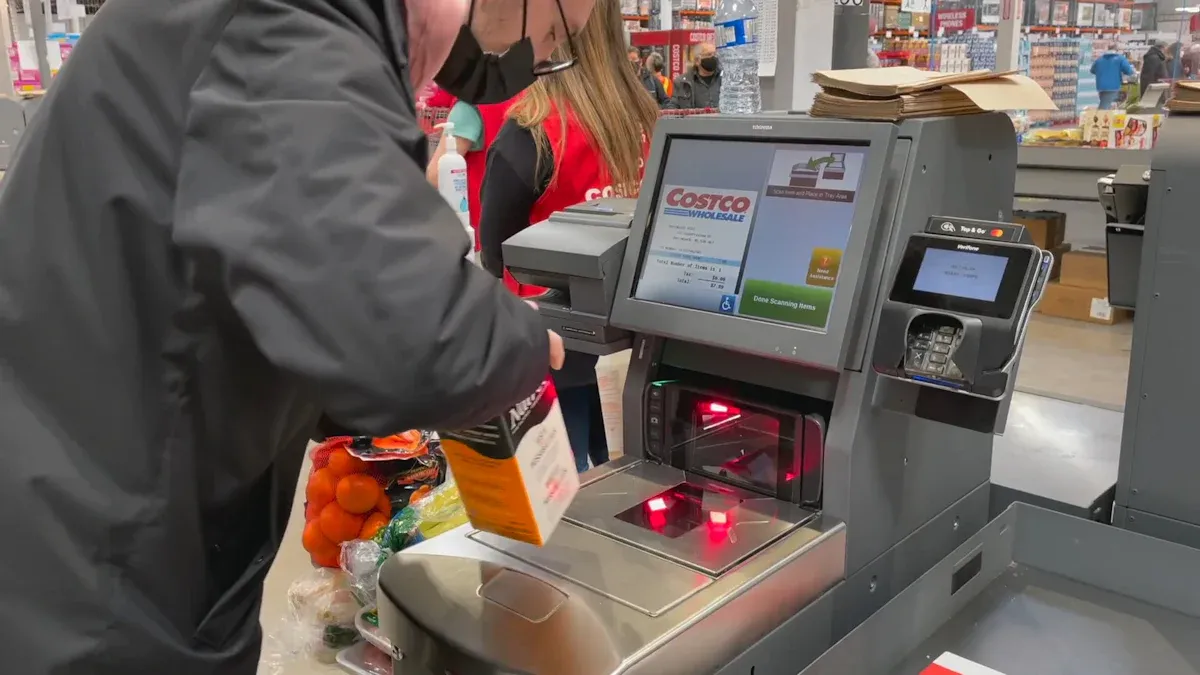
Making your store ready for cashierless shopping takes a few steps. You must pick the right technology. You also need to plan for new hardware. Smart shelves and sensors are important. Each step helps your store run smoother.
Select Cashierless Technology
First, choose the best technology for your store. Many stores use computer vision, RFID, sensor fusion, and machine learning. These tools track products and customers as they shop. Computer vision uses cameras to watch what shoppers do. RFID tags and readers help find products fast without scanning each one.
Feature | Computer Vision-based Systems | |
|---|---|---|
Technology | Uses RFID tags and readers for product identification and inventory management. | Uses high-resolution cameras and image recognition for real-time monitoring. |
Advantages | Fast product identification and checkout. | Tracks customer movements and actions for a better experience. |
Challenges | Needs RFID readers and tags, which can be expensive. | Needs good camera placement and lighting for accuracy. |
North America uses these systems the most. Europe is next. Asia Pacific is growing quickly because of new smart retail investments. Stores like Amazon Go use AI so customers can walk in, grab items, and leave. The system charges their account without stopping at a register.
Tip: Pick a technology that fits your store and goals. Think about your budget and how much you want to change.
Plan Hardware Upgrades
Once you pick your technology, plan for hardware changes. Most stores need new cameras, sensors, and special shelves. You may need better lighting or wiring for these devices. Changing an old store can be tough. Some stores have narrow aisles or not enough power outlets. Make a list of what needs fixing.
Put in high-resolution cameras for computer vision.
Add RFID readers at doors if you use RFID tags.
Upgrade your network so it can handle more data.
Improve lighting so cameras work well.
Think about software too. Your new system must connect with billing and inventory tools. This step helps you avoid problems when you upgrade.
Implement Smart Shelves and Sensors
Smart shelves and sensors are key for cashierless shopping. These shelves use weight sensors to know when someone picks up or puts back a product. Cameras and sensors track what each customer does and update their cart right away. This makes checkout faster and more accurate.
Smart shelves help you track inventory as it changes. They alert staff when stock is low.
Sensors and cameras keep each customer’s cart up to date.
The system finishes the purchase as the customer leaves, making payment easy.
Stores with smart shelves manage inventory better and restock faster. A 2024 Deloitte report says these tools help stores serve customers better and keep shelves full. Upgrading your store with smart shelves makes shopping easier for everyone.
Note: Smart shelves and sensors help with checkout and store management. They show which products sell best and when you need to restock.
Follow these steps to upgrade your store for cashierless shopping. Start by picking the right technology. Plan your hardware upgrades. Install smart shelves and sensors. Each step helps your store become modern and efficient.
Integration and Setup
Connect to Backend Systems
You must connect cashierless technology to your store’s backend systems. This step helps your store work better. Linking these systems makes wait times shorter. It also improves how people move in your store. Checkout mistakes happen less often. Billing becomes more accurate. You can track products and inventory easily. Your store stays organized, even when it is busy.
You see updates on what sells right away.
Staff can refill shelves quickly.
Customers have a smooth shopping experience.
Tip: Make sure your cashierless system matches your billing and inventory software. This stops problems from happening later.
Use Standardized Retail Models
Standardized retail models help set up cashierless technology correctly. These models use vision and machine learning to keep data good. Automated checks make sure everything works in each part of your store. Secure APIs link cameras and sensors to delivery and payment systems. This setup lets you handle research, testing, and updates in one place.
Build your system with vision and machine learning.
Use automated checks to keep things working well.
Protect customer data by securing your APIs.
Bring teams together for easy upgrades.
Test and Optimize System
Testing is important for cashierless systems to work well. You must check hardware and software. Stores face problems like fast-changing technology and long testing times. Devices can be hard to test. Automated tests and clear plans help fix these issues. The table below shows common problems and ways to solve them:
Challenge | Solution |
|---|---|
Rapid technological advancements | Use smart test strategies for hardware and software. |
Long regression cycles | Automate tests to save time. |
Multiple configurations and complex interfaces | Make detailed test plans. |
Testing Mobile POS systems | Use testing tools that work with any device. |
Testing with peripheral devices | Set up AI-powered automation to spot design flaws. |
Back-end verification | Use automated testing for checking data transfers. |
Compliance-related challenges | Test often to meet industry rules. |
Maintenance and upgrades | Hire experts for quality checks if needed. |
When you upgrade your store, test and improve your system often. This keeps your store running well and customers happy.
Staff and Customer Transition

Train Employees
You need to get your staff ready for the cashierless system. Training helps them learn how the technology works. It also shows them how to help customers. Start with hands-on practice using the new tools. Teach staff how to fix common problems. Show them how to answer customer questions. Employees should know how to guide shoppers step by step. They should also fix small issues fast.
Retailers should spend money on teaching customers. Workshops or online videos can help people learn about self-checkout kiosks and mobile apps.
Here is a table with ways to help staff and customers adjust:
Strategy | Description |
|---|---|
Use both automation and regular checkout for different needs. | |
Scan-and-go checkout | Shoppers scan items with phones and get help if needed. |
Smart carts with AI | Customers can see their spending as they shop. |
Retail membership models | Registered members can shop without cashiers. |
Consumer Education Programs | Teach people about new technology with workshops and tutorials. |
Inform and Guide Customers
You need to tell customers about changes in your store. Use clear signs to show how the new system works. Put staff near the entrance to greet shoppers and answer questions. Social media can help you share videos and posts about the new process. Give special deals to get customers to try the new system.
Use signs in the store to guide shoppers.
Share news on social media to reach more people.
Train staff to answer questions and help with problems.
Give discounts to first-time users of the cashierless system.
Let customers know how the new payment works. Tell them how it makes shopping easier. When you upgrade an existing store, clear messages help everyone adjust and trust your store.
Gather Feedback and Improve
After you start the new system, ask customers for feedback. Use surveys at checkout or send emails later. Track Net Promoter Score (NPS) and customer satisfaction (CSAT) to see how people feel. Watch online reviews and social media for quick feedback.
Use surveys to get opinions from customers.
Check online reviews to see what people like or dislike.
Track NPS and CSAT to measure loyalty and happiness.
Give special deals to keep customers interested.
Talk to shoppers after their visit to build good relationships.
Look at feedback often to find ways to improve. Make changes based on what customers say. This helps your store stay up to date and keeps shoppers coming back.
Overcoming Challenges
Address Privacy and Security
You need to keep customer data safe in a cashierless store. Many shoppers worry about their privacy. Some think cameras and sensors collect too much information. Others feel nervous about bias in systems that watch for shoplifting. You can build trust by being honest about your data rules. Tell customers what data you collect and why you need it. Let them choose to opt out before they enter.
Collect only the data you really need.
Follow privacy laws like GDPR to stay legal.
Use synthetic datasets to make your AI less biased.
Set up AI-powered theft prevention to boost security.
Experts say stores should use clear signs and rules to explain privacy. Hybrid systems can help balance convenience and privacy.
Manage Technical Issues
Technical problems can slow down your cashierless upgrade. Cameras may miss items. Sensors might not work together. Slow data processing can cause mistakes at checkout or missed sales. You can fix many problems by using different sensors together. For example, combine computer vision, RFID, and weight sensors to track products better.
Test your system often to find problems early.
Use cloud-based AI services to save time and money.
Start small and grow as you fix issues.
Train staff to handle technical glitches fast.
Testing your system for integration, security, and performance helps you avoid common mistakes.
Handle Customer Concerns
Customers may feel nervous about new technology. Some worry about privacy. Others do not trust automated systems. You can help by giving clear information and support. Make your system easy to use. Provide help when needed.
Offer programs to teach customers how the system works.
Give strong technical support for app or checkout problems.
Use clear data handling to build trust.
Increase security to prevent theft and keep shoppers safe.
Listen to feedback and make changes based on what customers need. This will help your store succeed with cashierless shopping.
You can make your store ready for cashierless shopping by taking simple steps. First, check if your store is ready for changes. Next, pick the best technology for your needs. Plan how you will set up your store’s layout. Make sure your systems work well together. Train your staff so they know what to do. Companies like NCR Voyix, Grabango, and Square POS can help you with this process. Over time, stores work better, spend less on workers, and keep track of products more easily.
Benefit | Description |
|---|---|
Customers wait less and feel happier | |
Reduced Labor Costs | Stores save money on paying workers |
Improved Inventory | Stores track products in real time and avoid running out |
Cashierless shopping will make customers happier and help stores do better in the future.
FAQ
What is cashierless shopping?
Cashierless shopping lets you pick items and leave without stopping at a checkout counter. Sensors, cameras, and software track your purchases. You pay automatically through an app or account.
How much does it cost to upgrade a store?
Costs depend on your store size and chosen technology. You may spend money on cameras, sensors, smart shelves, and software. Small stores usually pay less than large stores.
Tip: Start with a pilot area to test costs before upgrading your whole store.
Will customers need special apps?
Most cashierless systems use store apps or mobile wallets. You may need to download an app to shop. Some stores offer options for guests who do not want to use apps.
Option | Description |
|---|---|
Store App | Tracks purchases and payments |
Guest Checkout | Lets you pay without an app |
How do you handle privacy concerns?
You must tell customers what data you collect and why. You can use signs and clear privacy policies. Let shoppers opt out if they feel uncomfortable.
What happens if technology fails?
Staff can help you if the system does not work. Stores often use backup checkout methods. You can get support quickly to finish your purchase.
See Also
Discover How Cloudpick Enhances Your Store's Cashierless Experience
Upcoming Changes to Walmart's Self-Checkout Experience in 2025
Walgreens Self-Checkout: Benefits and Hurdles in Retail Shopping
A Journey Through the Development of Self-Checkout Systems
Comparing Micromarkets and Smart Stores in Global Retail Automation
