Inventory management for corporate micro stores

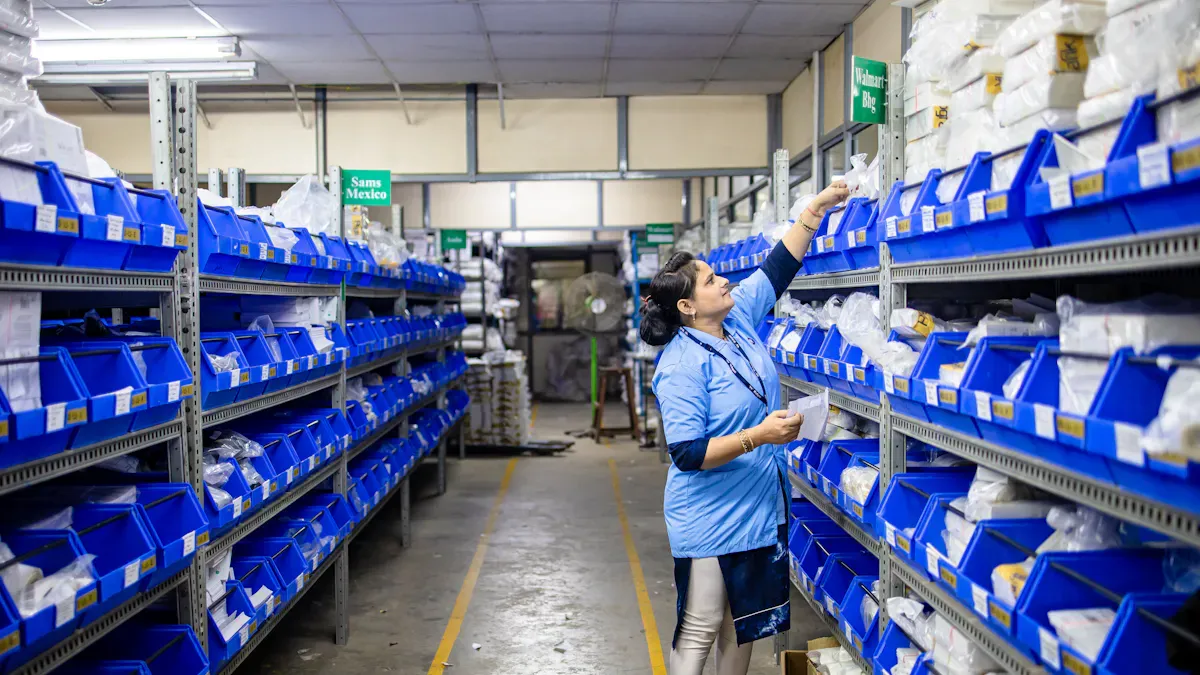
You handle inventory in your micro store carefully to stop expensive errors. Watching stock and using digital tools helps you avoid buying things quickly for too much money. Good inventory management makes sure products are there when you need them and helps you sell more.
Good inventory control helps your business stay strong with money.
Digital systems stop stock problems and help you earn more.
Use simple methods and easy tools to make your work smoother and spend less money.
Key Takeaways
Use digital tools to watch inventory and cut mistakes.
Keep popular items in stock but do not keep old stock.
Move stock with FIFO to stop waste and spoilage.
Guess demand to keep shelves full and stop shortages.
Check and watch inventory often to make it correct.
Micro store inventory needs
Unique challenges
Managing inventory in a corporate micro store is different. You do not have as many products as big retail stores. Micro-fulfillment centers usually have 8,000 to 15,000 SKUs. Big warehouses can have more than 50,000 SKUs. With fewer items, you must work fast and be efficient.
You need to keep best-selling items on your shelves but not too many.
You should not let dead stock take up space or money.
You have to change your stock quickly if people want new things or seasons change.
Tip: Try using digital tools to watch what sells fast and find slow items early.
Your plan for inventory should help you restock quickly and waste less. You cannot let products sit for too long because it hurts your budget and service.
Corporate requirements
Corporate micro stores have to follow company rules. You also need to help the business make money. Good inventory management keeps your store making money and running well.
Watching inventory in real time helps you make better choices and avoid running out.
Safety stock rules stop you from having to buy things in a hurry.
Digital systems help you make fewer mistakes and earn more.
Controlling inventory well makes your store stronger than others.
Keeping the right amount of stock can lower storage costs by 15-30%.
Having less inventory means you pay less for insurance and save 10-20% each year.
Modern inventory systems use smart tools to stop dead stock. These tools help you keep just enough stock and not waste money on things that do not sell. When you use these systems, your store works better and saves money.
Inventory management essentials
Tracking systems
You need a good tracking system to keep your micro store working well. If you track things by hand, you can make mistakes and lose products. Digital tracking systems let you see your stock right away and make fewer mistakes. When you use a system, you can find problems early and fix them fast.
Here is how tracking systems and manual processes are different:
Metric | Manual Process Accuracy | System Accuracy |
|---|---|---|
Accuracy Rate | 99%+ | |
Human Error Factor | High | Low |
Operational Reliability | Low | High |
You can pick simple and free inventory management tools that do the basics. These tools show you your stock in real time. You do not have too much or too little stock. Some tools help you make smart choices by showing trends and giving alerts. You do not need a hard system to get good results. Start with a simple app or a spreadsheet to track what comes in and goes out.
Tip: Try barcode scanning or RFID to make tracking faster and cut down on mistakes.
Stock rotation
Stock rotation keeps your products fresh and stops waste. You must use older stock first so nothing goes bad or expires. The best way is to use the FIFO method. Put new stock behind old stock so you use the oldest first.
You should make clear steps for stock rotation. This means you manage raw materials, work in progress, and finished goods. Good manufacturing practices help your store stay safe and work well.
Use FIFO to make sure old stock is used first.
Check food deliveries for use by dates and temperatures.
Label opened foods with new use by dates.
Look at storage areas every day for items close to expiry.
Take out expired items and write them in a wastage log.
Move old stock to the front and put new stock behind.
Watch dry storage items so they do not pass best before dates.
Check refrigerated items and remove anything past its use by date.
Stock rotation also helps you waste less. When you rotate stock and check expiry dates, you throw away less and save money. Automated tools and sensors can warn you about spoilage, so you can act fast and keep your inventory strong.
Demand forecasting
Demand forecasting helps you guess what your customers will want next. You use past sales and trends to plan your orders. This keeps your shelves full with the right products and stops shortages or too much stock.
You can use different ways to do demand forecasting:
Method | Description |
|---|---|
AI-based Forecasting | Uses AI to find patterns in big data and make better guesses. |
Time Series Analysis | Looks at old sales to find trends and changes in seasons. |
Moving Averages | Averages old sales to smooth out big jumps and drops. |
Exponential Smoothing | Gives more value to recent sales, which helps with fast changes. |
Regression Analysis | Looks at how things like marketing change sales. |
Hybrid Methods | Mixes different ways for better results when things are unsure. |
You can also use easy tools like spreadsheets or free apps to track sales and find trends. Simple inventory tools often have basic forecasting features. These help you plan orders and avoid mistakes.
Note: Automation and IoT devices can watch stock levels and conditions in real time. This cuts down on mistakes and helps you make better choices.
When you use these basics—tracking systems, stock rotation, and demand forecasting—you make stock control easier and have fewer mistakes. You keep your micro store working well and ready for anything.
Inventory process steps

Assessment
You begin by checking your inventory carefully. This helps you know what you have and what you need. You also see what you should change. You look at your stock levels and sales data. You search for patterns in what people buy. You find out which items sell slowly and which sell fast. This information helps you decide what is most important.
Check your inventory records to make sure they are correct.
Match sales trends with what you have in stock.
Find items that need your attention right away.
Tip: Try using simple digital tools to gather and study inventory data. These tools make your checks faster and more trustworthy.
Reorder points
You set reorder points so you do not run out of stock. Reorder points tell you when it is time to order more. You use a formula to figure out the best time to reorder:
Reorder Point = Total Lead Time Demand + Safety Stock
This formula helps you plan before you run out. You think about how long it takes for new stock to arrive. You also add extra stock for surprises. You look at different things to set reorder points:
Criteria | Explanation |
|---|---|
Lead Time Demand | The amount of stock needed while waiting for new inventory. |
Safety Stock | Extra stock for sudden changes or late deliveries. |
Demand Variability | You need to check often if demand changes a lot. |
Review Frequency | Check more often if demand changes a lot, less if it is steady. |
Adaptive Reorder Points | New systems can change reorder points using recent numbers. |
Exception Triggers | Alerts warn you if demand or delivery times change a lot. |
Reorder points help you know when to order more, so you always have enough.
More safety stock means better service but can cost more money.
The formula uses lead time demand and safety stock to balance needs and costs.
Note: Change your reorder points often. Demand can change fast, so you need to keep up.
Audits
You do regular audits to keep your inventory correct. Audits help you find mistakes and fix problems. You use different ways to make audits work well:
Do spot checks on some items to check accuracy without a full count.
Use barcode scanners to track inventory with technology.
Use point-of-sale tracking with SKUs for real-time updates.
Have two people count each item to make sure it is right.
An inventory report shows you the value of your inventory. You use this report to find mistakes and problems. This helps you make better choices about what to keep or stop buying.
Benefit | Description |
|---|---|
Consistent Execution | Makes sure all stores handle inventory the same way. |
Identify Operational Gaps | |
Improve Accountability | Makes store workers more responsible for inventory. |
Check how well your store is doing and if inventory is correct.
Make sure you follow the right steps for handling inventory.
Use data to make smart choices about inventory.
Tip: Plan audits often. Doing audits regularly makes your inventory more accurate and your store more responsible.
Monitoring
You watch your inventory to stay in control. Monitoring helps you see stock levels and fix problems fast. You use different ways to make monitoring work well:
Strategy | Description |
|---|---|
Periodic Reviews | Check your process often to find problems and try new tools. |
Real-time Inventory Management | Use advanced systems to see stock levels right away and avoid running out or having too much. |
Data Collection and Analysis | Use the newest inventory and sales data to make good choices. |
Smart Labeling | Use RFID or barcodes to label items for better tracking. |
Automated Reordering | Set up reorder points so the system orders more when needed. |
Real-time monitoring makes inventory management better. You get more accurate inventory and faster stock turnover. Orders are filled faster, and workers are happier. Customers return less often.
Benefit Type | Improvement Percentage |
|---|---|
Inventory accuracy | 90+% |
Stock turnover rate | +40% |
Order fulfillment speed | Reduced to minutes |
Employee satisfaction | +38% |
Reduced training time | -62% |
Customer return rate | -27% |
Average transaction value | +34% |
Real-time monitoring makes inventory more accurate and easier to manage.
Faster stock turnover helps you meet customer needs quickly.
Faster order filling makes customers happier.
Neural Inventory Networks let you check lots of data at once. This helps you make smart choices fast. You lower the chance of running out or having too much stock. This is very important for your micro store.
Callout: Use real-time monitoring tools to keep your inventory right and your store running well.
Technology for inventory management

Software options
There are many software choices to help with your micro store. These tools make your job easier and help you make fewer mistakes. Some popular options are cloud-based platforms for small teams and inventory trackers for people who make things by hand. You can also use digital tools like SafetyCulture and MicroBiz to check your stock and make your work better.
Here are some things you should look for in inventory management software:
Feature | Description |
|---|---|
Watches products as they move and updates stock right away. This stops mistakes and keeps things correct. | |
Order management and stock alerts | Makes purchase orders and sends alerts so you do not run out. It also keeps track with audit logs. |
Demand forecasting | Guesses what stock you will need by looking at old sales. This helps you not run out and keeps inventory just right. |
Barcode scanning and batch tracking | Lets you scan products to follow rules and check expiry dates. This is important for some businesses. |
Multi-location warehouse management | Makes it easier to handle stock in more than one place. This helps balance supply and stops shortages. |
Integration with 3rd parties | Connects with other systems like accounting, ERP, CRM, and POS. This puts everything in one place. |
Analytics dashboards | Shows you trends and helps you make good choices about inventory. |
You should also look for tools that let you work from anywhere, connect with accounting, and link to sales.
Automation tools
Automation tools help you save time and money. They cut down on manual work and lower mistakes. When you use automation, you can fill orders faster and keep your stock at the right level.
Impact Area | Description |
|---|---|
Labor Costs | Automation means you do not need as many workers, so you spend less money. |
Error Rates | Tools like AI help stop mistakes that people make, so things are more correct. |
Automation helps you work faster and lets you handle more orders without hiring more people. It also makes things safer and helps you avoid errors. New systems can be over 99% correct, so you lose less money from mistakes.
Tip: Use automation to pick orders faster and keep your inventory right in all your stores.
Digital tracking
Digital tracking systems let you see your inventory all the time. You can use RFID or barcode scanning to keep your records up to date. These systems help you stop loss, lower theft, and make audits quicker.
Benefit | Description |
|---|---|
High Accuracy and Stock Availability | RFID makes stock more correct, going from about 65–75% to 93–99%. This can help you sell 1–5.5% more. |
Shrinkage and Loss Prevention | RFID lets you see your stock better, so you lose less from theft or mistakes. |
Faster Cycle Counting and Audits | You can count inventory all the time without stopping work. This helps you focus on problem spots. |
Smarter Merchandising and Forecasting | RFID gives you lots of data to find trends and plan better. |
Enabling Omnichannel Services | Good inventory data helps you do things like ship-from-store and check stock right away. |
You can use digital tracking to help with things like checking stock in real time and shipping from your store. This helps you serve your customers better and keeps your store running well.
Common challenges and solutions
Stockouts and overstocking
Micro stores have two big problems. Sometimes you run out of stock. Other times you have too much. Both problems can hurt your store. If you run out, you lose sales and customers. If you have too much, your money gets stuck in products. Your shelves fill up with things that might not sell.
Here are some main causes and what happens:
Cause | Effect |
|---|---|
Poor demand forecasting | Lost sales, lower fill rate, customer churn |
Data fragmentation | Unreliable inventory records |
Operational complexity | Excess stock in one location, stockouts in another |
Inaccurate inventory records | Poor planning decisions and fulfillment errors |
Running out of stock can hurt your money and upset customers, especially if ghost inventory is a problem.
Having too much stock happens when you try to avoid empty shelves, but it costs more to keep.
You can fix these problems with smart ideas:
Strategy | Description |
|---|---|
Supplier Coordination | Work with suppliers to set up restocking plans using real sales numbers. |
Inventory Management Systems | Use automatic tracking and reorder tools to keep stock just right. |
Operational Efficiency | Make your store layout and steps better to speed up orders and make fewer mistakes. |
Tip: Keep extra stock for busy times and use real-time tracking to get alerts before you run out.
Perishables and turnover
Perishable goods need special care. These items can spoil fast and cost you money if not handled right. Bad storage and old equipment can make up to 30% of perishables go bad in micro stores. In some places, this means losing billions of dollars every year.
About 20% of all food is wasted because it is not stored well.
Many micro stores lose up to 40% of their perishable items each year.
You can stop these losses by using better storage, rotating your stock, and checking expiry dates. Demand forecasting and inventory tracking help you order the right amount and sell items before they spoil.
Callout: Take care of perishables. Use clear labels, check temperatures, and move older items to the front.
Human error
People can make mistakes with inventory. Counting, recording, or labeling things wrong leads to bad stock numbers. This can mean lost sales or wasted products.
You can make fewer mistakes by:
Using barcode scanners or RFID tags to track items right.
Training your team to follow simple inventory steps.
Doing regular spot checks and audits.
Automatic systems help you find mistakes early. When you use technology and good steps, your inventory stays correct and your store works well.
Note: Small changes in your daily work can stop costly mistakes and help your store do better.
Inventory optimization best practices
Waste reduction
You can cut down on waste in your micro store by using smart tools and clear steps. AI-powered forecasting helps you guess what people will buy. It looks at things like weather and sales. Real-time inventory tracking lets you watch your stock and see when things expire. You can find items that might spoil and fix the problem fast. Batch balance management uses FIFO. This means you sell older stock first so it does not go bad.
Best Practice | Description |
|---|---|
AI-powered forecasting | Helps you guess what people will buy by looking at things like weather and sales. |
Real-time inventory tracking | Lets you watch your stock and see when things expire to stop waste. |
Batch balance management | Uses FIFO so you sell older stock first. |
Unified planning platform | Puts all your store plans together so you can make good choices. |
You can use automatic controls to make fewer mistakes. Temperature and humidity controls keep products safe. Quality testing checks food and stops waste. Automatic pull systems and alerts help you order more stock on time.
Tip: Always use FIFO for perishables. This keeps your stock fresh and stops loss.
Accuracy improvement
You can make your inventory more accurate with technology and good organization. RFID technology makes accuracy go from 70% to over 95%. It helps you track products and stop theft. Printed labels with barcodes or QR codes stop mistakes from handwriting. Cycle counting lets you check your stock often without stopping work. Organized storage helps you find things and make fewer mistakes.
Method | Description |
|---|---|
RFID technology | Makes inventory more accurate and helps stop theft. |
Well-labeled items | Use printed labels with barcodes or QR codes to stop mistakes from handwriting. |
Cycle counting | Lets you check your stock often without counting everything. |
Inventory storage | Good storage helps you find things and saves money. |
Note: Small steps like labeling and cycle counting help your accuracy every day.
Communication
Clear communication helps your inventory process go well. You should tell your team about stock levels and changes. Use digital tools to send alerts and reminders. Have short meetings to talk about problems and set goals. When everyone knows their job, you make fewer mistakes.
Share real-time data with your team.
Use group chats or apps for quick updates.
Look at inventory reports together.
Good communication builds trust and helps your store work better. You fix problems faster and keep your inventory in great shape.
You can help your micro store do better by watching inventory, moving stock, and guessing what people will buy. Try using digital tools and machines to make fewer mistakes and save time. Simple inventory management gives you many benefits:
Benefit | Description |
|---|---|
Enhanced Accuracy | You keep better track of stock and stop big mistakes. |
Improved Efficiency and Productivity | Machines let you do more important work and get 25% more done. |
Better Decision-Making Capabilities | Looking at data helps you pick the best stock and make smart choices. |
Start using these good ideas now to spend less money and work better.
FAQ
How often should you audit your micro store inventory?
You need to check your inventory at least once every month. Doing quick checks each week helps you find mistakes early. This habit keeps your records right and stops big problems.
What is the best way to prevent stockouts?
Set clear reorder points and use tools that track in real time. These steps let you see when stock is low before it runs out. Automatic alerts remind you to order more on time.
Which inventory tool works best for small teams?
You can use a simple spreadsheet or a free app to start. Pick tools that have barcode scanning and show updates right away. These features make tracking simple and stop mistakes.
How do you handle perishable items in a micro store?
Use the FIFO method for perishable items. Put new products behind the old ones. Check expiry dates every day. Label all items so you know what is fresh. This helps you waste less and keep things good.
Can automation replace manual inventory checks?
Automation cuts down on manual work but does not do everything. You still need to look at reports and do some spot checks. Automation saves time and helps you find mistakes faster.
See Also
Boosting Workplace Efficiency Using Intelligent Vending Systems
Global Insights Into Automated Retail: Micromarkets Versus Smart Stores
Revolutionizing Online Retail Management With AI-Driven Tools
Explore Top Micro Market And Vending Options For Your Enterprise
Finding Premier Micro Market And Vending Services In The USA
