Preventing Retail Shrinkage with Advanced Computer Vision Solutions


Retail shrinkage means stores lose products, which results in lost revenue. The global shrinkage rate is about 1.6% of all retail sales, according to the 2023 NRF National Security Survey. To prevent shrinkage, you can implement computer vision technology. Many stores experienced a reduction in shrinkage by up to 70% after adopting computer vision platforms. Experts predict that half of large stores will utilize computer vision by 2028, with shrinkage rates potentially decreasing by as much as 40%.
Key Takeaways
Retail shrinkage makes stores lose about $112.1 billion each year. Knowing why it happens helps you stop it better.
Computer vision technology can lower shrinkage by up to 70%. This technology gives alerts right away and helps manage inventory.
Using AI-powered cameras and smart carts helps find theft. These tools watch how shoppers act and spot mistakes fast.
Check your store’s needs often and pick the best technology partner. This helps you use computer vision well and get the most out of it.
Track how well your computer vision system works. Try to lower shrinkage by 20-40% to make your store earn more money.
Retail Shrinkage Overview

Types of Shrinkage
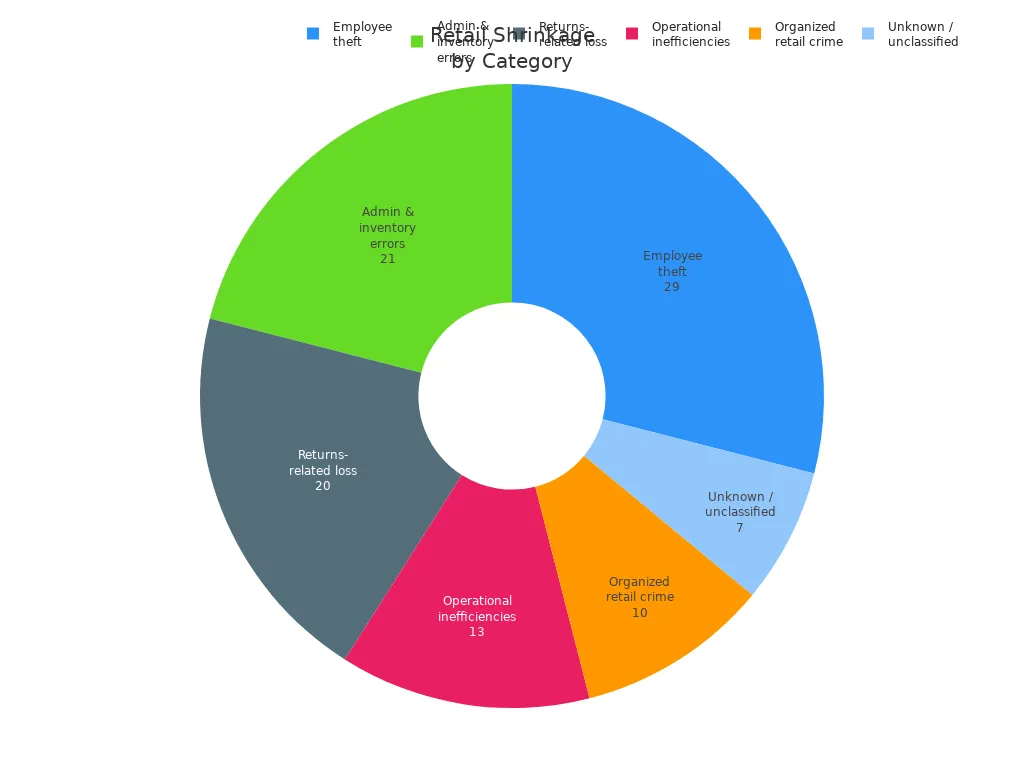
It is hard to stop shrinkage in stores. Shrinkage can happen in many ways. Employee theft is a big issue. This means workers might trick the point-of-sale system or give refunds they should not. Sometimes, workers work together to steal. Mistakes with inventory and paperwork also cause losses. These mistakes happen when workers pick the wrong items or barcodes do not match. Damaged goods may not get handled right. Stores can lose money if things spoil or get broken. Coupons and prices can be used in the wrong way too. Groups of people sometimes steal from many stores and sell the items online. Some customers take advantage of return rules. They might return used items or use fake receipts. Some losses are hard to explain and need more checking.
Annual Loss | Share of Total | Key Characteristics | |
|---|---|---|---|
Employee theft (internal shrink) | $26 billion | 29% | POS manipulation, unauthorized refunds, void transactions, collusion schemes |
Administrative and inventory errors | $19 billion | 21% | Mispicks, receiving errors, barcode mismatches, unprocessed damage write-offs |
Operational inefficiencies | $12 billion | 13% | Spoilage, damaged merchandise, coupon abuse, price manipulation |
Organized retail crime (ORC) | $9 billion | 10% | Coordinated, multi-location theft with resale through online marketplaces |
Returns-related loss | ~$18 billion | 20% | Wardrobing, bracketing, receipt fraud, cross-channel abuse |
Unknown / unclassified | ~$6 billion | 7% | Losses requiring deeper forensic analysis |
Financial Impact
Shrinkage hurts your store’s profits and how it runs. Stores lose a lot of money each year because of shrinkage. In the United States, stores lose about $112.1 billion every year. This happens because of theft, vendor fraud, and mistakes.
The yearly loss from shrinkage in the United States is about $112.1 billion.
This number includes losses from theft, vendor fraud, and mistakes.
Shrinkage makes it harder to manage money. Stores must buy more products to replace what is lost. If inventory records are wrong, orders can fail. Stores pay more for extra stock because they do not know what is missing. Customers get upset when things are out of stock. They might not come back to shop again.
Impact Area | Description |
|---|---|
Cash flow | Losses are absorbed while funding replacement inventory through additional purchasing cycles. |
Fulfillment accuracy | Phantom inventory leads to failed orders and potential marketplace penalties. |
Safety stock costs | Inaccurate records force buyers to inflate orders, increasing carrying costs by 20–30%. |
Customer experience | Out-of-stock situations due to inaccurate records diminish customer loyalty and repeat purchases. |
You can stop shrinkage if you know where it comes from. Learning about shrinkage helps you pick the best ways to protect your store.
Why Loss Prevention Matters
Industry Trends
Every year, stores face new problems. People who steal find new ways to do it. Stores must change how they protect things. Here are some trends you see now:
Many stores design their layouts to protect products. This helps stop organized retail crime before it happens.
Return fraud is getting worse. About 15% of returns are not honest. Some people use fake receipts or return used things.
More stores use biometrics and facial recognition. These tools help catch repeat offenders and keep stores safe.
Smash-and-grab crimes worry 40% of stores. Thieves break in fast and take expensive things.
Organized retail crime burglaries worry 38% of store owners. These crimes often have groups working together.
Online fraud is getting smarter. Criminals use fake names and even AI to trick stores.
Note: You must stay alert and update your loss prevention plan often. Criminals use old tricks and new ones too.
Risks of Poor Prevention
If you do not focus on loss prevention, your store faces many risks. The biggest dangers are shown in this table:
Risk Type | Description |
|---|---|
External Theft | Theft from outside, often by shoplifters. |
Organized Retail Crime | Groups steal from many stores, making it hard to stop them. |
Internal Theft | Employees may steal, and it is hard to catch without good systems. |
Administrative Errors | Mistakes in inventory or money records can cost you a lot. |
Inventory Mismanagement | Poor tracking leads to lost products and lost money. |
Shoplifters and criminals look for weak spots in stores. If you do nothing, you lose money and trust. You need strong tools and smart plans to stop shrinkage and protect your business.
Traditional Methods vs. Computer Vision
Common Loss Prevention Tools
Stores use many tools to stop theft and mistakes. These tools help you watch products and people. Here is a table showing the most used loss prevention tools:
Tool Type | Description |
|---|---|
CCTV | CCTV lets you watch the store all the time. It helps keep things safe and stops stealing. |
RFID | RFID uses radio waves to track products. This helps you manage inventory and stop theft. |
POS Monitoring | POS Monitoring checks sales for strange actions. It helps find problems and lowers losses. |
Access Control Systems | Access Control Systems control who enters special areas. This stops people from getting in and stealing. |
You use these tools to find problems and keep your store safe.
Limitations of Traditional Approaches
Old methods have problems. People must notice issues, but they make mistakes. Most accidents and missed thefts happen because of human error. Data silos make sharing information hard between systems. You may not see everything when you try to stop shrinkage. Sometimes, you do not have enough trained workers to watch all areas. This makes it slower to fix problems.
Limitation | Description | Evidence |
|---|---|---|
Human Error | Depending on people can cause mistakes and missed dangers. | |
Data Silos | Not sharing data makes it hard to check risks. | Data silos make response time 40% slower. |
Resource Limitations | Not enough trained workers makes it harder to find dangers and manage risks. | There is a 25% shortage of safety workers in all industries, says the Bureau of Labor Statistics. |
Note: You can miss theft or mistakes if you only use old tools.
Computer Vision Advantages
Computer vision changes how you protect your store. Smart cameras and software help you spot problems right away. This technology finds things like label swapping that old tools miss. You get alerts and information fast, so you can stop shrinkage sooner. Computer vision also helps you manage inventory and serve customers better.
Here are some important features of computer vision systems:
Real-Time Visual Verification: You check if scanned items match what goes in bags. This helps you catch items that are not scanned or are in the wrong place.
Behavior Analysis: You see strange actions, like staying in risky spots or handling expensive items oddly.
Employee Monitoring: You watch what workers do to make sure they follow rules and to spot possible theft.
You get better accuracy and faster response with computer vision. You can stop shrinkage better than with old tools.
How Computer Vision Prevents Shrinkage
Real-Time Detection
Computer vision helps you spot theft and mistakes fast. AI cameras and smart carts watch people in the store. They track what shoppers and workers do. You see problems right away. JJ Liquors in Washington, D.C. uses an AI system. The system checks how customers act and sends alerts to the owner. The owner can stop theft before it happens. This keeps your store safe and stops shrinkage.
Computer vision makes regular cameras smarter. You get feedback right away and can act quickly. Real-time monitoring means you do not wait to check old footage. You see things as they happen, so you catch problems sooner.
Tip: Real-time detection lets you act fast. You can stop theft and mistakes before they cause loss.
Automated Alerts
Computer vision sends alerts to your staff automatically. These alerts help you find problems and stop shrinkage. The system watches shoppers and spots patterns. You get alerts for bad actions like fake purchases or stealing.
Here are some alerts you might get:
Customers hiding items.
Known shoplifters entering the store.
Carts leaving without paying.
You use these alerts to help your team. Staff know where to look and what to do. Automated alerts make your store safer and your team stronger.
Note: Automated alerts keep your staff ready. You do not miss important events.
Reducing Errors
Computer vision helps you make fewer mistakes in your store. The technology watches customers closely and spots strange actions. It checks if security rules are followed. You do not depend only on people, who can make errors.
You get these benefits:
Good at finding odd actions.
Makes sure security rules are used.
Computer vision uses cameras and sensors to show what happens in your store. The system tracks shoppers and what they touch. This lowers human mistakes and helps you stop shrinkage. Machine learning makes the system smarter over time, so your store stays safe.
Callout: You can stop shrinkage by using computer vision to catch mistakes and theft early.
Smart Solutions to Prevent Shrinkage
AI-Powered Cameras
You can use AI-powered cameras to watch your store. These cameras do more than just record video. They study how shoppers act and look for strange actions. For example, ECAM uses AI to spot hiding items and scanning tricks right away. You get alerts fast, so your team can help quickly. Walmart uses AI cameras to check inventory and saw 30% fewer empty shelves. Kroger put smart shelves and AI cameras at self-checkout. This led to over 70% less cheating at self-checkout. Decathlon made their store layout and staffing better with AI cameras. This helped them sell more and made lines shorter.
AI cameras tell the difference between normal shopping and stealing.
They watch body language and odd moves.
You can connect these cameras to inventory systems to find mistakes.
Tip: AI-powered cameras help you stop shrinkage by catching theft and errors before they get worse.
Smart Carts
Smart carts use computer vision to see what shoppers put in their carts. You can watch the checkout area and see if items are left in carts without being scanned. These carts catch tricks where someone scans one thing but hides others. Retail crime costs stores a lot of money every year. Smart carts let you watch what happens in the store right away and spot strange actions. You can act before you lose money.
Smart Cart Feature | Benefit |
|---|---|
Cart tracking | Stops unscanned item theft |
Shopper behavior analysis | Finds multiple item scams |
Real-time monitoring | Allows quick response to theft |
Inventory Management
Computer vision makes inventory management more correct. You can use it to check stock levels all the time. Cameras and sensors find items that are running low and help you restock fast. New computer vision tools are right 96% of the time, which is better than counting by hand. You get quick updates for managing stock and make fewer mistakes. This keeps shelves full and customers happy.
Callout: You can stop shrinkage by using computer vision to watch inventory and find problems early.
Implementation Considerations
Cost and ROI
You should think about your budget before using computer vision. The price changes based on how big your store is and what you want to do. Here is a table that shows what a mid-sized store might pay:
Cost Component | Range |
|---|---|
Hardware Investment | $25,000 - $100,000 |
Software Licensing | $20,000 - $75,000 |
Monthly Subscription | $1,500 - $5,000 |
$15,000 - $100,000 | |
$50,000 - $200,000+ |
Most stores get their money back in about 11 to 18 months. You save money fast because computer vision stops shrinkage right away.
Tip: Try a small test first to see how much you save before using it everywhere.
Integration
You have to link computer vision to your store’s systems. This can be tough if your tech is old. Here are some problems you might face:
Challenge Type | Description |
|---|---|
Product Recognition Accuracy | The system might mix up products and need more training. |
Environmental Variables | Bad light or blocked cameras can make it less accurate. |
Old systems may need extra work and money to connect. | |
Scalability Issues | More stores and products make setup harder. |
Cost of Implementation | High prices can make it slower to use. |
Real-time Monitoring Limitations | You need strong networks and computers for fast alerts. |
Some workers may not like new changes or need to learn new skills. Training helps your team use the new tools better.
Scalability
If you have lots of stores, you need to plan how to grow your system. Each store is different, so you may need to change things for each one. You should plan for more time and money to set up the system in every store. Small or old stores might not have what you need for advanced systems.
Note: Privacy is important. You must keep customer data safe by following privacy rules, blurring faces, and storing data on local devices when you can.
You can stop shrinkage in all your stores if you plan for costs, training, and privacy from the start.
Getting Started with Computer Vision
Assess Store Needs
Before using computer vision, look at your store closely. Find out where losses happen most often. Walk around and watch how shoppers and workers move. Write down which spots have the most theft or mistakes. Count your cameras and check if they cover all areas. Ask your team about problems they see. Make a list of your store’s goals, like stopping theft or making inventory better. Check your current technology. See if your systems can connect with new computer vision tools. This step helps you pick the best way to prevent shrinkage.
Tip: Ask your staff for feedback. They notice problems every day and can help you find weak spots.
Choose Technology Partner
Pick a technology partner that fits your needs. Look for companies with lots of experience and ready-to-use tools. Check their APIs and see if they work for your store. Make sure they know your industry well. See if they protect your data and follow privacy rules. Ask if they can build custom solutions for your store. Trust is important, so choose a partner who shows skill and honesty.
Criteria | Description |
|---|---|
Look at the provider's APIs to see if they meet your needs quickly. | |
Reviewing Domain Expertise | Check if the provider has experience in your industry. |
Ensuring Robust Data Privacy | Make sure the provider keeps your data safe and follows rules. |
Assessing Custom Development | Find out if the provider can make solutions just for your store. |
Building Confidence in Partnership | Build trust by checking the provider's skills and experience. |
Measure Success
Track how well computer vision works in your store. Set clear goals, like lowering theft or finding mistakes faster. Use numbers to see how things improve. Stores often see a 20–40% drop in shrinkage after using computer vision. Targeted theft can go down by up to 60%. Process errors may drop by 70%. Vendor compliance gets better by 50%. Use these numbers to check your results.
Metric | Improvement Percentage |
|---|---|
Overall Shrinkage Reduction | 20-40% decrease |
Targeted Theft Reduction | 30-60% decrease |
Process Error Identification | 40-70% reduction |
Vendor Compliance | 25-50% improvement |
Callout: Keep checking your numbers. You can change your system and make your store safer.
When you use computer vision, your store gets long-term value. Experts say it helps you stop shrinkage before it happens. You also give customers a better shopping experience. You get real-time information about what happens in your store. Security gets stronger, and you can prevent problems instead of just reacting. First, check your store’s systems. Then, try a small test and work with people who know about computer vision. Stores that use computer vision see shrinkage drop by 20-40%. Electronics and clothing stores make more money when they use it.
Benefit | Impact |
|---|---|
Shrinkage Reduction | |
Targeted Theft Reduction | 30-60% decrease |
Process Error Reduction | 40-70% reduction |
Check out solutions like Trigo Retail to learn more and find helpful tools.
FAQ
What is computer vision in retail?
Computer vision uses cameras and AI to watch your store. The system finds theft, mistakes, and inventory problems. You get real-time alerts and better control over your store.
How does computer vision help reduce shrinkage?
You use computer vision to spot theft and errors as they happen. The system sends alerts to your team. You can act fast and stop losses before they grow.
Is computer vision hard to set up in my store?
Most providers help you install and connect the system. You may need to train your staff. Many stores start with a small test before using it everywhere.
Will computer vision protect customer privacy?
Yes, you can set up privacy rules. Many systems blur faces or store data locally. You control what gets recorded and who can see it.
How soon will I see results after using computer vision?
You often see less shrinkage within a few months. Many stores report a 20–40% drop in losses after starting computer vision.
See Also
Transforming Retail: The Impact of Smart Vending Machines
Understanding AI-Driven Convenience Stores: Essential Insights for Retailers
Analyzing Walgreens Self-Checkout: Benefits and Hurdles in Retail
Revolutionizing Online Retail: The Role of AI Tools
Enhancing Office Efficiency with Intelligent Vending Solutions
