A Step-by-Step Guide to Preventing Shrinkage Using Computer Vision

You can use computer vision to prevent shrinkage in stores effectively. Shrinkage refers to losing products due to theft or mistakes in counting items. The primary causes of shrinkage are stealing and errors in inventory management. Take a look at the breakdown below:
Cause of Shrinkage | Percentage |
|---|---|
External Theft | |
Administrative Errors | 21% |
Smart tools and machines can help prevent shrinkage by monitoring products and identifying issues quickly. Some stores have successfully reduced shrinkage by up to 56%, saving as much as $128,000 annually. By leveraging these tools, you can prevent shrinkage, keep your store secure, and boost profitability.
Key Takeaways
Computer vision can help lower shrinkage by spotting theft and mistakes fast.
Using smart tools and machines helps watch products and makes inventory more correct. This can help stores make more money.
Teaching workers how to use new systems and alerts is very important to stop shrinkage.
Check important numbers often to see if computer vision works well. Make changes if needed.
The Total Retail Loss framework helps find the main reasons for shrinkage. It helps teams focus on fixing these problems.
How Computer Vision Helps Prevent Shrinkage
Detecting Theft and Inventory Errors
Computer vision helps you find theft and mistakes fast. AI systems watch checkout areas and track shoppers in your store. These systems look for loss, like items left in carts or people scanning one item but taking more. They compare scanned barcodes with what cameras see, so you catch mistakes right away.
AI checks video feeds and POS data to spot suspicious actions.
Predictive analytics help you see patterns of loss, like employee fraud or inventory errors.
Shelf monitoring alerts you when stock is low, so you fix problems before they get worse.
You can see how computer vision is different from old methods in the table below:
Metric | Traditional CCTV | Computer Vision with AI |
|---|---|---|
Theft Prevention | Reactive (post-incident review) | Proactive (real-time detection) |
Monitoring Capability | Limited by human capacity | AI monitors all feeds at once |
N/A | Up to 50% reduction | |
Detection Basis | N/A | Behavioral patterns (e.g., concealment gestures, unusual movement) |
Bias Risk | N/A | Low (focus on behavior, not appearance) |
With computer vision, you stop losses before they happen. This helps you prevent shrinkage and protect your profits.
Real-Time Alerts and Visual Validation
Computer vision systems send alerts right away when they see theft or errors. These alerts help you act fast and stop losses as they happen. The system can tell if someone leaves an item in their cart or tries to trick checkout. You get reports about shrinkage instantly, which helps you make better choices.
Tip: Real-time alerts cut down false alarms by using visual validation. The system checks itself before alerting staff, so you only get notified when it matters.
If the system is unsure, it sends the event to your staff. Your team decides if the alert is a real risk or just normal shopping. This lowers false positives and helps the AI learn from new situations. Over time, your system gets better at spotting real threats and ignoring harmless actions.
Operational Stage | Visual Validation Method | Impact on False Positives |
|---|---|---|
Verification | Review by trained staff | Reduces false positives and improves AI accuracy |
Real-time Monitoring | Flags low-confidence events | Prevents false positives by sending them for human review |
Turning Cameras into Active Prevention Tools
You can make your store’s cameras active tools that prevent shrinkage. Before, cameras only recorded video for later. Now, computer vision lets you respond right away. The system sends alerts as soon as it sees theft or mistakes, so you can act fast.
Retailers use solutions like Kognition AI to upgrade their cameras. This technology helps you spot threats as they happen, not after. You can use these tools in many stores, making it easier to prevent shrinkage everywhere.
Note: Using computer vision gives your team power to stop losses before they hurt your business. This proactive way leads to fewer thefts, better inventory control, and higher profits.
By making your cameras smart, you move from watching to acting. You prevent shrinkage, keep your store safe, and improve your bottom line.
Understanding Shrinkage in Retail
Causes: Theft vs. Inventory Management Errors
Stopping shrinkage in stores is hard. Theft and mistakes cause most losses. Shoplifting and organized crime are big problems. Employees sometimes steal too. Staff can make mistakes when counting items or entering data. Vendor fraud and unknown losses also happen.
Here is a breakdown of the main causes:
Cause | Percentage of Total Shrinkage |
|---|---|
External Theft (Shoplifting) | 36% |
Employee Theft (Internal Fraud) | 29% |
Administrative Errors | 21% |
Vendor Fraud | 5% |
Unknown/Other Losses | 9% |
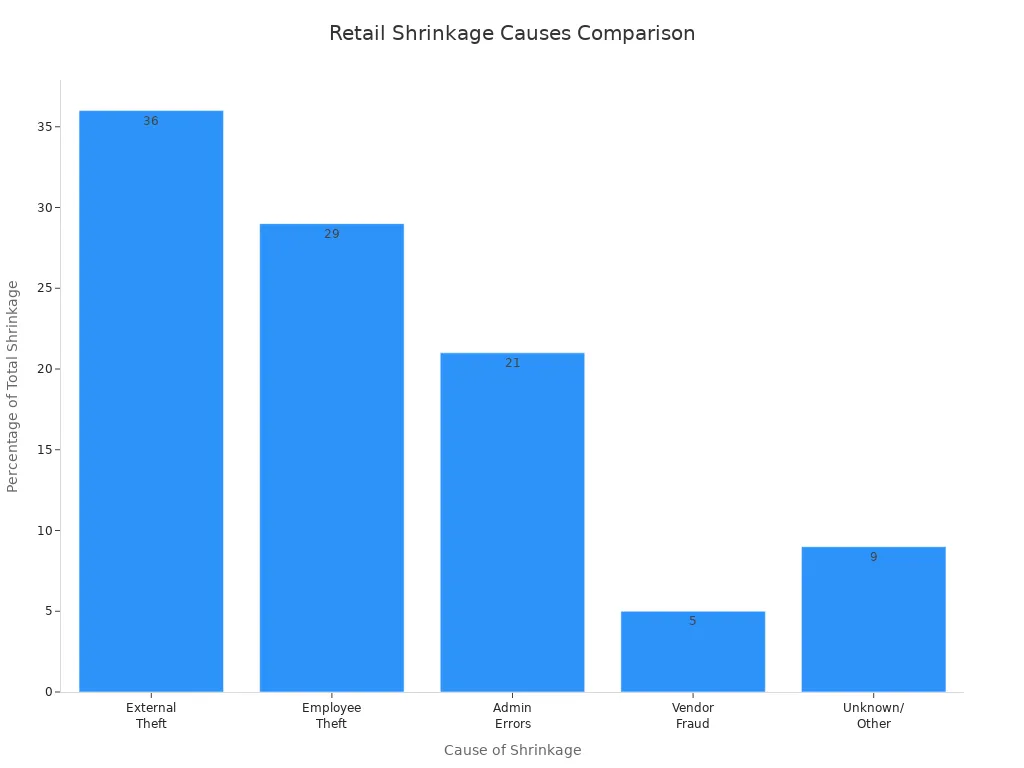
You need to know why shrinkage happens. This helps you focus your efforts. When you know the causes, you can use technology and training to fix them.
Impact on Profitability and Operations
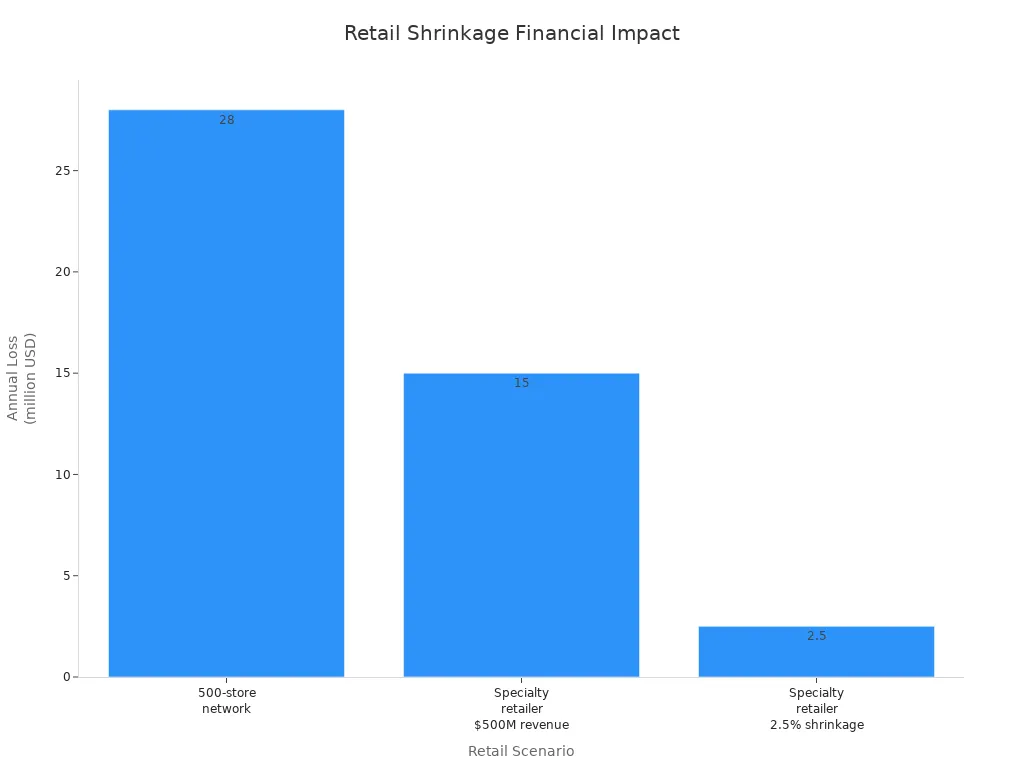
Shrinkage hurts your profits and daily work. Lost products mean less money for your store. Even a small shrink rate can cost a lot. For example, a network with 500 stores and $2 billion inventory loses $28 million with a 1.4% shrink rate. Specialty stores can lose up to $15 million each year.
Scenario | Shrink Rate | Annual Loss |
|---|---|---|
500-store network with $2 billion inventory | 1.4% | $28 million |
Specialty retailer with $500 million revenue | 3.0% | $15 million |
Specialty retailer with 2.5% shrinkage | 2.5% | $2.5 million recovery |
Shrinkage makes your job harder. You spend more money on audits and security. You need to restock more often. Staff must focus on stopping losses instead of helping customers. Bad inventory data leads to wrong orders and empty shelves. Lost money means you cannot grow or try new ideas.
Note: Fixing shrinkage helps your store work better and keeps your profits safe. You build a stronger base for growth and new plans.
Implementing Computer Vision Solutions
Identifying Store Risks and Needs
You need to start by understanding your store’s unique risks before you use computer vision. Every store is different. Some stores lose products from theft. Others have problems with inventory mistakes. You can use tools like the Shrink metric to measure the difference between what you should have and what you actually have. The Total Retail Loss (TRL) framework gives you a bigger picture by showing all types of losses, not just theft.
To get ready, follow these steps:
Check your current setup. Look at your cameras, computers, internet, and how you handle data.
Find any gaps that could stop you from running a pilot program.
Run a pilot in a few stores. Pick stores that show your main challenges. Set clear goals and compare different solutions.
Build a strong base. Invest in tools to manage experiments, data, and models. This helps you grow later.
Make a plan to expand. Set up rules for changes, privacy checks, and training. Plan how you will roll out the system to more stores.
You should also look at risks like stock theft, wrong inventory records, and poor stock handling. Use regular audits and good tracking systems to keep your store safe.
Tip: Use the Total Retail Loss Framework to spot where you lose the most and make a plan to fix it.
Deploying Smart Carts and Automation
Smart carts and automation help you prevent shrinkage by tracking every product as shoppers move through your store. These carts use cameras and sensors to watch what goes in and out. For example, Shopic’s smart cart has two cameras that check every item. This makes sure you only lose less and keep better records.
Automation does more than just track products. It connects your checkout, customer, and supply chain data. This creates a feedback loop that helps you spot problems fast. Frictionless checkout systems also track items as soon as shoppers take them from shelves. They help you see which products are at risk and adjust your store layout.
Here are some ways smart carts and automation help:
Reduce manual work and improve how fast you fill shelves.
Give you heat maps and patterns to spot where you lose the most.
Track every item in real time to stop theft and mistakes.
Suggest related products to shoppers, which can increase sales.
Benefit | Description |
|---|---|
Smart carts show real-time totals and loyalty offers, making shopping easier. | |
Increased Average Order Value | Smart carts suggest related products, raising sales by 1-2%. |
Better Store Operations | Automated checkout lets you move staff to other jobs, cutting labor costs by up to 65%. |
Loss Prevention | Smart carts check every purchase, improving inventory accuracy and reducing shrinkage. |
Note: Automation and smart carts help you prevent shrinkage and make shopping better for your customers.
Integrating with Existing Systems
You need to connect your new computer vision tools with your current systems. This includes your point of sale (POS), inventory, and customer management tools. Use software that works with your store’s cameras to collect data on shopping habits, pricing, and stock.
Best practices for integration include:
Use computer vision to track and analyze your store data.
Combine camera data with POS and inventory systems for a full view.
Adjust your AI tools to fit your store’s needs, like lighting and camera spots.
Start with small pilot projects to test how well everything works together.
Sometimes, you may face problems connecting new tools to old systems. You can solve this by working with experts, using open APIs, and starting small. Cloud-based solutions can also help lower costs.
Callout: Always protect customer data. Use strong privacy rules and follow laws to keep trust.
Staff Training and Alert Setup
Your staff plays a big role in making computer vision work. Train your team so they know how to use new tools and understand the alerts. Good training helps your staff spot real problems and act fast.
Set up alerts that tell your team when the system finds a risk. Make sure the alerts are clear and easy to understand. Let your staff review alerts that are not certain, so they can teach the system what is normal and what is not.
Hold training sessions to show how the system works.
Explain the benefits, like less shrinkage and easier work.
Involve staff in setting up alerts and reviewing cases.
Keep training up to date as the system learns and changes.
Tip: When your staff understands the system, you prevent shrinkage and improve store operations.
Monitor and Optimize Results

Tracking Metrics and ROI
You need to watch the right numbers to see if your computer vision system works well. These numbers help you know if you are getting your money’s worth. They also show where you can do better. Here are some things you should check:
Fewer mistakes in counting items
Faster action when there is a problem
Less shrinkage in your store
Fewer hours spent checking by hand
You can use a table to keep track of these important numbers:
Key Performance Metric | Description |
|---|---|
Shrinkage reduction percentage | Shows how much less you lose from theft or mistakes. |
False positive rate reduction | Counts how many wrong alerts the system stops making. |
Response time improvement | Tells how much faster you spot and fix problems. |
Investigation efficiency increase | Shows how much better you get at solving cases. |
Watching these numbers helps you see what is working and what needs fixing.
Continuous Improvement
You should always try to make your system better. Computer vision can study how people move in your store. This helps you put enough workers at busy spots before lines get long.
By always checking how crowded your store is, computer vision can warn you before lines get too long for customers.
AI systems send quick alerts when they see something odd. Your team can act fast to stop stealing or fix safety problems. Computer vision also watches where shoppers spend time. You can use this to move products or change your store to sell more.
Computer vision also helps you catch missed scans at checkout. This means honest shoppers get through faster. It also stops shrinkage from missed items.
Success Stories
Many stores have seen great results with computer vision. Here are some real examples:
Grocery stores using computer vision to find fraud have cut shrinkage by up to 60%.
Vision AI can watch every sale and aisle to find missed scans and hidden items.
Stores say they fix problems faster because of computer vision.
Some stores use AI cameras to spot people acting strange near expensive things. Others use AI to check if the weight at self-checkout is wrong. Automatic checks and data help you find patterns that cause shrinkage. All these tools work together to stop shrinkage and keep your profits safe.
You can stop shrinkage by taking a few simple steps. First, check if your store is ready for AI. Next, focus on important things like shelf monitoring. Build models and train them well. Connect these models to your store’s systems. Keep checking how they work. Automation and real-time monitoring help you watch your store all the time. They send fast alerts when something happens. Look at your store’s tech and upgrade it if needed. This plan helps you keep your profits safe and makes your store run better.
Benefit | Description |
|---|---|
Continuous Monitoring | Always watching for better security. |
Immediate Identification | Finds and reacts to threats quickly. |
Improved Data Analysis | Gives you better ideas to stop losses. |
Tip: Tell your team about new systems and keep training fresh.
FAQ
What is computer vision in retail?
Computer vision uses cameras and AI to watch your store. It tracks products, shoppers, and actions. You get real-time alerts about theft or errors.
You can use computer vision to spot problems before they hurt your profits.
How does computer vision reduce shrinkage?
Computer vision finds theft and mistakes fast. It sends alerts when it sees risks. You can act right away to stop losses.
You save money.
You keep better records.
You protect your store.
Is computer vision hard to set up?
You can start with your current cameras and systems. Many solutions work with what you have. Experts help you connect everything and train your staff.
Step | What You Do |
|---|---|
Assess | Check your setup |
Integrate | Connect new tools |
Train | Teach your team |
Will computer vision protect customer privacy?
You can set rules to keep data safe. Most systems focus on actions, not faces. You follow privacy laws and use strong security.
Tip: Always tell your customers about new technology in your store.
See Also
Boosting Efficiency And Customer Experience With Cloudpick Checkout
Navigating Convenience And Challenges Of Walgreens Self-Checkout
A Journey Through The Development Of Self-Checkout Systems
Easy Tips For Hassle-Free Garlic Purchases At Self-Checkout
The Influence Of Cloudpick Vending Machines On Healthy Snacking
