Reducing labor dependency in Convenience store chains & small-format grocery with AI-powered stores

AI-powered stores give you a real way to tackle reducing labor dependency in convenience store chains and small-format grocery.
Labor costs make up about 14% of total sales for these stores.
Rising wages and fewer available workers push you to look for new solutions.
"We had huge labor shortages, and we didn't have people to do the jobs... That’s when technology stepped up. We said, ‘Well, how can we start to take these tasks and shift some of them to customers or to automation?’"
You see automation helping you handle daily tasks faster and making your operations run better. AI tools also help you keep your store safe and prevent losses. If you want to stay competitive, you need to use smart technology that improves efficiency and boosts profits.
Key Takeaways
AI-powered stores can significantly reduce labor costs by automating tasks like scheduling and inventory management.
Implementing automated labor management systems can cut staffing needs by up to 50%, leading to substantial cost savings.
AI-driven workflow optimization enhances efficiency, allowing stores to allocate staff based on customer traffic and improve service levels.
Investing in AI technologies like self-service checkouts and smart inventory systems can enhance customer experience and reduce wait times.
Regularly measure key performance indicators (KPIs) to track the success of AI tools and ensure they meet your business goals.
Reducing Labor Dependency with AI
You face many challenges when you try to run a convenience store or a small-format grocery. AI-powered solutions help you tackle these problems by making your store more efficient and less dependent on manual labor. You can use smart technology to automate tasks, improve workflows, and create a leaner business model.
Automated Labor Management
You can use automated labor management systems to cut down on staffing needs and lower costs. These systems handle tasks like scheduling, compliance, and candidate tracking. You see real results when you use these tools. For example, companies that use Xenqu’s automated workflows have reduced candidate falloff and boosted efficiency. Rocky Mountain ATV used the OPEX® Sure Sort® system and saw a 45% drop in manual labor needs. Delta Galil reduced labor requirements from 12 to 6 employees per shift with automated sorting technology.
Here is a table showing how different companies benefit from automated labor management:
Company | Description | |
|---|---|---|
Quality Labor Management | 50% | Implemented Xenqu’s automated workflows, reducing candidate falloff and boosting efficiency. |
Rocky Mountain ATV | 45% | Implemented OPEX® Sure Sort® system, reducing manual labor needs significantly. |
Delta Galil | 50% | Automated sorting technology reduced labor requirements from 12 to 6 employees per shift. |
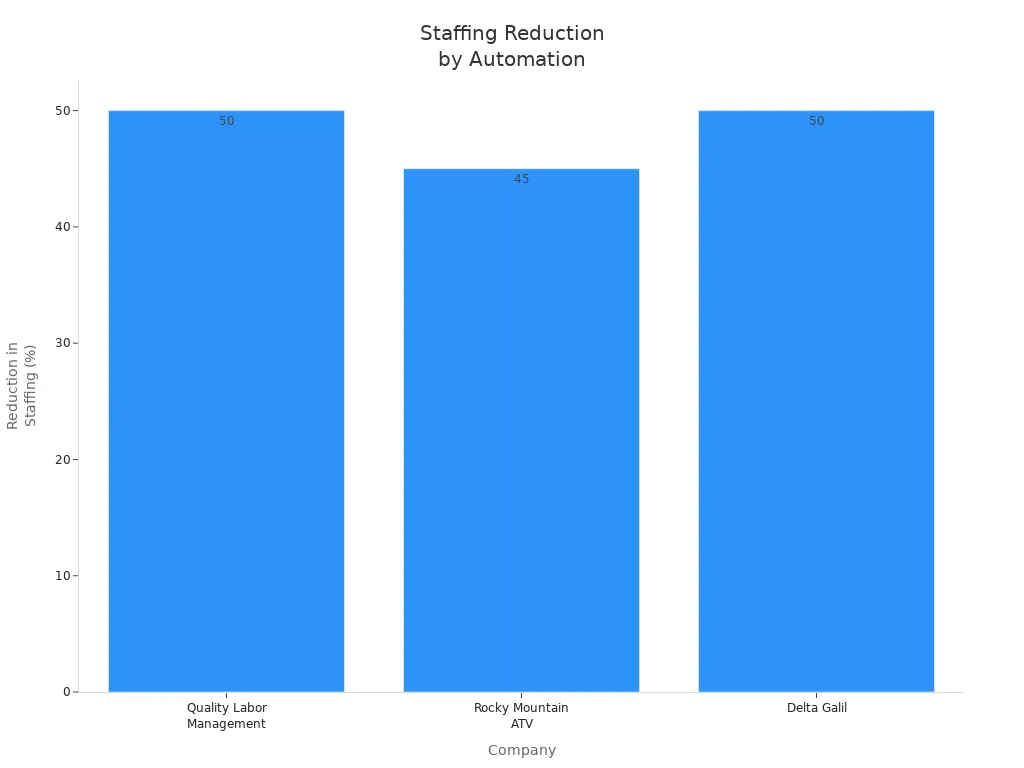
You can see that automated labor management helps you save money and run your store with fewer staff. This is a key step in reducing labor dependency.
AI-Driven Workflow Optimization
AI-driven workflow optimization tools help you make your store run smoother. You can use these tools to manage inventory, schedule staff, and track important tasks. Enhanced inventory management leads to better stock availability and less time spent on restocking. Optimized staff scheduling lets you allocate workers based on predicted customer traffic, so you always have the right number of people on hand. Improved operational visibility helps you make smart decisions and prioritize critical tasks.
Here is a table that shows how AI-driven workflow optimization impacts labor efficiency:
Evidence Description | Impact on Labor Efficiency |
|---|---|
Enhanced inventory management | Leads to better stock availability and reduces labor time spent on restocking. |
Optimized staff scheduling | Allows managers to allocate staff based on predicted customer traffic, improving service levels. |
Improved operational visibility | Facilitates informed decision-making, ensuring critical tasks are prioritized effectively. |
You also benefit from technologies like frictionless checkout, in-store automation, and smart shelving. These tools reduce the need for cashiers, minimize manual restocking, and make inventory management easier. AI-based video analytics can cut shrinkage by up to 35%. Faster incident response times mean you need fewer staff during slow hours.
Tip: When you use AI to optimize your workflows, you support your existing employees, enhance customer experience, and build a leaner business model.
Reducing labor dependency becomes possible when you combine automated labor management with AI-driven workflow optimization. You can run your store more efficiently, save money, and keep your customers happy.
Labor Challenges in Convenience and Grocery Stores
Rising Costs and Shortages
You face many labor challenges in convenience stores and small-format grocery stores. Rising wages and worker shortages make it hard to keep your business running smoothly. Over the past decade, wages in the convenience store industry have increased by 70%. Some retailers, like Rutters, now pay a minimum starting wage of $18 per hour, while others average around $12 per hour. In 2023, almost half of former convenience store employees said low pay was the main reason they left their jobs. With 23 states planning to raise minimum wages, you will see even higher labor costs. Many retailers respond by raising prices, cutting employee hours, or investing in automation.
You also struggle to find and keep good workers. The convenience store industry has a turnover rate of 118%. Over 70% of grocery retailers say hiring is their biggest challenge. Labor market changes have a significant impact on your business, with 60% of retailers reporting major effects. You must compete for talent, retain employees, and attract new skills. Many executives believe the store associate experience should match the consumer experience, so you need technology to support your staff.
Talent retention (40%)
Attracting emerging and in-demand skills (36%)
Operational Inefficiencies
You deal with many operational inefficiencies that hurt your profits. Managers often report problems like shrink, food waste, high labor costs, pricing errors, and complex inventory management. These issues make it harder to run your store efficiently.
Inefficiency Type | Description |
|---|---|
Shrink | Loss of inventory due to theft, damage, or mistakes, which lowers your profits. |
Food Waste | Unsold food must be thrown away, causing financial losses. |
Labor Costs | High staffing expenses can reduce your overall profitability. |
Pricing Errors | Mistakes in pricing can lead to lost revenue or unhappy customers. |
Complex Inventory Mgmt | Managing stock levels and product availability can be difficult and inefficient. |
In-store inefficiencies account for an average of 5.5% of gross sales losses, up from 4.5% the previous year. If you overcome these problems, you could save up to $162.7 billion across U.S. retailers. Reducing labor dependency helps you address these challenges and improve your store’s performance.
AI Technologies Transforming Retail

Self-Service Checkout
You see self-service checkout systems in more stores today. These systems let customers scan and pay for items themselves. Since the pandemic, self-checkout has become twice as common. You can now have one employee supervise several registers at once. This change helps you use your staff more efficiently and lowers labor costs. You need fewer cashiers at traditional checkout stations, so you can focus your team on other important tasks.
Smart Inventory Systems
Smart inventory systems use AI to track products and manage stock. These systems help you avoid running out of popular items and reduce waste. You get real-time insights into what is on your shelves. AI-powered image recognition checks product placement and availability. The system can even create purchase orders for you, saving time and reducing mistakes. Here is how smart inventory systems help you:
Evidence Type | Description |
|---|---|
Reduced Errors | Automated, data-driven decision-making minimizes the human error common in manual inventory planning. |
Demand Planning Flexibility | AI adapts to seasonality, promotional campaigns, or unexpected events, giving grocers the flexibility to plan with confidence. |
Automated Purchase Orders | AI generates recommended purchase orders based on predicted demand, saving time and reducing stockouts or overorders. |
Smart Replenishment of Perishables | AI forecasts demand for perishables, aligning orders with real-time sales patterns to reduce spoilage and ensure freshness. |
Demand Forecasting Analytics
AI analytics help you predict what customers will buy next. These tools look at past sales, market trends, and customer habits. You can plan better and avoid having too much or too little stock. Retailers using AI have seen a 20% to 50% drop in supply chain errors and a 65% boost in operational efficiency. Better forecasting means you can keep your shelves full and your customers happy.
Automated Order Fulfillment
Automated order fulfillment uses AI to assign tasks and schedule staff. You can cut overstaffing by 5-10%, which saves money. A retailer with $50 million in revenue can save up to $500,000 each year by using AI for labor allocation. These systems also help you reduce wait times and improve customer satisfaction. When you use AI to schedule shifts fairly, you lower turnover and keep your best workers. Automated order fulfillment plays a big role in reducing labor dependency and making your store more efficient.
Benefits of AI Adoption
Cost Savings
You can save money when you use AI in your store. Automated systems help you lower labor costs by reducing the need for extra staff. Smart checkout and inventory tools cut down on mistakes and waste. You spend less on training and overtime. AI also helps you spot theft and shrinkage quickly. Real-time monitoring and behavior analysis let you prevent losses before they happen. You can focus your staff on high-risk areas and use cloud-based systems to watch multiple stores at once. These changes help you keep more of your profits.
AI systems enable real-time monitoring and behavior analysis, helping you detect and prevent shrinkage.
You can identify suspicious behaviors like loitering and send alerts to security teams for quick action.
AI focuses on high-risk areas, optimizing staff allocation to prevent theft.
Surveillance monitors both customer and employee areas to spot internal theft.
Real-time shelf monitoring alerts staff to potential theft or restocking needs.
AI analyzes customer actions at return counters to catch suspicious behavior.
You can manage customer flow by alerting staff when areas get crowded, reducing theft chances.
AI monitors checkout processes to find scanning errors or unauthorized discounts.
Analytics give insights into customer movement, helping you design safer store layouts.
Cloud-based systems allow remote monitoring of many locations, improving security response.
AI data supports staff training by showing common shrinkage patterns.
Efficiency Gains
AI helps you run your store more smoothly. You can automate tasks like scheduling, inventory checks, and order fulfillment. These tools let you use your staff where they are needed most. You spend less time on manual work and more time serving customers. Smart systems reduce errors and speed up checkout. You can restock shelves faster and keep products available. AI-driven analytics help you plan for busy times and avoid overstaffing. Your store becomes more productive and less dependent on manual labor.
Enhanced Customer Experience
AI makes shopping easier and more enjoyable for your customers. You can offer personalized recommendations based on their purchase history. Voice recognition lets customers order groceries with simple commands. AI-driven promotions give discounts that match buying habits, making shoppers feel valued. Smart checkout systems, like Amazon Go, let customers pick items and leave without scanning. Smart billing systems detect items in carts and charge customers automatically, reducing wait times.
Feature | Description |
|---|---|
Grocery apps analyze purchase history to suggest relevant products. | |
Voice Recognition Shopping | Customers can order groceries using voice commands, enhancing convenience. |
AI-Driven Promotions | Offers personalized discounts based on buying behavior, improving customer satisfaction. |
Smart Checkout Systems | AI-powered systems like Amazon Go allow customers to pick items and leave without scanning. |
Smart Billing Systems | Automatically detects items in carts and charges customers, reducing wait times. |
Tip: When you use AI, you create a safer, faster, and more personalized shopping experience for your customers.
Implementation Challenges
Upfront Investment
You need to plan for the costs of bringing AI into your store. Small chatbot solutions may start at a few hundred dollars each month. Comprehensive AI systems often require tens of thousands of dollars. Custom AI solutions can range from $50,000 to $500,000 or more for development. Maintenance usually adds 15-20% each year. AI implementation services may cost between $50,000 and $250,000 for integration. Monthly usage fees can reach $1,000 to $50,000. The price depends on your store size, the type of AI, and whether you build in-house or use third-party platforms.
Small chatbot solutions: a few hundred dollars per month
Comprehensive AI systems: tens of thousands of dollars
Custom AI solutions: $50,000–$500,000+ for development, plus 15–20% annual maintenance
Implementation services: $50,000–$250,000 for integration, $1,000–$50,000 per month for usage
Tip: Start with a clear budget and compare options before you invest.
Staff Training
You must train your team to use AI tools. Training costs can add up quickly. Some employees may not have the skills needed for new systems. Others may worry about losing their jobs. Resistance to change is common. Upskilling programs help your staff learn how to use AI effectively. You need to prioritize employee training to make AI work for your store.
Challenge | Description |
|---|---|
Training Costs | |
Skill Gaps | Staff may lack the skills required to manage and leverage AI. |
Resistance to Change | Adopting AI often faces pushback from employees and stakeholders. |
Workforce Concerns | Employees may fear job displacement due to automation. |
Upskilling Programs | Train employees on how to use AI tools effectively. |
System Integration
You face technical hurdles when you add AI to your current systems. Legacy software often uses different data formats. Data may be spread across many systems, causing gaps and delays. Field names and structures can mismatch, making it hard for AI to read information. Some systems lack APIs, so you need custom solutions. Incomplete or inaccurate data can lead to poor AI predictions. Duplicate records and outdated information also cause problems.
Integration Issue | Description |
|---|---|
Inconsistent Data Formats | Legacy systems use non-standard formats, complicating AI use. |
Fragmented Data Sources | Data spread across systems leads to incomplete datasets. |
Data Latency | Batch processing causes delays and outdated insights. |
Data Schema Mismatches | Differences in field names and structures confuse AI models. |
Integration Complexity | Lack of APIs requires costly custom integration. |
Incomplete Data | Gaps in data can skew AI predictions. |
Inaccurate Data | Errors or old records lead to flawed insights. |
Data Redundancy | Duplicate records distort AI processing. |
Data Inconsistency | Variations in data representation cause confusion. |
Outdated Data | Old data leads to incorrect predictions. |
Data Security
You must protect your store’s data when you use AI. Hackers may target AI systems and steal information. Cyberattacks can disrupt operations and demand ransom. AI can identify people with limited data, raising privacy concerns. Sensitive customer data needs strong safeguards. Some customers may resist new technology because of privacy worries. AI algorithms can also show bias, which may lead to unfair practices and reputational harm. Breaches can cause financial losses and damage your store’s reputation.
Cyberattacks can disrupt operations and demand ransom
AI can identify individuals with limited data, raising privacy concerns
Sensitive customer data needs strong protection
AI algorithms may show bias, leading to unfair practices
Note: Always update your security systems and train staff to spot risks.
Action Steps for Retailers
Assessing Store Readiness
You need to know if your store is ready for AI. Start by looking at four key areas. Each area helps you see where you stand and what you need to improve.
Pillar | Description |
|---|---|
Demand Generation | Check if your products are easy to find. AI can help with search and recommendations. |
Site Performance | Make sure your online store loads fast and works well on phones. This helps turn visitors into buyers. |
Logistics | Use AI to find ways to cut costs and make your supply chain stronger. Predictive analytics can help. |
Customer Experience | Look at how you treat your customers. Personalization with AI can build loyalty and trust. |
Tip: Review these pillars to spot gaps before you invest in AI.
Selecting AI Solutions
When you pick an AI solution, you want one that fits your store’s needs. The right choice will help you grow and keep your data safe.
Technology Scalability: Choose a solution that works for one store or hundreds.
Cost-Effectiveness: Pick tools that save money and work well at scale.
Data Security: Make sure your data stays safe, even in remote locations.
Increase Profits: Use AI to boost your bottom line.
Simplify Operations: Find solutions that make daily tasks easier.
Secure Your Data: Always protect customer and business information.
Note: The AI market is growing fast. Choose tools that can keep up with your business.
Measuring Success
You need to track how well your AI tools work. Use clear numbers to see if you meet your goals. Here are some key performance indicators (KPIs) to watch:
KPI | Description |
|---|---|
Sales per customer | See how much each shopper spends. This helps you grow basket size. |
Customer retention rate | Track how many customers come back. High rates mean strong loyalty. |
Average inventory turnover | Measure how often you sell out and restock. This keeps your inventory healthy. |
Inventory accuracy | Check if your stock counts match what you have. Accurate counts reduce waste and shortages. |
Average checkout speed | Watch how fast customers move through checkout. Faster lines mean happier shoppers. |
Keep an eye on these KPIs to make sure your AI investment pays off. 📈
AI-powered stores help you cut labor needs and boost efficiency. You can see the impact in many ways:
Evidence Description | Impact on Labor Dependency |
|---|---|
Automated checkout systems reduce wait times for customers. | Fewer staff needed at checkout, lowering labor dependency. |
Dynamic pricing strategies use real-time data. | Less manual work for pricing, freeing up your team. |
You gain long-term advantages like better decision-making and higher profits. Experts say AI will help you manage your workforce and create new roles for your staff. As retail automation grows, you should align AI with your goals and keep your data connected. Now is the time to explore AI solutions and secure your place in the future of retail.
FAQ
How does AI help you reduce labor costs in your store?
AI automates tasks like scheduling, inventory checks, and checkout. You need fewer staff for daily operations. This helps you save money and use your team for more important jobs.
Can small stores afford to use AI technology?
You can start with basic AI tools that fit your budget. Many solutions offer monthly plans. Begin small and scale up as you see results. Some AI tools cost less than hiring extra staff.
Will AI replace all your store employees?
AI will not replace everyone. You still need people for customer service and special tasks. AI helps your team work better and focus on what matters most.
Is it hard to train your staff to use AI systems?
Most AI tools have simple interfaces. You can train your team with step-by-step guides or short videos. Upskilling programs help your staff learn quickly and feel confident using new technology.
See Also
Understanding AI-Driven Convenience Stores: Key Insights for Retailers
The Future of Retail: Embracing AI-Enhanced Stores
Comparing Micromarkets and Smart Stores: Global Automation Trends
Launching an AI-Driven Corner Store on a Budget
Modern Retail Advantages of AI-Enhanced Combo Vending Machines
