Step-by-Step Guide to Implementing Cashless Internal Billing


You might ask how cashless internal billing helps your office store. This system lets workers buy snacks, drinks, or supplies without cash. All purchases are tracked on a computer for easy control. Cashless solutions remove problems like looking for coins or going to an ATM. Many offices make up to 30% more money with cashless vending machines. Workers get more choices because you can use live data to change what you sell.
Cashless vending machines can help you earn up to 30% more.
Workers do not need to bring cash or worry about change.
You can make people happier with better choices using data.
Key Takeaways
Cashless internal billing can help office stores earn more money. It can raise revenue by up to 30%. This system lets people buy things fast and easy without cash.
Using cashless payments means you do not need coins or cash. Transactions are quicker and employees spend less time waiting.
Cashless systems help offices track data better. They help manage sales and inventory more accurately.
Training staff on cashless payment systems is very important. Good training lowers mistakes and helps staff feel confident with new technology.
Watching key performance indicators helps make the cashless system better. Regular checks make sure the system works well and meets user needs.
Cashless Internal Billing Overview
What Is Cashless Internal Billing
Cashless internal billing lets you buy things at work without cash. You pay with a card, phone, or badge. The system records your purchase right away. This helps your office keep track of sales. You do not need to carry bills or coins. Cashless payments make shopping at work simple and quick.
Technology connects your purchases to your account. You can see what you bought and how much you spent. Your company can see all transactions as they happen. This method uses a cashless-first model. Your office focuses on digital payments instead of cash. Cashless payment systems help your office avoid mistakes from manual entries. You get more accurate records. Your company can make better choices.
How It Works in Office Retail
In office retail, cashless internal billing is easy to use. You pick what you want from a vending machine or store. You pay by tapping your badge or scanning your phone. The system charges your account and updates records right away. You do not need to handle cash or wait for change.
Cashless payments give your company a clear view of sales. Every transaction is saved digitally. This makes it easy to check records and spot errors. Cashless business models use these records for account reconciliation. Your office can compare digital records with bank statements. This helps make sure everything matches. This step stops mistakes and fraud. Cashless payments also make audits easier. They help your company show financial reports to banks or investors.
Tip: Cashless payments save time for you and your company. You get your items faster. Your office gets better data for planning.
Cashless internal billing brings many good things to office retail. You get quick service. Your company gains accuracy and transparency.
Implementation Steps

Assess Needs and Readiness
First, you look at what your office needs. You check if your system can do cashless payments. You ask if your staff and customers want faster service. You think about costs and safety. You see how cashless internal billing can help your office store. Many businesses have problems when they switch to cashless. The table below shows some of these problems:
Challenge Description | Evidence |
|---|---|
Costs associated with processing transactions | Businesses incur fees for credit and debit card transactions, which can vary significantly. |
Need for enhanced security measures | Retail companies lose about $40 billion in cash to theft annually, necessitating security upgrades. |
Potential loss of revenue from not offering cashless options | A survey indicated that 11.8 million consumers would stop shopping at businesses not offering cashless payments. |
Complexities of integrating new payment systems | Businesses face challenges in integrating new payment systems, which can be operationally costly. |
Operational costs related to cash handling | Cash handling requires manual counting and verification, leading to increased employee hours and potential errors. |
You use this information to see if your office is ready for cashless. You check if your team can use new technology. You see if cashless payments can cut mistakes and save time.
Select a Cashless System
You pick a cashless system that fits your office. Small offices choose simple devices. Big companies buy custom hardware. You compare systems by cost, size, and how they work with other tools. The table below shows how small and big offices use different systems:
Category | Small Businesses | Enterprises |
|---|---|---|
Cost | Prefer simpler, cost-effective devices | Invest in custom-built hardware solutions |
Scalability | Tend to use standalone terminals | Utilize integrated POS systems for higher transaction volumes |
Integration | May lack integration with complex systems | Require custom-built payment gateways and analytics tools |
You look for systems that let you pay with cards, phones, or badges. You check if the system can grow with your office. You make sure it matches your cashless-first plan.
Integrate with Workflows
You connect your cashless system to your office work. You link it to sales and inventory records. Every cashless payment updates your records right away. You use tools like RFID and mobile payments to make things faster. You set up automatic tracking so you do not need to enter things by hand. You test the system to see if it works well.
Tip: Use RFID badges or mobile apps to make cashless payments faster and more secure.
You check if your cashless system helps your office avoid mistakes. You make sure your team can use it easily.
Train Staff and Communicate
You teach your staff how to use cashless payment systems. You show them how to enter sales the right way. You explain how to handle cashless payments and avoid mistakes. You train cashiers to fix cash problems. You set rules to stop errors and fraud. You give steps for giving change and checking big bills, even if you do not use cash much.
Proactive cashier training to address cash handling issues.
Clear cash-handling protocols to reduce discrepancies.
Comprehensive training to minimize human error and deter fraud.
Procedures for entering transactions accurately.
Guidelines for giving correct change.
Methods for verifying high-denomination bills.
You tell your staff why cashless payments are good. You explain how cashless internal billing makes things safer and faster. You answer questions and listen to ideas. You make sure everyone feels good about the new system.
Launch and Monitor
You start your cashless internal billing system. You watch important numbers to see how it works. You track how many sales you have, how long each sale takes, what customers think, and if the system works all the time. The table below shows these key numbers:
KPI | Description |
|---|---|
Transaction Volume | The total number of transactions processed. |
Processing Time | The average time taken to complete a transaction. |
Customer Feedback | Insights gathered from customer surveys regarding the new system. |
System Reliability | The uptime and performance consistency of the billing system. |
You use this data to make your cashless business better. You fix problems fast. You keep your system working well. You ask staff and customers for ideas. You change your cashless payment systems to fit their needs.
Note: Staff training and clear communication help your office adopt cashless internal billing smoothly. Advanced technologies like RFID and mobile payments make your system more efficient.
You follow these steps to build a strong cashless internal billing process. You make your office store faster, safer, and more correct.
Cashless Payment Benefits
Efficiency and Speed
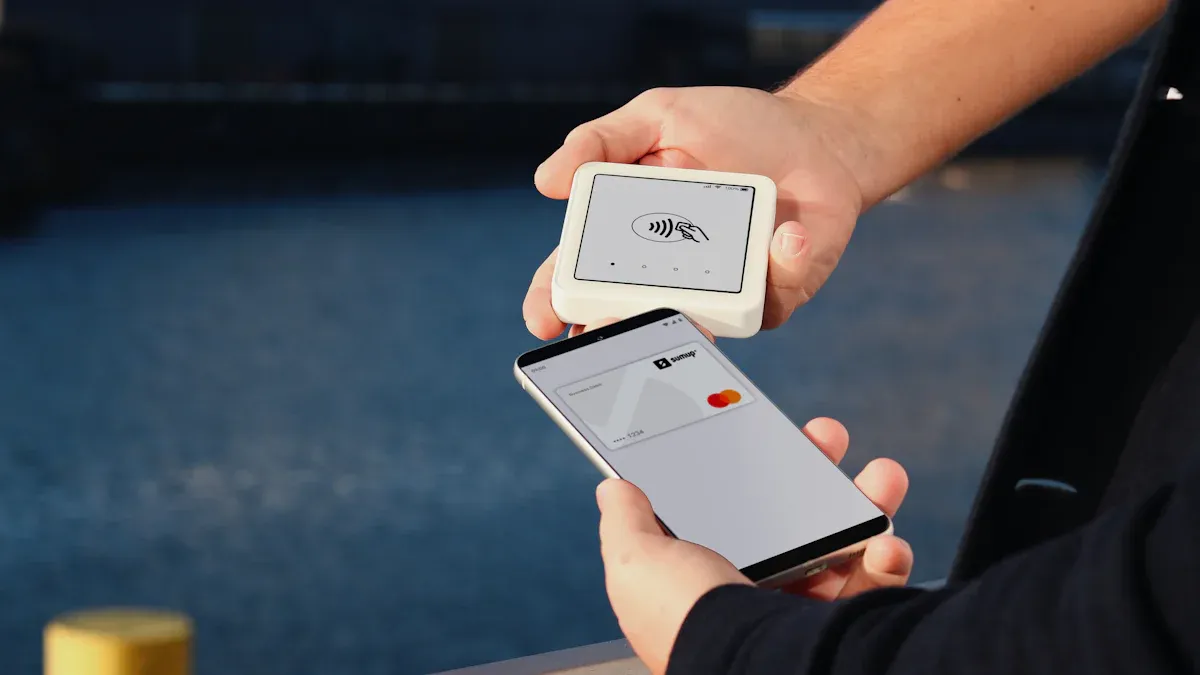
Cashless payments make your office store work faster. You do not need to count money or look for coins. You can tap your card, phone, or badge to pay. This only takes a few seconds. You get back to work quickly. Your coworkers do not have to wait in long lines.
Cashless systems mean you do not handle cash, so service is faster.
These systems do reports and accounting by themselves, so staff do less paperwork.
You can see payments right away, which helps your office manage money better.
Cashless payments lower mistakes in accounting and make daily work easier.
Cashless options make customers happier and help you sell more. Using a cashless-first model helps your office work better.
Security and Reduced Risk
Cashless payment systems keep your office safe from theft and fraud. You do not have to worry about someone stealing cash. Every sale is tracked, so cheating is hard. You also do not have to deal with fake bills.
Benefit | Explanation |
|---|---|
Digital payment systems remove cash, so robbery is less likely. | |
Reduced Internal Theft | Electronic tracking makes it hard for workers to steal from the register. |
Fewer Counterfeit Scams | Cashless payments stop problems with fake money. |
Secure Audit Trails | Digital sales make records that help find fraud and mistakes. |
You also get better data security. NFC devices let you pay without touching anything, so your info stays safe. Biometric checks, like fingerprints, add more safety. AI can find strange activity and stop fraud early. Encryption and tokenization keep your digital payments safe.
Increased Revenue and Engagement
Cashless payments help your office earn more money. Faster service means more people can buy snacks or supplies. You do not lose sales if someone forgets their wallet. Cashless systems make it easy to give rewards or discounts, so employees want to shop more.
A cashless business uses sales data to learn what people like. You can change what you sell to match what your team wants. This keeps everyone happy and helps your office grow.
Tip: Use cashless payments to help sales and make workers happy. Happy workers buy more and stay loyal to your office store.
Challenges & Solutions
Integration Issues
Adding cashless payments to your office store can be tricky. Sometimes, your system does not connect well with new cashless tools. You need a solution that fits your business and keeps things working. Many industries have found ways to fix these problems. Healthcare uses virtual terminals to send safe payment links. Drivers in transportation use mobile platforms to take payments on their phones. Local retailers pick systems that work even if the internet is slow. Government offices use tools for both online and in-person payments. The table below shows how different industries fix integration issues:
Industry | Solution Description |
|---|---|
Healthcare | Fiuu Virtual Terminal lets patients pay safely and quickly, so cash flow stays steady. |
Transportation | Drivers use mobile platforms to take payments fast on their phones. |
Local Retailers and Restaurants | Payment systems work even when internet is slow, so many payment types are supported. |
Government and Municipal Services | Tools handle online and in-person payments, so cash handling and manual checks are not needed. |
You can learn from these examples. Pick a cashless system that fits your needs and works with your current setup. Test your system before you start using it to avoid problems.
Staff Adoption
Getting your team to use cashless payments can be tough at first. Some people may not trust new technology. You can help your staff feel confident with good training and support. Training keeps everyone up to date. Certification courses give staff a goal to reach. Hands-on training lets your team practice with real cashless systems. The table below lists helpful strategies:
Strategy Type | Description |
|---|---|
Ongoing Training | Continuous training helps staff learn cashless systems and feel more confident. |
Certification Courses | Certifications encourage staff to improve their skills and use cashless systems more. |
Hands-on Training | Practice with cashless systems helps staff get better and makes customers happier. |
Incentive programs reward staff for using and promoting cashless payments.
Training helps your team give better service, which makes customers happy.
You should also listen to feedback from your staff. This helps you find problems early and fix them.
Security Concerns
Security matters a lot in a cashless business. You want to keep your data and money safe. You can use fingerprint or face scans to protect your system. Real-time monitoring helps you spot and stop fraud fast. Multi-factor authentication adds more safety. Teach your team to make strong passwords and spot scams. These steps keep your cashless payments safe.
Note: Keep helping your team with training and updates. Set up feedback loops so you can keep making your cashless-first model better.
You can build a safe and smooth cashless system by using the right tools and listening to your team.
You can help your office store work faster and be safer by using cashless internal billing. First, figure out what your office needs. Next, choose a system that fits your office. Then, connect the system to how your office works. Teach your staff how to use it. Watch how things go and check results. Cashless payments make things quicker and keep your office safe. Using technology helps you stop mistakes and grow your business.
Tip: Begin with one small area. Add more as your team learns. This makes the change easier for everyone.
FAQ
What is the main benefit of cashless internal billing?
You save time and avoid mistakes. Cashless billing lets you track every sale. You do not need to count cash or worry about change. Your office gets better records and faster service.
Can you use your phone to pay at the office store?
Yes, you can use your phone. Many systems support mobile payments. You just tap or scan your phone to buy snacks or supplies. This makes shopping quick and easy.
How do you keep your cashless system secure?
Use strong passwords.
Turn on fingerprint or face ID.
Update your system often.
Teach your team about scams.
These steps help protect your data and money.
What if the cashless system stops working?
Problem | Solution |
|---|---|
System offline | Use backup payment method |
Device error | Restart device |
Lost connection | Contact support |
You should always have a backup plan ready.
See Also
Discover How Cloudpick Enhances Your Store's Checkout Experience
Identifying Self-Checkout Cash Mistakes and Their Solutions
Tracing the Journey of Vending Machines to Digital Payments
Understanding Vending Machine Features for Handling Large Bills
The Transformation of Vending Machines to Contactless Payment Systems
