How to use computer vision to prevent inventory shrinkage

You can use computer vision AI to prevent shrinkage in your store. This technology lets you watch your store live, helping you see items clearly. It sends fast alerts when something is wrong. Most inventory loss comes from theft and mistakes. The table below shows how much these things matter:
Source | Theft (%) | Administrative Errors (%) |
|---|---|---|
National Retail Federation | 65-75 | 25-35 |
Retail Dogma | 65 | 27 |
Computer vision helps you find these problems fast, allowing you to keep your inventory correct and lose less.
Key Takeaways
Computer vision AI stops inventory shrinkage by watching items all the time and sending alerts. This helps people act fast if there is theft or a mistake.
Knowing why shrinkage happens, like theft or errors, helps stores protect their items better. Stores can take special steps to keep their inventory safe.
Using computer vision makes inventory more accurate, reaching over 99.5%. This lowers shrinkage and makes the store work better.
Checkout systems with computer vision make shopping easier and faster. They cut down mistakes and stop losses at the register.
Teaching staff to use computer vision tools well is very important. It helps stores get the most out of these tools and keeps shrinkage low.
Understanding Inventory Shrinkage
What Causes Shrinkage
You may wonder why products disappear from your store shelves. Retail shrinkage happens for several reasons. The most common causes include theft, mistakes, and fraud. You can see the breakdown in the table below:
Cause of Shrinkage | Percentage of Total Shrinkage |
|---|---|
External Theft (Shoplifting & ORC) | 36% |
Employee Theft (Internal Fraud) | 29% |
Administrative Errors | 21% |
Vendor Fraud | 5% |
Unknown/Other Losses | 9% |
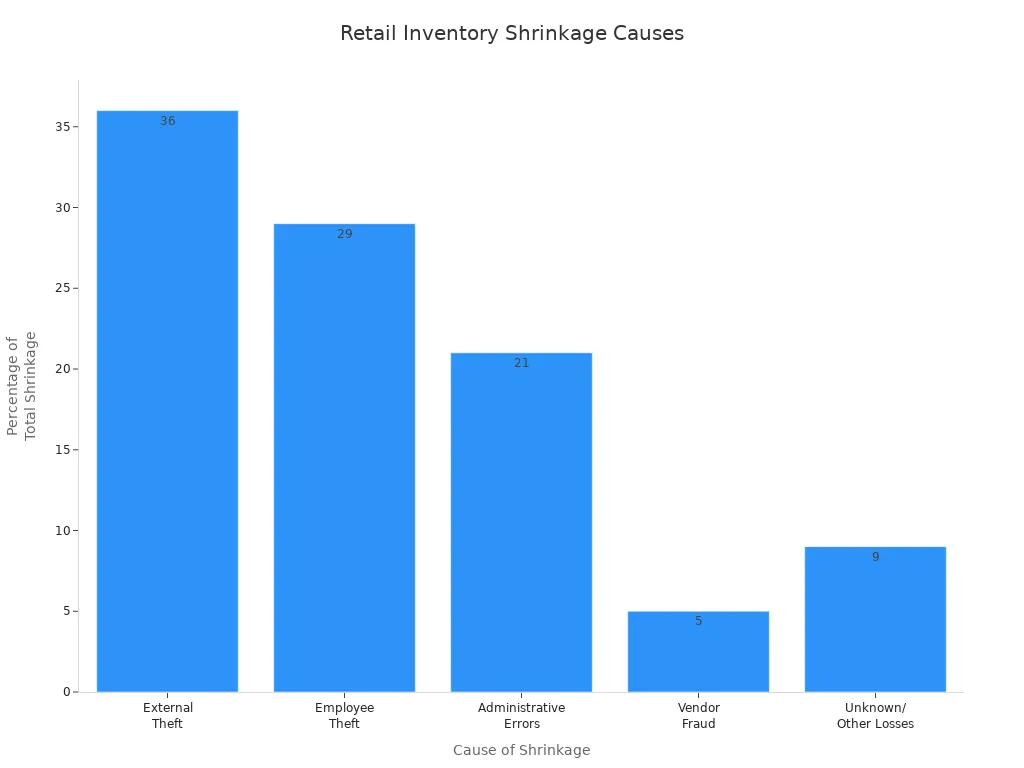
External theft, like shoplifting, makes up the largest part. Employee theft also plays a big role. Mistakes in counting or tracking items, called administrative errors, add to the problem. Vendor fraud and other unknown losses make up the rest. You need to watch for all these causes to keep your inventory safe.
Impact on Retailers
Retail shrinkage costs you more than just missing products. Each year, U.S. retailers lose billions of dollars. In 2022, losses reached about $112.1 billion, which is around 1.6% of all retail sales. This loss means you have less money to spend on new products or store improvements.
When you lose inventory, your profit drops. You pay for goods that you cannot sell. This makes it harder to grow your business or open new locations. Shrinkage also raises your cost of goods sold, so you earn less from each sale. Over time, these losses can hurt your store’s success and make it tough to compete.
Tip: By understanding the main causes and effects of shrinkage, you can take steps to protect your business and improve your bottom line.
Traditional Loss Prevention vs. Computer Vision AI
Manual Methods and Their Limits
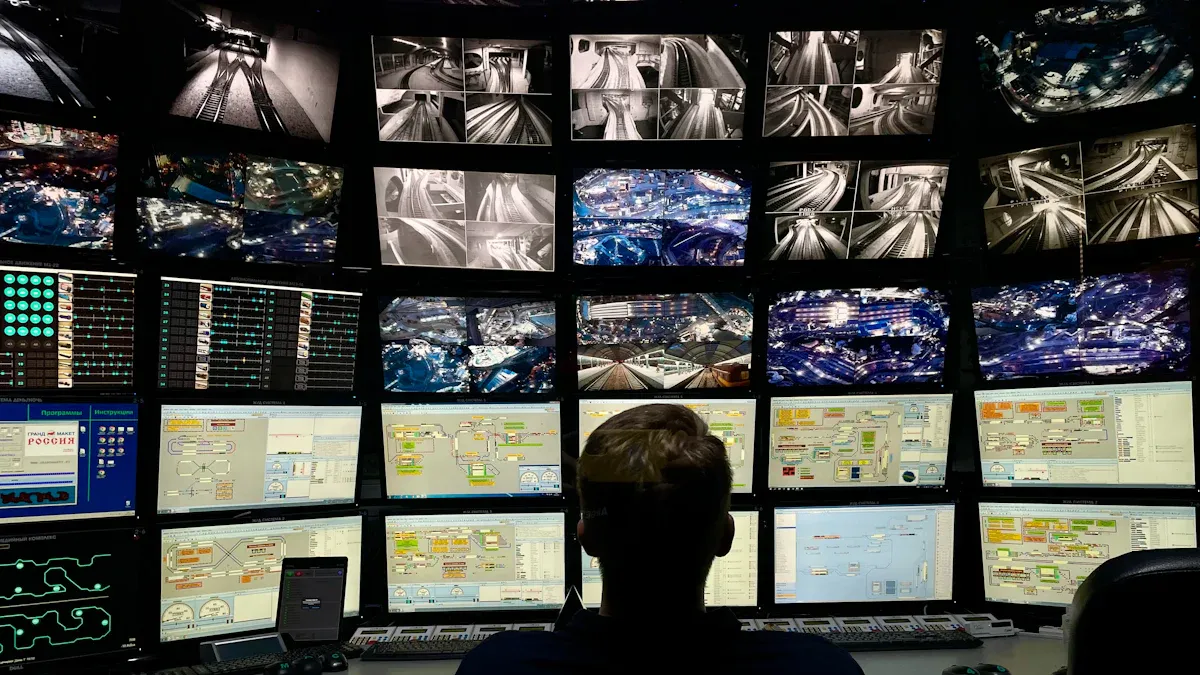
You might already use some old ways to stop loss in your store. These ways include teaching workers, locking doors, and using cameras. Each way helps stop stealing and cheating, but they are not perfect.
Method | Description | Limitations |
|---|---|---|
Teaches staff about responsibility and ethics. | Needs regular updates and strong engagement. | |
Access Control | Blocks entry to sensitive areas. | Determined people can still find ways around it. |
Surveillance Measures | Uses cameras to watch high-risk spots. | Fails if no one monitors or reviews footage. |
Manual ways help you make rules and keep people honest. They might stop some stealing, but they can miss sneaky cheating or mistakes. These ways need people to pay attention all the time. People can get tired or miss things.
You can see how well each way works:
Method Type | Effectiveness in Reducing Shrinkage |
|---|---|
Traditional Manual Methods | Establish accountability, deter theft |
Automated Solutions | Enhance accuracy, provide real-time visibility |
Combined Approach | Reduce shrinkage rates from 1.5-3% to under 0.5% |
Note: Barcode scanning and RFID gates can help, but people still need to use them and they can miss some problems.
Computer Vision AI for Loss Prevention
Computer vision AI is a new way to stop loss. It uses cameras and smart programs to watch your store right away. It can see stealing, cheating, and mistakes as they happen.
Feature | Computer Vision AI Systems | Traditional Methods |
|---|---|---|
Improved Customer Experience | Makes shopping smooth and secure. | Security guards and cameras can feel intrusive. |
Finds patterns and predicts losses. | Manual checks may miss important trends. | |
Fraud Detection | Spots internal fraud using smart alerts. | Relies on people to notice issues. |
Strategic Insights | Gives you data to improve marketing and inventory. | Offers only basic reports. |
You can use computer vision for many jobs. It counts items on shelves, shows where shoppers walk, and sends warnings if something looks wrong. It also checks if sales work well and gives you proof that your money was well spent.
With computer vision AI, you stop loss faster and better. You can fix problems before they get big. This keeps your store safe and helps your business do well.
How Computer Vision Prevents Shrinkage
Real-Time Monitoring and Alerts
You can stop shrinkage by using computer vision for live watching. Cameras look at your store aisles all day and night. The system checks if items are missing or running low. If stock gets too low, you get a quick alert on your phone or computer. These alerts go to managers and security teams. You can act fast to stop loss before it happens.
Computer vision also looks for strange actions. If someone acts in a weird way, the system tells your security team. This helps you stop theft or mistakes before they cause shrinkage. Staff get quiet alerts on their devices when there is a problem. This lets you act fast and keep your store safe.
Cameras watch aisles and shelves all the time.
The system finds low stock and sends quick alerts.
Managers and security hear about risky events right away.
Staff get alerts on their phones for fast help.
You can focus on real problems and stop shrinkage quickly.
A study found that when shoppers saw a message about scanning mistakes, 75% fixed the problem right away. This shows that live alerts help you lower shrinkage and make things more correct.
Frictionless Checkout Systems
Frictionless checkout systems use computer vision to stop shrinkage at the register. These systems watch every item from shelf to checkout. You do not need extra guards or gates. The technology uses cameras and sensors to see what shoppers pick up and put back. This cuts down on mistakes and stops cheating.
Many stores use these systems now. For example:
Retailer | Technology Description |
|---|---|
Uses vision and sensors to track customers and process payments automatically. | |
Grabango | Offers cashierless checkout for grocery stores using computer vision and sensors. |
With frictionless checkout, you can cut shrinkage by up to 70%. The system checks what shoppers scan and what they really have. If something does not match, you get an alert. This helps you fight shrinkage and keep your inventory right.
Vision AI systems watch products from shelf to checkout.
Cameras and sensors follow what shoppers do.
The system finds mistakes between scanned and real items.
Security teams can look at real problems, not fake ones.
Accurate Item Recognition
Computer vision gives you very good item recognition. The system can see and know every product on your shelves. This keeps your inventory numbers right all the time. You can keep inventory accuracy above 99.5%. After using computer vision AI, you can cut shrinkage by 50%. The system also lowers mis-picks by over 80% and removes many receiving mistakes.
Impact Description | Statistic |
|---|---|
Inventory accuracy maintained continuously | 99.5%+ |
Reduction in inventory shrinkage after AI vision | 50% |
Reduction in mis-picks | 80%+ |
Elimination of receiving errors | 25%+ |
You can trust your stock counts are right. This helps you stop shrinkage and avoid big mistakes. Good item recognition also means you can find problems faster and fix them before they get worse.
Reduce Shrinkage with Visual Validation
Visual validation is a big part of computer vision in stores. The system checks for strange actions and watches how workers handle products. You get live information that helps you fix problems fast. If there is a mismatch at self-checkout, the system uses both camera pictures and barcode data to find the problem. This lowers false alerts and helps you act only when needed.
New systems need photos during checks. This protects honest workers and gives your loss prevention team proof to act on shrinkage. AI video tools can cut shrinkage by 25-40%. False alarms can drop by up to 80%. You can find and fix more problems, with some stores seeing shrinkage drop from 2.1% to 1.4% of sales. Walmart saw a 15-25% drop in shrink after using shelf-scanning robots.
By using computer vision, you can stop shrinkage, lower shrinkage, and make your store safer. These tools help you keep your inventory right, protect your money, and make your store work better.
Implementing Computer Vision in Retail
Integration Steps
You can add computer vision to your store by following easy steps. First, check if your store is ready for retail ai. This means seeing if you have the right tools and data. Next, pick the use cases that help you most, like shelf monitoring or stopping shoplifting. Build and test AI models that fit your store’s needs. Connect the new system to your checkout and inventory tools. Keep checking how well the system works and make changes when needed.
Check if your store is ready for retail ai.
Choose the most helpful use cases, like shelf monitoring.
Build and test AI models for your store.
Connect the system to your current technology.
Watch and improve the system over time.
Tip: Start with one or two use cases first. This helps you see results fast and learn what works best.
Cost and Scalability
You need to think about costs when using computer vision. Costs include hardware, software, and support. The table below shows the main cost areas:
Cost Component | Description |
|---|---|
Hardware Costs | Devices like cameras, self-checkout stations, and smart carts. |
Software Development | Building and connecting software to your current systems. |
System Integration | Linking computer vision with inventory and checkout tools. |
Ongoing Operational Costs | Maintenance, internet, and upgrades. |
Infrastructure Needs | Power, internet speed, and space for new devices. |
Computer vision works for small shops and big chains. Large stores use retail ai to track thousands of products. Stores like Amazon Go show how these solutions fit many store types. You can use computer vision to watch shelves, manage checkout lines, and keep your stores running smoothly.
Staff Training
You need to train your staff to use computer vision well. Start with easy lessons on tagging and labeling products. Use a clear program to teach image and tagging rules. Hold practice sessions for tagging and shelf setup. Set simple rules for labeling and checking products. Use real-time checks to make sure tagging is correct.
Teach staff how computer vision helps their work.
Show that the system supports them, not just watches them.
Good training helps staff use new tools and lowers shrinkage.
Note: Well-trained staff help computer vision work better and save your store money.
Benefits and Challenges of Computer Vision AI
Reduce Shrinkage and Improve Accuracy
Computer vision AI helps your store be more accurate. It also helps you lose less inventory. This technology lets you watch your shelves all the time. You can check if products are in the right spot. You can see if items are missing from shelves. Computer vision helps you keep shelves full and run sales better. These steps make your service better and help your team do more.
You get updates about shelf stock right away.
You can find mistakes and fix them fast.
You follow store plans better.
When you use computer vision, your profit can go up by 5%. You might also see sales rise by 4.5%. These numbers show that being accurate is important for your business.
Enhanced Customer Experience
Computer vision AI makes shopping easier for customers. The system can tell when shoppers need help and let your staff know. Your team can help people find things faster. This makes shopping less stressful. You can also use computer vision to see how people move in your store. This helps you put products in the best places and make your store look better.
You can make heatmaps to see busy spots.
You can change your ads to fit what customers do.
You can give faster checkout with "Just Walk Out" tech.
Many shoppers want to check out quickly. About 70% say they would go to another store for faster checkout. Some stores saw sales go up by 20% and customers were happier after using computer vision.
Addressing Privacy and Technical Issues
You need to think about privacy and tech problems when using computer vision. Customers want their data to be safe. You should use strong security to protect videos and customer info. Always ask before using data for things like facial recognition. Put up clear signs to tell people about cameras and how you use their data.
Privacy Concern | Solution |
|---|---|
Failure to secure customer data | Use strong data security to block unauthorized access. |
Lack of informed consent | Get clear permission before using personal data. |
Inadequate transparency | Post signs to explain camera use and purpose. |
Data exposure through improper anonymization | Blur faces or group data to hide identities. |
Capturing sensitive information | Adjust cameras to avoid recording private details. |
Sharing data without customer knowledge | Explain data sharing in your privacy policy and get consent. |
You might also have tech problems. Sometimes items are hard to see if something blocks them or the light is bad. Products that look the same can trick the system. Adding new products takes extra time. Big stores need more setup and changes. Hardware and setup can cost a lot. You need to plan for these problems to get the best results from computer vision AI.
You can use computer vision AI to help stop shrinkage in your store. This technology lets you watch your store live and track items better. It also makes shopping easier for your customers. First, look at what systems you already have. Then, teach your staff how to use the new tools. Connect these tools to your store’s other systems. If you want to see how it works, try a small test or talk to a company that sells this technology.
Start now. Check your plan to stop loss and see how computer vision can help your store do better.
FAQ
What is computer vision in retail?
Computer vision uses cameras and software to watch your store. The system checks shelves, tracks products, and spots problems. You get alerts when something goes wrong. This helps you keep your inventory safe.
How does computer vision help prevent retail fraud?
Computer vision finds signs of retail fraud by watching for strange actions. The system can spot theft, fake returns, and errors. You get fast alerts so you can act quickly and protect your store.
Is computer vision expensive to install?
You pay for cameras, software, and setup. Costs depend on your store size and needs. Many stores start small and grow later. You can save money by stopping shrinkage and improving accuracy.
Will computer vision affect customer privacy?
You must protect customer data. Use strong security and clear signs. Ask for permission before using personal information. Make sure your system follows privacy rules.
Do staff need special training to use computer vision?
You teach your staff how to use the system. Training covers tagging products and checking alerts. Good training helps your team work better and keeps your store safe.
See Also
Navigating Walgreens Self-Checkout: Benefits and Hurdles in Retail
Enhancing Office Efficiency with Innovative Vending Solutions
Transforming Retail Through Smart Technology in Vending Machines
The Advantages of Cloudpick's Checkout Systems for Retail Efficiency
Addressing Cash Errors at Self-Checkout for Seamless Transactions
