How to Implement Edge AI Architecture for Smarter Retail Operations


You can set up edge AI architecture in your store by taking simple steps. First, look at your IT systems and find what is missing. Choose devices that can handle data on their own. Link these devices to your store’s software. Make sure you have good security rules to protect data. Use real-time processing to get quick answers. This way, you can make your store work better and help customers faster.
Key Takeaways
Check your store's IT systems to find any missing parts before you use edge AI architecture.
Pick devices that can handle data nearby to make things faster and stop the network from getting too busy.
Use strong security steps to keep customer data safe and follow rules.
Use real-time data processing so you can react fast to sales changes and inventory needs.
Buy the best hardware and software to get the most out of edge AI in your store.
Retail IT Challenges
Centralized System Limits
Many retail IT systems use a central server for all data. This can make things slow as your store gets bigger. Adding more stores or devices can crowd the network. It costs more to send lots of data and the network can get full. When more devices send data, it takes longer to get answers. Your team cannot react fast. Edge AI architecture works by handling data where it starts. You do not need to send everything to one place. This helps you act faster and spend less on the network.
Tip: If you process data in the store, you can help customers faster and keep the network from getting too busy.
Here is a table that lists problems you might see when you upgrade your systems:
Challenge | Description |
|---|---|
Infrastructure | Old store tech may not work with new jobs. |
Updating many stores is hard and mistakes can happen. | |
Security | Store devices are often not safe, so data is at risk. |
Legacy Systems | Using old and new systems together can cost more and be confusing. |
Connectivity | Bad networks can stop your systems from working right. |
Operational Costs | Sending people to fix each store costs a lot. |
Real-Time Data Issues
Stores need to move fast. Central servers can slow things down. Sometimes, you only check stock once a week. This means you miss what is selling now. Slow steps for sales or prices can hurt your store. If data comes late, it is hard to know what is happening. With edge AI architecture, you can use data right away in each store. You can find and fix problems before they get big.
Checking stock late can mean empty shelves or too much stuff.
Real-time systems help you fix things fast.
Security and Continuity
Stores have many security problems. Hackers like to attack point-of-sale systems because they use payment data. If someone steals data, customers can get hurt. Supply chains can also bring new risks. Attacks like ransomware or DDoS can stop your store from working. You must follow strict rules to keep data safe. Edge AI architecture helps by finding threats and locking data at every step. You can make plans to fight attacks and check if vendors are safe.
Description | |
|---|---|
Point-of-Sale (POS) System Vulnerabilities | Hackers go after payment systems. |
Data Breaches | Hackers want customer data. |
Supply Chain Security | Vendors can make your system weak. |
Ransomware and DDoS Attacks | These attacks can stop your store. |
Compliance with Data Protection Regulations | It is hard to follow rules like GDPR and PCI DSS. |
Note: It is easier to keep your data safe when you handle and protect it in the store.
Edge AI Architecture in Retail
Key Components
You need the right parts to make edge AI architecture work. Each part helps your system run fast and smart. The table below shows the main things you need:
Component Type | Description |
|---|---|
High-Performance Hardware | Uses AI accelerators, GPUs, and NPUs to handle real-time analytics and heavy tasks. |
Optimized AI Models and Frameworks | Runs lightweight models that work well even on small devices. |
Edge AI Applications in Retail | Powers smart shelves, video analytics, and tracks customer behavior for better store management. |
Tip: Pick hardware and software that fit your store’s needs. This helps you get the best results from your edge AI architecture.
Edge vs. Cloud
You may wonder how edge AI architecture is different from cloud solutions. The biggest difference is where data gets processed. Edge AI works in your store. Cloud solutions send data to a faraway server. The table below compares both choices:
Feature | Cloud-Based Solutions | |
|---|---|---|
Customer Experience | Real-time analysis of customer traffic patterns | Dependent on data transmission delays |
Store Operations | Local processing for immediate actions | Needs cloud connectivity for updates |
Inventory Management | Smart shelves monitor inventory locally | Centralized data management |
Security | Local data processing boosts security | Data can be at risk during transfer |
Personalization | Adapts ads to local shoppers | Uses data from many stores |
Note: Edge AI architecture lets you act fast and keep data safe. It still works even if your internet stops.
Core Benefits
When you use edge AI architecture, you can save money and work better. You spend less on IT and help your team do more. The chart below shows how much you can gain over time:
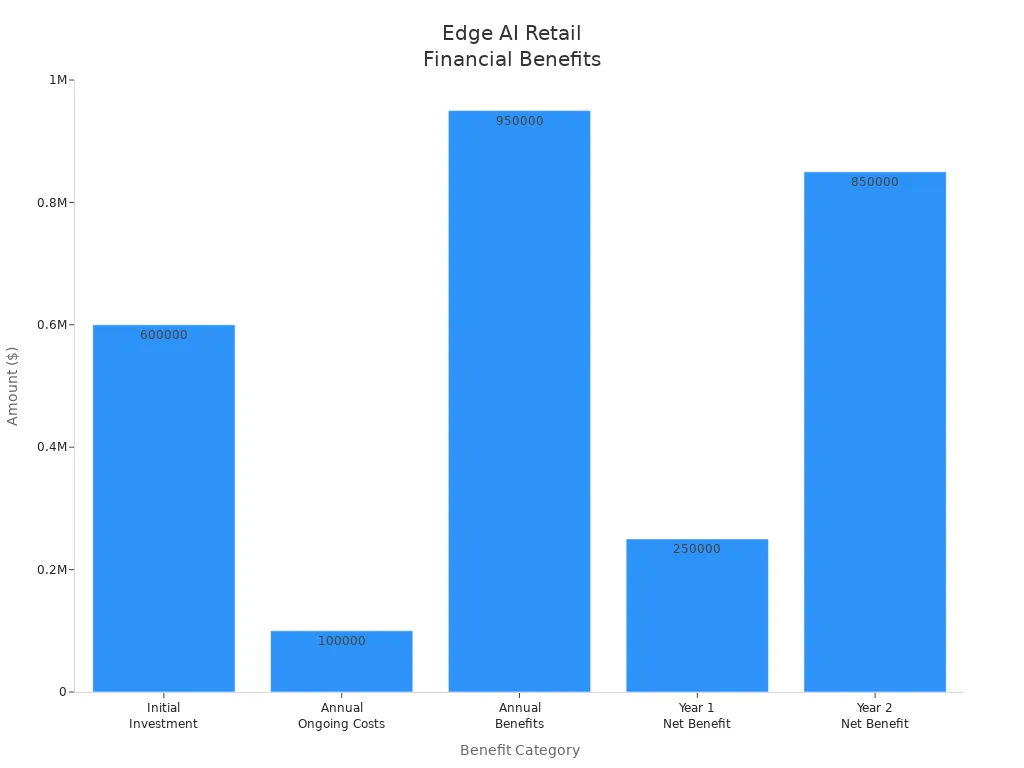
You can see big gains in just one year. For example, you might get a 35.7% return on investment in the first year. In the second year, it could go up to 850%. Over five years, your average ROI could reach 462%. You may also cut IT costs by 17%. Your team could work 22% faster.
Callout: Edge AI architecture helps you make smart choices, save money, and keep your store running well.
Implementation Steps
Assess Infrastructure
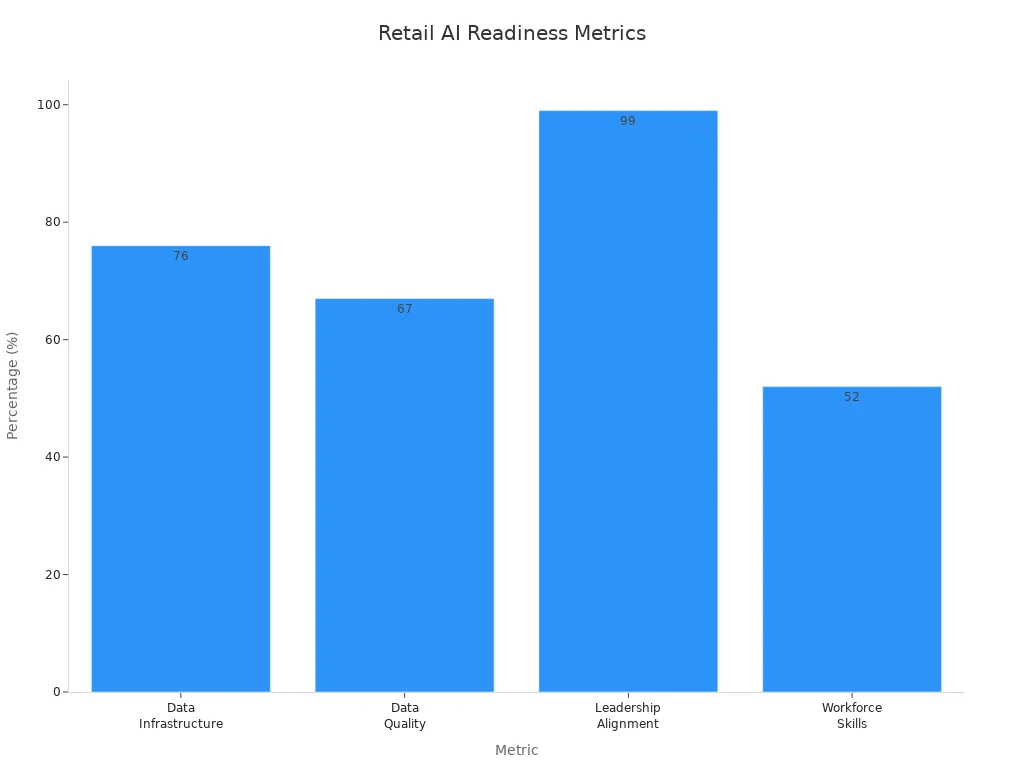
Check if your store is ready for edge AI architecture. Look at your data setup and see if it is organized. Make sure your data is good and your team knows about AI. Your leaders should support the plan. Use these metrics to help you review:
Metric | Description | Example Insight |
|---|---|---|
Data Infrastructure | Centralized data helps AI work better. | 76% of AI-ready stores have fully centralized data. |
Data Quality | Good data is key for smart systems. | 67% of stores say data quality is their top challenge. |
Leadership Alignment | Leaders must support and plan for AI. | 99% of AI-ready stores have a clear AI strategy. |
Workforce Skills | Your team needs AI knowledge. | 52% of stores lack enough AI talent. |
Tip: Ask your team if they can use new AI tools. Make sure your data is clean and simple to use.
Example: Walmart uses strong data systems and skilled teams. They manage inventory in real time with edge AI architecture.
Choose Edge Devices
Pick devices that match your store’s needs. Find tools that work even if the internet stops. They should protect your data and give fast answers. Here are some things to look for:
Criteria | Description |
|---|---|
Operational Resilience | |
Data Security and Compliance | Devices protect data and follow rules. |
Real-Time Responsiveness | Devices give quick results for fast actions. |
Different platforms do different jobs. Here are some popular choices:
Platform Name | CPU | Device | Model Types Used | Video Type/Resolution | Throughput | Streams | Power (Watts) |
|---|---|---|---|---|---|---|---|
i5-14500 | GPU | detection, classification, face recognition | 1920x1080 @15FPS | 133.99 | 3 | 52.19 | |
Raptor Lake | i5-14500 | CPU | detection, classification, face recognition | 1920x1080 @15FPS | 187.98 | 6 | 59.55 |
Meteor Lake | Ultra 5 125HL | GPU:NPU | detection, classification, face recognition | 1920x1080 @15FPS | 279.34 | 7 | 26.5 |
Note: For self-checkout, pick devices with strong video processing. For inventory, use devices that scan and track items fast.
Example: Amazon uses AI assistants and cameras. They help customers check out without waiting in line.
System Integration
Connect your new edge devices to your store’s software. Make sure your system can handle more data and still work if the internet is slow. Here are some best ways to do this:
Use storage that can grow and supports fast analytics.
Design your system to keep working if the internet stops.
Pick AI models that run well on small devices.
Plan for safe updates and long device life.
Test your system in real stores before using it everywhere.
You may face some problems when you connect everything. Here is how you can fix them:
Challenge | AI Solution | Business Impact |
|---|---|---|
Data Flow Bottlenecks | Workload balancing algorithms | |
Sync Conflicts | Predictive conflict resolution | Fewer inconsistencies |
Priority Management | Automated source precedence | Smoother data flow |
Compliance Issues | Real-time validation filters | Stronger data security |
Tip: Store Intelligence used edge computing to update shelf labels in real time. This made price changes faster and helped customers more.
Security Measures
Keep your edge AI devices safe from threats. Use these steps to protect your data and systems:
Turn off ports you do not need and change passwords.
Encrypt all data when stored and sent.
Encrypt and sign your AI models before using them.
Use a zero-trust network. Only let people who need access use it.
Alert: Edge AI architecture keeps data in the store. This helps you follow privacy rules and lowers attack risks.
Example: Many stores use computer vision at the edge to spot theft. This keeps customer data safe and helps stop losses.
Real-Time Processing
Set up your system to process data right away. This helps you react fast to what happens in your store. Here are some ways to do this:
Strategy | Description |
|---|---|
In-store processing | Devices handle data instantly, with no lag. |
Real-time inventory updates | Stock levels update as items are scanned or sold. |
Local data processing | Stores make decisions without waiting for the cloud. |
Reduced cloud dependency | Less data sent to the cloud means faster and cheaper operations. |
Stream processing architecture | Data is analyzed as it comes in for quick insights. |
Event-driven architecture | Systems react right away to events like sales or price changes. |
You can check your system’s speed and success by looking at:
How fast the system gives answers (inference latency)
How many requests it handles at once (throughput)
How much memory and CPU it uses (resource use)
How well it finds trends or problems (accuracy)
How much energy it uses (important for battery devices)
How it helps your business (like faster checkout or fewer empty shelves)
Examples:
Self-checkout systems use edge AI to scan items and update inventory right away.
AI tracks customer movement to help with store layout and staffing.
FLO, a shoe store, used AI to raise product availability from 71% to 94%.
Pincode, an eCommerce store, cut manual stock checks by 20% with real-time updates.
Callout: Edge AI architecture lets you spot trends, stop theft, and help customers faster. You can keep your store running even if the internet goes down.
You can change your store by using edge AI architecture steps. This way, you make decisions fast and help customers quicker. You also use less energy in your store. Experts think you will see happier customers and smoother work. Be careful not to make mistakes like having no clear goals or bad data. Keep learning new things and teach your team new skills. If you are ready for change, your store can be a leader in smart retail.
FAQ
What is edge AI in retail?
Edge AI in retail means you use smart devices in your store to process data right where it happens. You do not need to send everything to the cloud. This helps you get faster results and keep your data safe.
How do you keep edge AI devices secure?
You should use strong passwords, encrypt your data, and update your devices often. Turn off any ports you do not need. Only let trusted people access your system. These steps help you stop hackers and protect customer information.
Can edge AI work if the internet goes down?
Yes, edge AI devices keep working even if you lose your internet connection. They process data locally. Your store can still scan items, update inventory, and help customers without waiting for the cloud.
What are some real-world uses for edge AI in stores?
Smart shelves that track stock
Cameras that spot theft
Personalized ads for shoppers
These tools help you run your store better and give customers a smoother experience.
How do you measure the success of edge AI in retail?
Metric | What it Shows |
|---|---|
Response Time | How fast you get answers |
Inventory Accuracy | How well you track stock |
Cost Savings | How much money you save |
Customer Feedback | How happy shoppers feel |
Check these often to see your progress.
See Also
Understanding AI-Driven Convenience Stores: Essential Insights for Retailers
The Future of Retail: Embracing AI-Enhanced Store Solutions
Starting an AI-Driven Corner Store on a Budget
Exploring AI-Enhanced Vending Machines: Advantages for Today's Retail
Transforming Online Retail: The Impact of AI E-Commerce Tools
