How to Test Computer Vision Models for Cashierless Stores

You need a clear plan to test computer vision models for cashierless stores. That plan covers collecting data, running simulations, doing real-world trials, and watching results over time. A testing framework with multiple phases gives you a clear path from start to finish.
Cashierless settings need stricter testing than normal retail computer vision cases. No human cashier catches mistakes at checkout. A missed item or a false detection directly hurts revenue and customer trust. Every mistake has real results.
Each section below gives you real steps for one phase. You will learn how to set goals, prepare data, check results offline, simulate environments, and test in live stores. Testing computer vision models well protects your money.
Key Takeaways
Set clear goals that link accuracy, speed, and reliability to business results like sales and customer trust.
Use real, synthetic, and edge-case data to handle all store situations and make the model work better.
Run offline tests like unit tests, confusion matrices, and stress tests for occlusion and lighting changes.
Create virtual stores and replay situations to find problems and lower risks before real store tests.
Use shadow mode, check for drift using math tests, and retrain often to keep accuracy.
Define Objectives for Testing Computer Vision Models
Before you run any tests, you must set clear goals. Your store goals—checkout speed, shrink reduction, and shelf availability—must turn into measurable vision targets. This step makes sure your testing work directly supports business results instead of chasing random technical benchmarks. You link each target to a store operation goal before you pick a model or run a single test.
Set Accuracy, Latency, and Robustness Targets
Start with accuracy. Your model must correctly identify products under normal conditions. But accuracy alone does not guarantee success. Two other dimensions matter just as much: latency and robustness.
Latency decides how fast your system processes each frame. In a cashierless store, the system must update the virtual cart almost instantly. You need real-time inference that keeps pace with customer movement.
The engineering benchmark for virtual cart updates sits under 500 milliseconds from the moment of product interaction to cart registration. Any latency above that threshold creates reconciliation errors at scale.
The difference between 30-millisecond and 200-millisecond latency can decide whether edge hardware or cloud processing is appropriate. For cashierless checkout, you need low-latency edge processing to meet that 500-millisecond threshold consistently.
Robustness means your model performs well across varied conditions. Lighting changes, product occlusions, and crowded aisles should not degrade accuracy. Your computer vision models must handle these retail environments without failing.
Different model families trade off speed and precision. SSD MobileNet V2 prioritizes speed for mobile deployment. YOLO-FastestV2 offers extreme efficiency. YOLOv5 and YOLOXn balance accuracy and latency for edge devices. Your model choice must match your latency and robustness targets.
Testing computer vision models requires you to set these three pillars—accuracy, speed limits, and overall reliability—before you begin validation.
Tie Metrics to Business Outcomes
Each metric should connect to a business outcome. Accuracy relates to shrink reduction. Latency ties to checkout speed. Robustness links to shelf availability scores.
Define your acceptance criteria in business terms. A 99% detection rate for checkout items might correspond to a 1% revenue loss threshold. A 400-millisecond inference latency target ensures the cart updates before the customer reaches the next aisle. When you test computer vision models, each metric tells you something about store performance. These connections make your testing strategy actionable for stakeholders who care about revenue, not recall rates.
Your retail computer vision strategy starts with these objectives. Clear targets prevent wasted effort on metrics that do not matter to your store operations.
Prepare Data for Retail Computer Vision
Data preparation sets the highest level your computer vision model can reach. You need labeled images and videos of products, shelves, and customer actions. Cover normal operations plus rare edge cases. A strong dataset makes every testing phase more reliable.
Combine Synthetic, Real, and Edge-Case Data
Start with real-world captures from your store cameras. Record products from many angles, customer movements, and shelf restocking. Real data alone cannot cover every scenario. Occlusion, glare, crowded aisles, and poor lighting create gaps in coverage.
Synthetic data fills these gaps well. Models trained only on synthetic data achieve only 16% accuracy on real test data. A training set with 33% real data (6,800 images) plus full synthetic data (187,928 images) achieves a 65.41% detection rate. This nearly matches a baseline trained on 100% real data, which scores 66.82%. About 13.82 synthetic samples equal 1 real sample. Synthetic data can replace 66% of real data collection while keeping nearly identical performance. When added to a complete real dataset, synthetic data gives a 13% relative improvement, raising performance from 66.8% to 75.7%.
Parameterizing scene components lets you vary lighting, geometry, and occlusion in a planned way. You generate edge-case-rich datasets without manual authoring. This structured control covers rare scenarios that appear unpredictably in stores.
Edge cases matter deeply for retail computer vision. A product hidden by a customer's hand, glare on shiny packaging, or a crowded checkout line—your test set must include these scenarios. Camera placement determines which edge cases appear in your data. Place cameras to capture problem areas directly.
Object detection performance depends heavily on data diversity. Shelf monitoring requires images of fully stocked shelves, nearly empty shelves, and partially occluded products. Each scenario trains your model to handle retail computer vision conditions.
Label and Version Data for Reproducibility
Labeling quality directly affects accuracy. Every bounding box must match the correct product. Every classification must reflect the right SKU. Inconsistent labels corrupt both training and testing phases.
Versioning ensures reproducibility across model iterations. DVC provides Git-like version control for datasets. It stores data in cloud or on-premise storage while Git tracks code and metadata. You reproduce any experiment by checking out the correct version. A visual MLOps workflow maps dataset relationships and processing applications. Each project version captures a specific data state, allowing reliable retraining. Benchmark reports evaluate mAP, Precision, Recall, and IoU across versions. Reviewing these reports reveals how your computer vision in retail models evolve over time.
Keep your data pipeline clean. Separate input data from model artifacts. Use tools like MLflow for model versioning. This discipline makes your ai model training reproducible and your testing trustworthy.
Check Computer Vision Models Without a Live Store
Testing offline finds issues before your model goes into a real store. You run planned tests on your ready dataset. This step saves money and guards your good name. You catch bugs in detection, classification, and tracking parts while the cost to fix them is still low.
Run Unit Tests and Confusion Matrix Analysis
Begin with unit tests for each part. Test your detection module on single-product images. Test your classification module on cropped product images with known labels. Test your tracking module on short video clips where you know each shopper's correct path. Each test checks one function alone. When a test fails, you know just where the problem is.
Confusion matrices show per-class accuracy gaps before any store trial. Roboflow's model evaluation tool builds these matrices by comparing ground-truth notes with model predictions. The diagonal of the matrix shows true positives. In a retail cooler model that finds empty spots on drink shelves, the diagonal showed 291 correctly found products and 26 correctly found empty spaces. Off-diagonal cells show wrong finds. The model guessed the wrong class or no class at all. You look at the exact misclassified images behind each cell. Patterns show up. Maybe the model misses blocked bottles at the bottom of an image. You then add more training data to close those gaps. You also check if a often misidentified class is underrepresented or mislabeled in your dataset. Both issues lower per-class performance.
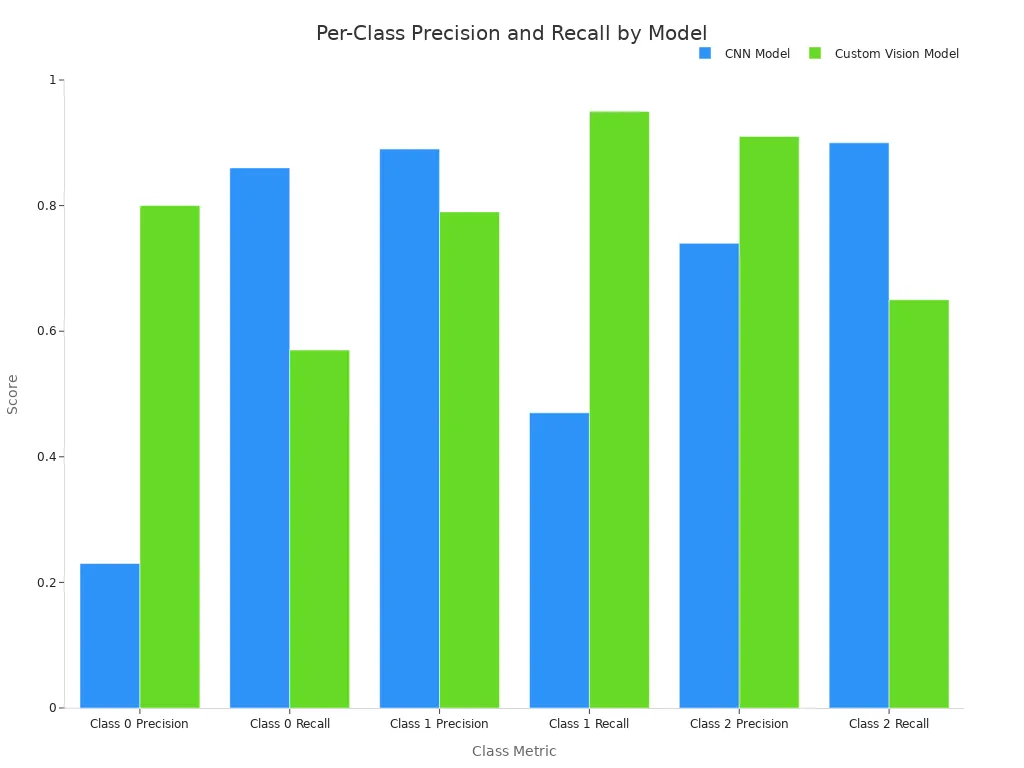
The table below shows how two models do across three classes. These numbers come from the confusion matrices behind each model.
Model | Class 0 Precision | Class 0 Recall | Class 1 Precision | Class 1 Recall | Class 2 Precision | Class 2 Recall |
|---|---|---|---|---|---|---|
CNN Model | 0.23 | 0.86 | 0.89 | 0.47 | 0.74 | 0.90 |
Custom Vision Model | 0.80 | 0.57 | 0.79 | 0.95 | 0.91 | 0.65 |
The CNN model often mistook Class 1 observations for Class 0. Class 2 had a higher true-positive rate. The CNN model maximizes recall for Classes 0 and 2. The Custom Vision model maximizes precision for Class 1. No single model wins across all classes. The best choice depends on your business needs. If you need high recall for stockout detection, the CNN model may work better for you. If you need high precision to avoid false alerts, the Custom Vision model wins.
Planogram comparison and shelf gap detection give you offline checks tied to retail KPIs. You compare your model's shelf-level analytics against the known planogram. Does the model correctly find which products sit on which shelf? Does it flag gaps where products are missing? These checks connect right to shelf availability scores. They also support stockout detection without running a single live test.
Stress-Test with Occlusion and Lighting Variations
Retail environments are not controlled labs. Shifting lighting, glare, crowded aisles, and partly blocked shelves all lower model accuracy. A system that scores well on clean test footage can drop sharply once camera angles shift or shelves become blocked. You must stress-test your computer vision models against these conditions before deployment.
Build a stress-test suite that covers the conditions your cameras will face. Capture sample footage across different times of day and days of the week. Do not rely only on best-case clips. Reflections, glare on refrigerated doors, seasonal lighting shifts, and camera vibration all impact accuracy. Your test set must include dim lighting, glare, shadows, and uneven lighting. It must also include partial occlusions, motion blur, sensor noise, and lower-resolution or compressed images.
Datasets must reflect deployment reality. Shelf-monitoring systems trained only on product catalog images struggle in messy stores. Models trained on real shelf photos with clutter and occlusion keep accuracy in production. In agriculture, mixing lab images with field photos improves disease detection far more than adding more pristine lab samples alone. The same principle applies to retail computer vision.
Apply targeted augmentations to your training data. These augmentations reduce false alarms in noisy conditions. They keep stability across different camera setups. They also cut post-launch debugging. Your occlusion handling improves when the model sees blocked products during training. Your accuracy and consistency across lighting conditions improve when the model sees glare and shadows during training.
Track inference latency during stress tests. A model that meets your speed target on clean images may slow down when processing cluttered scenes. Measure latency under every condition in your test suite. This practice makes sure your system meets its real-time needs in the store.
Offline validation gives you confidence before you invest in simulation or live pilots. You catch per-class accuracy gaps, test occlusion handling, and verify shelf-level analytics against planograms. The next phase moves your testing computer vision models work into simulated environments that mimic real store complexity.
Simulate Complex Retail Environments
Offline validation catches many problems. But your model still needs to handle the messy reality of a real store. Simulation fills that gap. You build virtual spaces that copy real store conditions without the cost and risk of a live pilot. This step lets you test computer vision models against complex retail environments before a single customer walks in.
Build Virtual Stores and Digital Twins
A virtual store model lets you test cameras in a controlled setting. You rebuild aisle layouts, shelf heights, and product placements from your actual store. You set camera angles to match your planned setup. You adjust shopper density to copy busy hours and quiet times. This digital twin approach gives you a safe space to find problems.
Camera placement matters a lot in these simulations. A camera that works well in one aisle may fail in another because of shelf height or lighting. You test multiple placements without moving real hardware. You also measure how well your computer vision handles crowded scenes. Smart camera computer vision models must track many shoppers at once. Simulation lets you push those limits safely.
Replay Scenarios for Regression Testing
You record real scenarios from your store. Then you replay them against every new model version. This practice catches regressions when you update your computer vision models. A change that fixes one problem may break another. Replay testing reveals those issues fast.
You build a library of recorded scenarios. Each one covers a specific challenge. One clip shows a shopper blocking a shelf. Another shows glare on a refrigerated door. You run your updated model against the full library. You compare results to the previous version. Any drop in accuracy flags a regression. This method supports shelf monitoring and checkout tracking alike.
Pre-deployment simulation reduces cost and risk. You find bugs before they reach a live store. You avoid lost revenue and unhappy customers. You also save money on repeated pilot setups. Simulation does not replace live testing. It makes live testing safer and more focused.
Test in Real Stores and Watch After Launch
Simulation helps you feel sure, but only a real store shows how the system truly works. This phase tests your computer vision models with real shoppers, actual crowds, and customers who do unexpected things. Live pilots swap guesses for real data.
Use Shadow Mode and A/B Testing During Pilots
Shadow mode runs your model next to the current checkout process without changing any sales. The model makes guesses, but the store uses the old system to charge customers. You check the model's results against what really happened. Did it find every item? Did it give the right items to each shopper? This method gives you a safety net. You check how well the system works without putting money or trust at risk.
In a normal shadow setup, you connect the model to the same store camera feeds your old system uses. The model looks at each image and figures out what the shopper picked to make a virtual cart. Your team checks the results later. You measure how often the model is right, how many items it finds, and how fast it works, and compare to the real sales. Any difference becomes a chance to learn.
A/B testing checks your work even more. You test two store layouts by watching how shoppers move. One group of shoppers sees layout A. The other sees layout B. Your computer vision models follow how shoppers move and how long they stay. You compare which layout has less crowding or finds items better. This turns your store into a place to test ideas.
Testing in the store with shadow mode and A/B finds problems that never show up in simulation. Real shoppers block cameras, move items between baskets, and take strange paths. Your retail computer vision system must handle these actions. Shadow mode shows it can.
Find Drift and Close the Feedback Loop
Putting the system in the store is not the end of testing. Store conditions always change. Lighting changes during the day. Products change with the seasons. Shoppers act differently during sales and holidays. These changes cause model drift, when your once-good model gets worse over time. Your computer vision setup must find and fix these shifts quickly.
You find drift using different methods. Math tests like the Kolmogorov-Smirnov test compare the new data against your old data. A failed test tells you the data has changed. The Population Stability Index measures how much the object types have changed, like when new products show up on shelves. A high PSI number means the model sees data it does not know.
Watching performance keeps track of how right the model is, how many items it finds, and how sure it is. A sudden drop in sureness often means the model has trouble with new patterns. You look at these numbers with tools like TensorBoard or Grafana to see changes by eye. Cloud services like AWS SageMaker Model Monitor or Google Cloud Vertex AI check for drift on their own.
When drift shows up, you must fix the feedback loop fast. Adaptive sliding windows and detectors like ADWIN start model updates by themselves. A champion/challenger setup tests a new model against the old one in shadow mode before you put it in the store. This way you can put computer vision models in place with a safety net. You treat training as a process that keeps going, not something you do once.
Always learning keeps your system correct. You gather new data from the live store. You label it and put it into your training system. You train the model again and test it in shadow mode. Then you put the better version in the store. This cycle runs all the time, not just every few months.
How well you watch shelves depends on this loop. New packages, moved shelves, or changed lights all hurt how well the system works. Without training again, your correctness drops over time. With training, your system adjusts to each change.
Testing computer vision models does not end after launch. It becomes something you do all the time. You watch, find, train again, and put back. Each cycle makes your system stronger.
You now have a five-phase plan: set goals, get data ready, check offline, simulate stores, and test in real stores with ongoing watching. Each phase builds on the one before it, going from clear metrics to real-world feedback.
Testing computer vision models never really stops. Store layouts change, lighting shifts, and product mixes evolve. A model that works today may drift tomorrow. Treat accuracy as a moving target, not a fixed goal.
Start small. Set clear metrics, run a focused pilot, and scale only after your computer vision system proves reliable. Build feedback loops that catch drift early. This approach turns testing computer vision into a daily practice, not a one-time project gate.
FAQ
How do offline validation and simulation differ for computer vision testing?
Offline validation checks your model against a fixed set of data. Simulation builds a pretend store to test different situations. Both find problems before you put the model in a real store.
What metric matters most when testing computer vision in live stores?
How often the model finds checkout items ties directly to lost money. Watch this number and how fast the system works. How well the model performs in a real store decides success.
How do I detect model drift after deployment?
Watch confidence scores and data patterns using math tests like PSI or KS. A quick drop means drift is happening. Train the model again right away with new store data.
When should I move from shadow mode to full go-live?
Run shadow mode until the model hits its goals for accuracy and speed in every store condition. Collect several weeks of data. Check performance during busy and slow times.
See Also
Artificial Intelligence Retail Stores Will Dominate The Future Market
Analyzing Walgreens Self-Checkout Systems Benefits And Retail Difficulties
Cloudpick Delivers Seamless Cashierless Shopping Experience For Your Business
Launching An AI-Driven Convenience Store With Low Initial Costs
Comparing Micromarkets And Smart Stores In Global Automated Retail Operations
